
Interactive Racing Helmet Smart Car Dashboard Robot
When you purchase through links on this post, we may earn an affiliate commission. Here's how it works.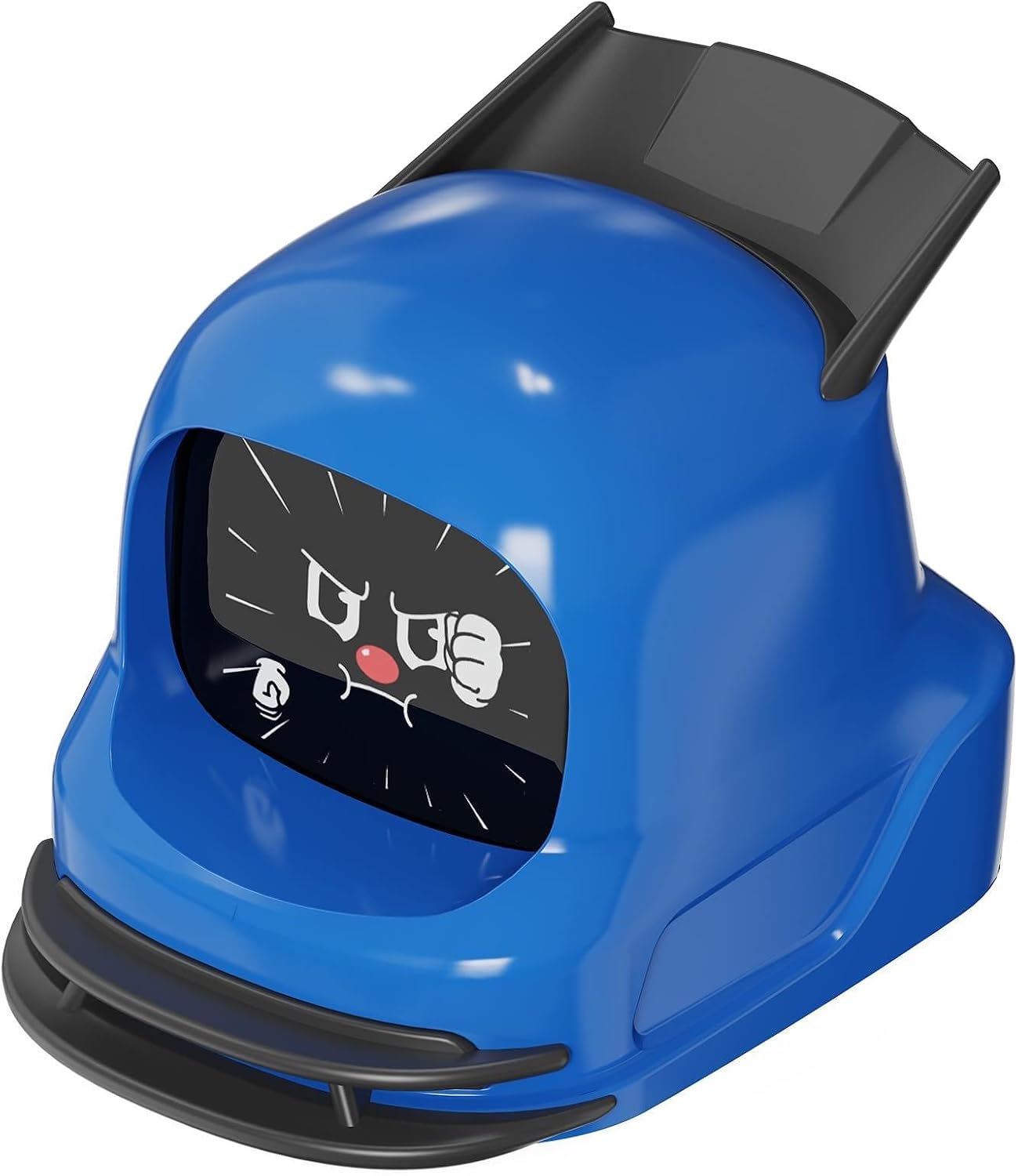
Every once in a while we stumble onto something online that makes us stop scrolling, and this is one of those times. The MANGOGO Smart Car Dashboard Robot Ornament is a tiny animated robot face that sits on your dashboard and reacts to the way you drive.
What it actually does
Inside is a gyro sensor, so it can sense when you accelerate, brake, and turn, and it changes its expression and sound effects to match. It has more than 300 expressions spread across three emoji sets, and owners describe the screen as a 1.83 inch HD display that makes the animations look sharp. Through the Mangogo app you can adjust the volume, brightness, and gyro sensitivity, switch between emoji sets, and pick up over the air updates as new faces come out. One expectation check: the company is upfront that this isn't an AI assistant. It simply reacts to your driving with expressions and sounds, so think of it more like a pet than a passenger.
Power and setup
It has a built-in 900mAh battery that charges over USB-C, and the maker says a single charge gives you over 10 hours of use, which works out to roughly a week of daily commuting. It turns itself on and off by detecting your car's ignition, so there's nothing to remember. It's also rated for temperatures from -4°F to 158°F, which matters for anything that lives on a dashboard in the summer sun. The robot sits on a magnetic base, and owners say it stays put while driving. If you'd rather not plug it in at all, there's an optional foldable solar base that you can buy separately or as part of a bundle.
How it stacks up against the Dasai Mochi 3
If dashboard robots sound familiar, that's probably because of the Dasai Mochi, the little robot that turned into a bit of a cult item with the car crowd. The latest version, the Mochi 3, has 70+ animations, gyro reactions you can switch off, a rechargeable battery rated for up to 8 hours of screen time, and a mute option. It also has interchangeable helmets and a steady stream of limited editions. It lists for around $55 in the US, but it has a history of selling out, and limited editions can climb to around $100 on resale sites.
The Mangogo takes a different approach. It offers a lot more expressions, an app to customize it, ignition based auto on and off, and a longer rated battery life, and it runs about $63 to $69. If you want the collector culture, the swappable helmets, and the original name, the Mochi is hard to beat. If you want more faces, more control, and something that's easier to find in stock, the Mangogo looks like the easier pick.
Colors and styles
The Racing set, which is the one we spotted, comes in black, red, yellow, and blue. There are also other sets like Vibrant and Crocodile if you want a different look for your dash.
The Good
- Reacts to acceleration, braking, and turns with a built-in gyro sensor
- 300+ expressions across 3 emoji sets, with sound effects
- App controls for volume, brightness, and gyro sensitivity, plus over the air updates
- Turns on and off with your ignition, so it just works
- USB-C rechargeable with 10+ hours per charge
- Rated for extreme in-car temperatures from -4°F to 158°F
- Owners say it feels sturdy and stays in place while driving
- Multiple color sets, and a fun gift for car lovers, new drivers, or anyone who loves a quirky gadget
The Bad
- It's not a true AI companion, just expressions and sounds that react to your driving
- It's an animated screen on your dash, so keep it low and out of your line of sight, and turn the volume and brightness down so it doesn't pull your eyes off the road
- Some owners report that expression or firmware updates can get stuck if your phone screen locks mid update, so keep the app open and the screen awake
- Around $63 to $69 is a fair bit for a novelty gadget
- If you want swappable helmets and collector appeal, the Mochi has far more options
Who it's for
If you spend a lot of time in the car, love cute tech, or need a gift for a car person, this is a fun one to put on your radar. Just be smart about where you place it and how bright and loud you set it.
Where to buy
At the time of writing, Amazon lists the Racing set at right around $63. You can check the current price and colors here: MANGOGO Smart Car Dashboard Robot Ornament
What it actually does
Inside is a gyro sensor, so it can sense when you accelerate, brake, and turn, and it changes its expression and sound effects to match. It has more than 300 expressions spread across three emoji sets, and owners describe the screen as a 1.83 inch HD display that makes the animations look sharp. Through the Mangogo app you can adjust the volume, brightness, and gyro sensitivity, switch between emoji sets, and pick up over the air updates as new faces come out. One expectation check: the company is upfront that this isn't an AI assistant. It simply reacts to your driving with expressions and sounds, so think of it more like a pet than a passenger.
Power and setup
It has a built-in 900mAh battery that charges over USB-C, and the maker says a single charge gives you over 10 hours of use, which works out to roughly a week of daily commuting. It turns itself on and off by detecting your car's ignition, so there's nothing to remember. It's also rated for temperatures from -4°F to 158°F, which matters for anything that lives on a dashboard in the summer sun. The robot sits on a magnetic base, and owners say it stays put while driving. If you'd rather not plug it in at all, there's an optional foldable solar base that you can buy separately or as part of a bundle.
How it stacks up against the Dasai Mochi 3
If dashboard robots sound familiar, that's probably because of the Dasai Mochi, the little robot that turned into a bit of a cult item with the car crowd. The latest version, the Mochi 3, has 70+ animations, gyro reactions you can switch off, a rechargeable battery rated for up to 8 hours of screen time, and a mute option. It also has interchangeable helmets and a steady stream of limited editions. It lists for around $55 in the US, but it has a history of selling out, and limited editions can climb to around $100 on resale sites.
The Mangogo takes a different approach. It offers a lot more expressions, an app to customize it, ignition based auto on and off, and a longer rated battery life, and it runs about $63 to $69. If you want the collector culture, the swappable helmets, and the original name, the Mochi is hard to beat. If you want more faces, more control, and something that's easier to find in stock, the Mangogo looks like the easier pick.
Colors and styles
The Racing set, which is the one we spotted, comes in black, red, yellow, and blue. There are also other sets like Vibrant and Crocodile if you want a different look for your dash.
The Good
- Reacts to acceleration, braking, and turns with a built-in gyro sensor
- 300+ expressions across 3 emoji sets, with sound effects
- App controls for volume, brightness, and gyro sensitivity, plus over the air updates
- Turns on and off with your ignition, so it just works
- USB-C rechargeable with 10+ hours per charge
- Rated for extreme in-car temperatures from -4°F to 158°F
- Owners say it feels sturdy and stays in place while driving
- Multiple color sets, and a fun gift for car lovers, new drivers, or anyone who loves a quirky gadget
The Bad
- It's not a true AI companion, just expressions and sounds that react to your driving
- It's an animated screen on your dash, so keep it low and out of your line of sight, and turn the volume and brightness down so it doesn't pull your eyes off the road
- Some owners report that expression or firmware updates can get stuck if your phone screen locks mid update, so keep the app open and the screen awake
- Around $63 to $69 is a fair bit for a novelty gadget
- If you want swappable helmets and collector appeal, the Mochi has far more options
Who it's for
If you spend a lot of time in the car, love cute tech, or need a gift for a car person, this is a fun one to put on your radar. Just be smart about where you place it and how bright and loud you set it.
Where to buy
At the time of writing, Amazon lists the Racing set at right around $63. You can check the current price and colors here: MANGOGO Smart Car Dashboard Robot Ornament


Posted In: Technology, Toys and Games
Posts You May Have Missed








keep up to date:

choose a category:
- Accessories and Decor
- Art
- Books
- DIY
- Editorials
- Furniture
- Garden and Patio
- Gifts for Men
- Gifts for Women
- Go Green
- Health
- Home Automation
- Kitchen and Baths
- Lighting
- Miscellaneous
- Parenting
- Pets
- Reviews
- Site News
- Software
- Sponsor Thanks
- Technology
- Tools
- Toys and Games
- Walls and Floors
- YouTube Video Review

stuff you might have missed