Energizer 15 minute charger review
If you have kids you likely go through dozens of batteries on toys. My wife and I have a 16 month old who loves her toys. We were throwing our money down the drain by buying batteries every time we went to the supermarket. Not having a good experience in the past with rechargeable batteries, we were skeptical about purchasing the Energizer 15-Minute Battery Charger .
.
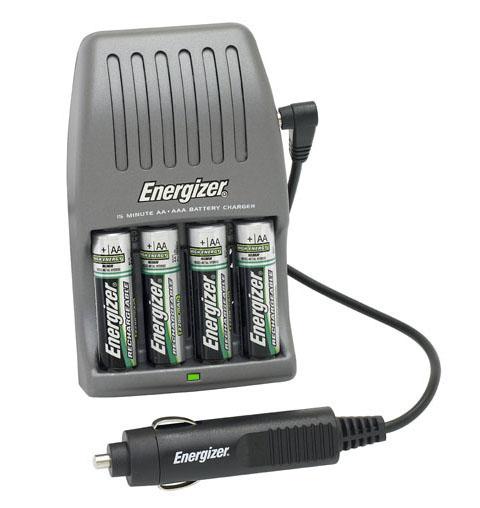
The charger pictured here is also available with an AC adapter which is the one that we used for the review. It really does take less than 15 minutes to charge and gets you up and going in no time. Even the Energizer bunny himself couldn't catch up with the speed of this charger. The charger typically sells for about $30.00 and comes with 4 X AA batteries, but is also compatible with AAA batteries (great for remote controls). Currently the highest ma rating available is 2500mAh and a pack of four AA will run you about $13.00. We found a good deal on amazon of 2 X 4 AA packs for under $20.00.
The included AA Energizer rechargeable batteries are not as long lasting as the regular Duracel or Energizer batteries you find on the shelf, but they do save you a lot of money in the long run. These batteries can be charged hundreds of times and although the battery life decreases as time passes, the effects are not noticeable until the end of a long life cycle.
A few hints when buying the batteries, make sure that you purchase the highest mAh (milli Amp Hour) rating you can find. The batteries will be more expensive, but will have more power and last longer per charge. Also label and charge the batteries in sets. They tend to last longer when charged as a set. I use a sharpie to label which helps me see which batteries are older and have degraded life. Finally, remember to check with the toy or appliance you are going to put them in to make sure it allows you to use these type of batteries. I have been able to use them on toys, cameras, and remotes without a problem.
If I had to buy this kit again I wouldn't hesitate. It has saved us a ton of money. The instant gratification of having fresh batteries in 15 minutes is also a plus. One last thing to note is that you are reusing these batteries so it is great for the environment.
IN THE BOX
- Energizer 15-Minute Battery Charger.
- 4 X AA Energizer rechargeable batteries
- AC Adapter
THE GOOD
- Saves you money over the long run
- Charges four batteries in under 15 minutes
- Batteries can be charged hundreds of times
THE BAD
- Initialialy expensive
- Batteries tend to degrade after many uses
WHERE TO BUY
Amazon
MANUFACTURER
Energizer
. The charger pictured here is also available with an AC adapter which is the one that we used for the review. It really does take less than 15 minutes to charge and gets you up and going in no time. Even the Energizer bunny himself couldn't catch up with the speed of this charger. The charger typically sells for about $30.00 and comes with 4 X AA batteries, but is also compatible with AAA batteries (great for remote controls). Currently the highest ma rating available is 2500mAh and a pack of four AA will run you about $13.00. We found a good deal on amazon of 2 X 4 AA packs for under $20.00.
The included AA Energizer rechargeable batteries are not as long lasting as the regular Duracel or Energizer batteries you find on the shelf, but they do save you a lot of money in the long run. These batteries can be charged hundreds of times and although the battery life decreases as time passes, the effects are not noticeable until the end of a long life cycle.
A few hints when buying the batteries, make sure that you purchase the highest mAh (milli Amp Hour) rating you can find. The batteries will be more expensive, but will have more power and last longer per charge. Also label and charge the batteries in sets. They tend to last longer when charged as a set. I use a sharpie to label which helps me see which batteries are older and have degraded life. Finally, remember to check with the toy or appliance you are going to put them in to make sure it allows you to use these type of batteries. I have been able to use them on toys, cameras, and remotes without a problem.
If I had to buy this kit again I wouldn't hesitate. It has saved us a ton of money. The instant gratification of having fresh batteries in 15 minutes is also a plus. One last thing to note is that you are reusing these batteries so it is great for the environment.
IN THE BOX
- Energizer 15-Minute Battery Charger
. - 4 X AA Energizer rechargeable batteries
- AC Adapter
THE GOOD
- Saves you money over the long run
- Charges four batteries in under 15 minutes
- Batteries can be charged hundreds of times
THE BAD
- Initialialy expensive
- Batteries tend to degrade after many uses
WHERE TO BUY
Amazon
MANUFACTURER
Energizer


Posted In: Toys and Games
Encrypted USB Ironkey Thumb Drive Review
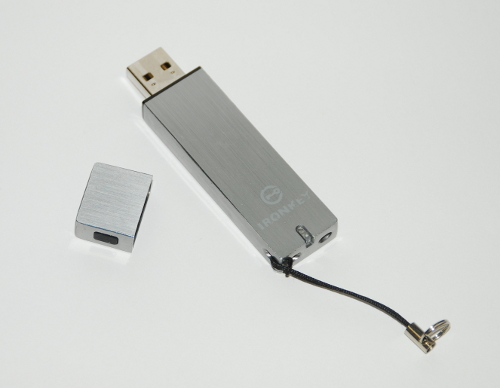
Looking for a safe way to transfer your important files? Take a glance at the Ironkey thumb drive. The Ironkey is an AES 256-bit hardware encrypted thumb drive that offers protection without the need to install any software.
The Ironkey features a Level 3 FIPS 140-2 security, which is basically a tamper-resistant and tamper-evident design. The way that Ironkey achieves this is by coating the internal chips with a hardened epoxy potting compound. The Ironkey is even capable of self destructing -- like something out of the spy movies.
THE HARDWARE
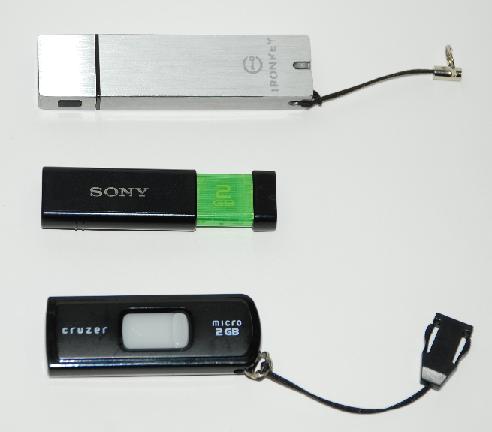
There's not really much to say about the hardware. It's about as boring as it gets. Silver tin can comes to mind. Its body and cap are made of a hardened metal alloy that is virtually indestructible. The body has a little pin that holds a ring which can be attached to a key chain. The Ironkey label will peel off if the device is used heavily but there is no harm done to the device. The drive is also a little longer than its competitors but its nothing that we feel will drive business away. Take a look for yourself and be the judge. The one thing we didn't really enjoy was the removable cap that can be easily lost.
OUR IMPRESSION
There is not really much to set up on the device itself, which is great. Just like all other USB thumb drives on the market today, it is password protected so you will have to set that up. Upon insertion of the device into your USB drive you will get a password prompt just like all the other thumb drives. The difference with this USB drive is that it is hardware encrypted as opposed to software encrypted. In layman's terms this means that the device will be much harder if not impossible to hack into. The device was made for the government so you could just imagine the crazy security.
Check out the difference between the Ironkey menu compared to what we think is the most widely used and available thumb drive, the
SanDisk Cruzer Flash Drive.
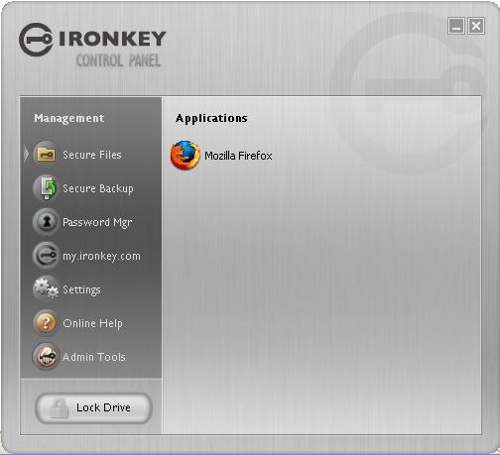
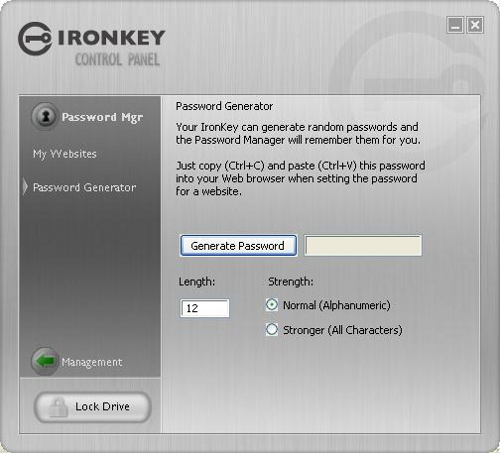
Here is a screen shot of the Ironkey Menu:
Here is a screen shot of the Cruzer Menu:
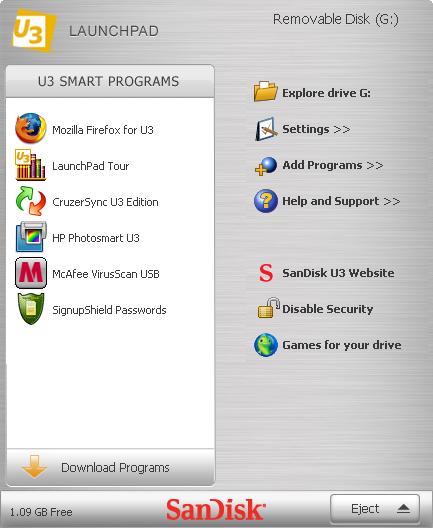
From the menu you can see that they are both pretty similar. You can easily notice that although both are user friendly, the U3 device
(Sandisk) allows the installation of U3 applications. The Ironkey is not so friendly in this department. To our knowledge, you are not able to install such applications, at least not yet. It was a big no-no for us. The Sandisk allows you to download and install applications easily over the web. We thought this might be a security feature on the part of Ironkey to keep their device secure. Standalone executables however could be run from the Ironkey device without any problem.
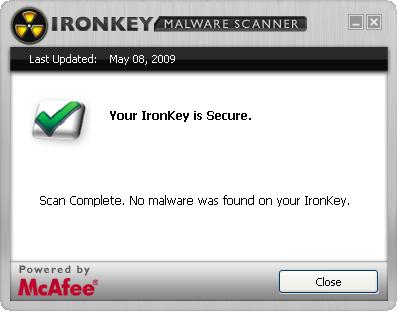
The three demo units that we have are the IronKey "enterprise products". They come complete with web management and malware protection, although these options come at an additional monthly cost.
For large businesses or enterprise customers, the web management allows the administrators to view activity on the device, enforce rules, or deactivate devices at the touch of a button. The product allows a great amount of flexibility, giving administrators full control. We don't see the average user using this but it might be of high value to enterprise customers or businesses that require that kind of security. A good example of one of these rules is a rule that limits the attempts on the device by allowing the device to self destruct if too many attempts are made to log in. Once all attempts are made the device is destroyed never to be used again.

Another plus is what Ironkey calls their "silver bullet", basically it is protection against rogue employees. If an employee is let go or somehow runs off with your data you can send the device a silver bullet through the web. This will destroy the device instantly never to be used again. The administrator can set up a limit on how many times the device can log in without using the web. This rule will force the user to eventually use the Internet to log in to the device and detonate the silver bullet.
The web browser that is available on the personal and enterprise versions forces encryption, and has a monitor for spoofing web sites to keep you safe. The browser always keeps its files on the thumb drive so you will never leave any trails behind. We have been using the devices for about four months now and are happy with them so far.
The enterprise version also allows VeriSign Identity Protection (VIP), RSA SecurID ready, CRYPTOCard One-Time Password which are amazing forms of security on their own.
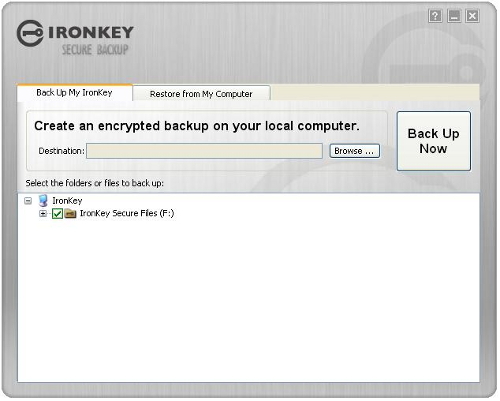
The Ironkey allows you to store an encrypted backup on your cpu and restore your drive at a future date.
It also features a pretty fancy password manager that is great to keep all 6000 of your user name and password combinations for your favorite web sites or accounts. The password manager will even generate strong passwords if you are having problems creating one. If that's not enough it will automatically fill out this information when you visit the website with what you have stored.
All in all it's a strong device that offers great peace of mind knowing that your files are virtually indestructible and secure. Can't decide which one? Ironkey helps you decide. Take a look here.
The current prices on Amazon are as follows.
1GB ~ $60.00
2GB ~ $80.00
4GB ~ $130.00
8GB ~ $199. 00
Note: If this is for enterprise use you will need to consider the charge for remote administration and extra services, but you will need to contact a vendor for a quote.
Check out the Demos
Basic / Personal Version for the average
Enterprise Version for business or Enterprise customers
IN THE BOX
- Ironkey USB Thumb Drive with Cap
- Key Ring
THE GOOD
- Strong design
- Offers ultimate encrypted protection for any type of file
- Malware Scanner
- Web management for enterprise users
- Web backup available
- Encrypted backup feature
- Password Manager
- Silver bullet feature (Allows admin to destroy a device remotely to protect data)
THE BAD
- Cap is easy to lose
- Expensive for home user
- Not very easy to find applications that can run on the device.
- Devices are currently only available in 2,4, and 8GB sizes
Get yours on Amazon
MANUFACTURER
IronKey
The Ironkey features a Level 3 FIPS 140-2 security, which is basically a tamper-resistant and tamper-evident design. The way that Ironkey achieves this is by coating the internal chips with a hardened epoxy potting compound. The Ironkey is even capable of self destructing -- like something out of the spy movies.
THE HARDWARE
There's not really much to say about the hardware. It's about as boring as it gets. Silver tin can comes to mind. Its body and cap are made of a hardened metal alloy that is virtually indestructible. The body has a little pin that holds a ring which can be attached to a key chain. The Ironkey label will peel off if the device is used heavily but there is no harm done to the device. The drive is also a little longer than its competitors but its nothing that we feel will drive business away. Take a look for yourself and be the judge. The one thing we didn't really enjoy was the removable cap that can be easily lost.
OUR IMPRESSION
There is not really much to set up on the device itself, which is great. Just like all other USB thumb drives on the market today, it is password protected so you will have to set that up. Upon insertion of the device into your USB drive you will get a password prompt just like all the other thumb drives. The difference with this USB drive is that it is hardware encrypted as opposed to software encrypted. In layman's terms this means that the device will be much harder if not impossible to hack into. The device was made for the government so you could just imagine the crazy security.
Check out the difference between the Ironkey menu compared to what we think is the most widely used and available thumb drive, the
SanDisk Cruzer Flash Drive.
Here is a screen shot of the Ironkey Menu:
Here is a screen shot of the Cruzer Menu:
From the menu you can see that they are both pretty similar. You can easily notice that although both are user friendly, the U3 device
(Sandisk) allows the installation of U3 applications. The Ironkey is not so friendly in this department. To our knowledge, you are not able to install such applications, at least not yet. It was a big no-no for us. The Sandisk allows you to download and install applications easily over the web. We thought this might be a security feature on the part of Ironkey to keep their device secure. Standalone executables however could be run from the Ironkey device without any problem.
The three demo units that we have are the IronKey "enterprise products". They come complete with web management and malware protection, although these options come at an additional monthly cost.
For large businesses or enterprise customers, the web management allows the administrators to view activity on the device, enforce rules, or deactivate devices at the touch of a button. The product allows a great amount of flexibility, giving administrators full control. We don't see the average user using this but it might be of high value to enterprise customers or businesses that require that kind of security. A good example of one of these rules is a rule that limits the attempts on the device by allowing the device to self destruct if too many attempts are made to log in. Once all attempts are made the device is destroyed never to be used again.
Another plus is what Ironkey calls their "silver bullet", basically it is protection against rogue employees. If an employee is let go or somehow runs off with your data you can send the device a silver bullet through the web. This will destroy the device instantly never to be used again. The administrator can set up a limit on how many times the device can log in without using the web. This rule will force the user to eventually use the Internet to log in to the device and detonate the silver bullet.
The web browser that is available on the personal and enterprise versions forces encryption, and has a monitor for spoofing web sites to keep you safe. The browser always keeps its files on the thumb drive so you will never leave any trails behind. We have been using the devices for about four months now and are happy with them so far.
The enterprise version also allows VeriSign Identity Protection (VIP), RSA SecurID ready, CRYPTOCard One-Time Password which are amazing forms of security on their own.
The Ironkey allows you to store an encrypted backup on your cpu and restore your drive at a future date.
It also features a pretty fancy password manager that is great to keep all 6000 of your user name and password combinations for your favorite web sites or accounts. The password manager will even generate strong passwords if you are having problems creating one. If that's not enough it will automatically fill out this information when you visit the website with what you have stored.
All in all it's a strong device that offers great peace of mind knowing that your files are virtually indestructible and secure. Can't decide which one? Ironkey helps you decide. Take a look here.
The current prices on Amazon are as follows.
1GB ~ $60.00
2GB ~ $80.00
4GB ~ $130.00
8GB ~ $199. 00
Note: If this is for enterprise use you will need to consider the charge for remote administration and extra services, but you will need to contact a vendor for a quote.
Check out the Demos
Basic / Personal Version for the average
Enterprise Version for business or Enterprise customers
IN THE BOX
- Ironkey USB Thumb Drive with Cap
- Key Ring
THE GOOD
- Strong design
- Offers ultimate encrypted protection for any type of file
- Malware Scanner
- Web management for enterprise users
- Web backup available
- Encrypted backup feature
- Password Manager
- Silver bullet feature (Allows admin to destroy a device remotely to protect data)
THE BAD
- Cap is easy to lose
- Expensive for home user
- Not very easy to find applications that can run on the device.
- Devices are currently only available in 2,4, and 8GB sizes
Get yours on Amazon
MANUFACTURER
IronKey

Posted In: Tools
ooma VOIP Phone System Review
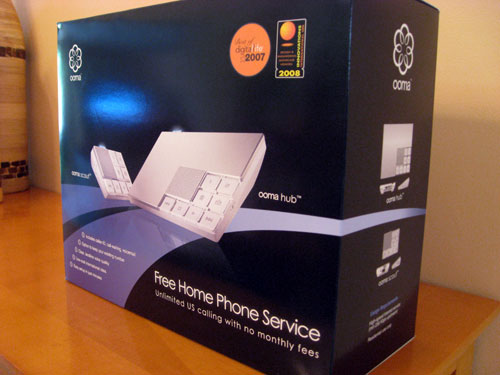
I'll get right down to it and say it: ooma has been one of the best investments I've made in the last few years. I'll explain briefly why, but it's going to be hard to do so without sounding like an outlandish fan boy (which I've become).
WHAT IS OOMA
ooma is in essence, a voice over IP (voip) system. The ooma device itself connects to your high-speed internet connection and existing telephone to allow you to make local and long distance phone calls in the US for free. That's the basic premise.
THE SET UP
The ooma phone system connects to your high-speed internet connection (your router) with an Ethernet cable and to the phone via a standard phone cable. Both of these cables come with the ooma phone system package. You then follow a few simple steps on the ooma web site to activate the device and you are ready to go. It took me approximately 15 minutes to do all the steps to get my system online.
HERE IS A TIP
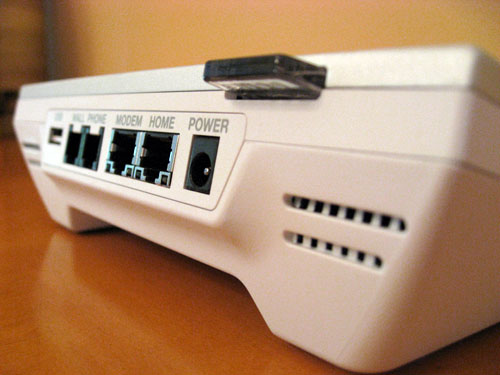
I connected the ooma Hub (the main device) to a wireless phone base. In turn this allows you to use multiple phones without the need for an additional ooma Scout. The ooma Scout is a tiny device that comes with the ooma phone system package that connects to any additional phone in your home that is connected directly to the phone wall outlet. If you go with my set up, you'll avoid the need to make use of any ooma Scouts.
SERVICE QUALITY
The voice quality on ooma is exceptional. I ran various tests calling individuals on landlines, on other voip services and on multiple cellphone carriers and we noticed no difference in quality. In the past 4+ months of ownership and over continuous use, I've had the service go down on me twice not due to my broadband connection, but directly related to two ooma incidents. The incidents were document on the ooma forums and the downtime lasted approximately 3 hours.
When using the service, my typical internet bandwidth was reduced anywhere from 20k - 30k (out of 150k). As soon as you hang up the phone, the bandwidth goes right back up.
THE REAL REASON TO LOVE THE OOMA
I could go on and on about the ooma set up. The fact is that the system works like any other phone you may own. And I think up to this point we all have used a phone before. The real reason to own an ooma is how much money you'll end up saving by ditching your landline carrier or other voip companies like Vonage.
I used to pay Bellsouth a total of $83 dollars a month for phone, long distance (just to have the long distance you had to pay), internet, and taxes. Now I pay only $37.95 for the internet connection. That's about $45 a month of savings. In other words, I was able to pay off my ooma phone system in about 5 months of owning the ooma. After the fifth month, I've basically become $45 richer and I can now make long distance phone calls whenever I want. And that's the whole point -- saving money!
For those who need/want it, ooma offers a premier service. For $12.99 a month (or $99.99 a year if you want a discount) you can get premium services like a second line, three-way conferencing, multi-ring and a slew of other features, but for those who just want to scrunch every penny, the features included in the basic package are the most essential: caller-ID, call-waiting, and voicemail (see full list).
A FEW BAD THINGS
Even with all the kudos, there is still a couple of things that ooma should improve. The number one gripe I had was the $40 fee to transfer your phone number to the ooma system. Though ooma provides the option to waive this one-time fee with an annual subscription to the premier service, charging $40 seems a bit on the hefty side.
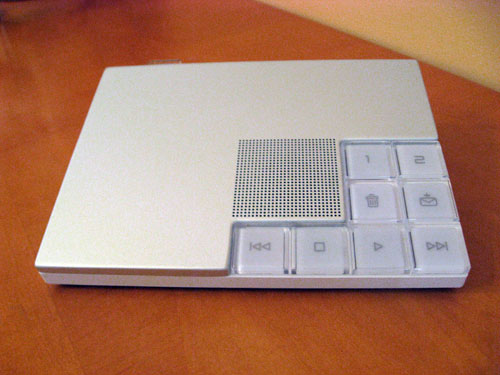
The other gripe is that we wish the ooma Hub would have some kind of LED screen for voice mail management. Currently the ooma Hub only tells you that there is a voice mail, not how many.
THE VERDICT
I don't think I dipped my cup in the ooma Kool Aid enough. I love the product. I love the service. And I love most of all, the money I'm saving every month now. The ooma phone system receives our highest possible recommendation.
IN THE BOX
- ooma Hub
- ooma Scout
- Instruction/installation manual
- Ethernet cable
- Phone cable
THE GOOD
- Great voice quality
- Free long distance calls
- Easy set up
- Apple-like design
- Computer not required unlike other devices (MagicJack)
THE BAD
- ooma hub voice mail function should be more visual
- You need to pay $40 to transfer your phone number
WHERE TO GET IT
Amazon
MANUFACTURER
ooma
WHAT IS OOMA
ooma is in essence, a voice over IP (voip) system. The ooma device itself connects to your high-speed internet connection and existing telephone to allow you to make local and long distance phone calls in the US for free. That's the basic premise.
THE SET UP
The ooma phone system connects to your high-speed internet connection (your router) with an Ethernet cable and to the phone via a standard phone cable. Both of these cables come with the ooma phone system package. You then follow a few simple steps on the ooma web site to activate the device and you are ready to go. It took me approximately 15 minutes to do all the steps to get my system online.
HERE IS A TIP
I connected the ooma Hub (the main device) to a wireless phone base. In turn this allows you to use multiple phones without the need for an additional ooma Scout. The ooma Scout is a tiny device that comes with the ooma phone system package that connects to any additional phone in your home that is connected directly to the phone wall outlet. If you go with my set up, you'll avoid the need to make use of any ooma Scouts.
SERVICE QUALITY
The voice quality on ooma is exceptional. I ran various tests calling individuals on landlines, on other voip services and on multiple cellphone carriers and we noticed no difference in quality. In the past 4+ months of ownership and over continuous use, I've had the service go down on me twice not due to my broadband connection, but directly related to two ooma incidents. The incidents were document on the ooma forums and the downtime lasted approximately 3 hours.
When using the service, my typical internet bandwidth was reduced anywhere from 20k - 30k (out of 150k). As soon as you hang up the phone, the bandwidth goes right back up.
THE REAL REASON TO LOVE THE OOMA
I could go on and on about the ooma set up. The fact is that the system works like any other phone you may own. And I think up to this point we all have used a phone before. The real reason to own an ooma is how much money you'll end up saving by ditching your landline carrier or other voip companies like Vonage.
I used to pay Bellsouth a total of $83 dollars a month for phone, long distance (just to have the long distance you had to pay), internet, and taxes. Now I pay only $37.95 for the internet connection. That's about $45 a month of savings. In other words, I was able to pay off my ooma phone system in about 5 months of owning the ooma. After the fifth month, I've basically become $45 richer and I can now make long distance phone calls whenever I want. And that's the whole point -- saving money!
For those who need/want it, ooma offers a premier service. For $12.99 a month (or $99.99 a year if you want a discount) you can get premium services like a second line, three-way conferencing, multi-ring and a slew of other features, but for those who just want to scrunch every penny, the features included in the basic package are the most essential: caller-ID, call-waiting, and voicemail (see full list).
A FEW BAD THINGS
Even with all the kudos, there is still a couple of things that ooma should improve. The number one gripe I had was the $40 fee to transfer your phone number to the ooma system. Though ooma provides the option to waive this one-time fee with an annual subscription to the premier service, charging $40 seems a bit on the hefty side.
The other gripe is that we wish the ooma Hub would have some kind of LED screen for voice mail management. Currently the ooma Hub only tells you that there is a voice mail, not how many.
THE VERDICT
I don't think I dipped my cup in the ooma Kool Aid enough. I love the product. I love the service. And I love most of all, the money I'm saving every month now. The ooma phone system receives our highest possible recommendation.
IN THE BOX
- ooma Hub
- ooma Scout
- Instruction/installation manual
- Ethernet cable
- Phone cable
THE GOOD
- Great voice quality
- Free long distance calls
- Easy set up
- Apple-like design
- Computer not required unlike other devices (MagicJack)
THE BAD
- ooma hub voice mail function should be more visual
- You need to pay $40 to transfer your phone number
WHERE TO GET IT
Amazon
MANUFACTURER
ooma

Posted In: Technology
Hookless Vision Shower Curtain Review

What better way to complement your new Arc Shower Curtain Bar than with a new hookless shower curtain? On our last review we told you about the Arc Shower Curtain Bar but we failed to mention the amazing shower curtain that was hanging from it. Sure we know what you are thinking. What's so amazing about a shower curtain? Well, it's actually fairly simple. The reason we fell in love with this curtain is because of its simplicity. The curtain as you could tell from its name is hookless which means no more worrying about the hooks falling off of your curtain when you slide the curtain. And no more scratchy noise when you move it to one side.
These curtains feature plastic hooks built right into the fabric. We must agree it's a great concept! The other thing that made us fall in love with these curtains was the window at eye level. This window is small enough to give you privacy while you are in the shower, yet large enough to let the light in when you are showering. If you have dim lights or little light in your bathroom area, then this is the curtain for you.
Finally, the curtains feature a removable inner curtain that can be washed on its own. The inner curtain has magnets on the bottom to make sure it sticks to your tub and not to you. Since the Hookless Vision shower curtains come in various colors and materials the prices vary but they are not too expensive. We have seen them at a good price on Amazon.
Get Yours on Amazon
These curtains feature plastic hooks built right into the fabric. We must agree it's a great concept! The other thing that made us fall in love with these curtains was the window at eye level. This window is small enough to give you privacy while you are in the shower, yet large enough to let the light in when you are showering. If you have dim lights or little light in your bathroom area, then this is the curtain for you.
Finally, the curtains feature a removable inner curtain that can be washed on its own. The inner curtain has magnets on the bottom to make sure it sticks to your tub and not to you. Since the Hookless Vision
shower curtains come in various colors and materials the prices vary but they are not too expensive. We have seen them at a good price on Amazon. Get Yours on Amazon

Posted In: Reviews
ARC Shower Bar Review

This past week Urban Lime was out on a business trip hunting down cool products for future reviews. We stayed at a hotel that had one of the Arcs & Angles shower rods and we couldn't believe that we had missed this product in the past. It's little things like this that pass you by and you take for granted.
I am one of those people who despise small showers, specially if they are equipped with shower curtains because I hate the feel of a plastic sticking to me. This product solves both of my problems with a simple solution: a new curved curtain shower rod.
This rod makes the shower curtain extend past the tub in order to give your upper body extra room (about 30% more) than conventional shower curtains. This extra room allows you to keep a safe distance from the shower curtain, giving you the feel of a larger shower and the comfort of not having the curtain stick to your body while you are showering.
Arcs & Angles shower curtains come in standard 60" or 72" rods, but don't let the sizes deter you. The rods can be installed in virtually any size shower since they can be cut to size. They come in chrome for a shiny finish and stainless steel for a brushed finish. The bars are made of aircraft aluminum so it will never rusts.
Simply stated, the ARC Shower Bar is amazing.
Get yours at Amazon
Manufacturer: Arcs & Angles
and we couldn't believe that we had missed this product in the past. It's little things like this that pass you by and you take for granted. I am one of those people who despise small showers, specially if they are equipped with shower curtains because I hate the feel of a plastic sticking to me. This product solves both of my problems with a simple solution: a new curved curtain shower rod.
This rod makes the shower curtain extend past the tub in order to give your upper body extra room (about 30% more) than conventional shower curtains. This extra room allows you to keep a safe distance from the shower curtain, giving you the feel of a larger shower and the comfort of not having the curtain stick to your body while you are showering.
Arcs & Angles shower curtains come in standard 60" or 72" rods, but don't let the sizes deter you. The rods can be installed in virtually any size shower since they can be cut to size. They come in chrome for a shiny finish and stainless steel for a brushed finish. The bars are made of aircraft aluminum so it will never rusts.
Simply stated, the ARC Shower Bar is amazing.
Get yours at Amazon
Manufacturer: Arcs & Angles

Posted In: Reviews
Windows Mobile HTC Fuze PDA Review
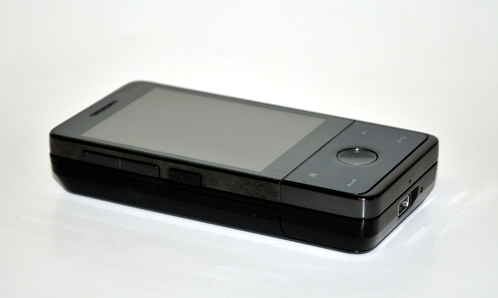
Our first impressions on this sleek looking phone was a good one. The HTC Fuze with it's glossy black finish made some of the people at our office turn their heads.
THE HARDWARE
The HTC Fuze has an average footprint of 4.02 x 2.01 x 0.71 inches, with a weight of 5.82 ounces. You can expect up to get up to 7.4 hours of talk time per full charge with the factory 1,340 mAh lithium-ion battery. HTC also claims that the Fuze has about 460 hours of standby timem but who actually leaves their phone on standby for that long without charge anyway.
The mobile phone has a Qualcomm MSM7201A, 528MHz processor for a brain, a processor that is pretty much at top of the line of PDA products at press time. It also has 512MB of ROM and 288MB of RAM for memory. A mini SD card slot that supports up to 32 GB at the moment helps make this phone a media device. A real screen resolution of 640x480 resolution on the 2.8" touchscreen that is flush to the body, gives the phone that head-turning look. One small warning, the flush screen might make it more susceptible to scratches.
The construction is very solid. Even the slide-out keyboard does not jitter when pulled out, which makes the phone feel that much sturdier.

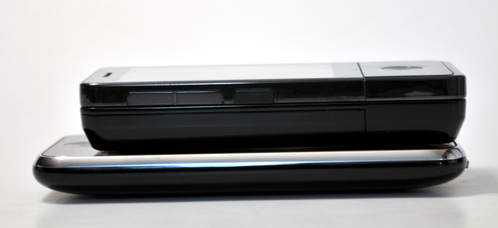
The HTC Fuze PDA Vs The Apple iPhone
THE SET UP
The Fuze was easy to set up. After powering it up for a few hours, when the device was booted up, it automatically recognized our 2GB mini SD card. The only thing we had to set up was the stylus screen alignment and input some basic user information.
OUR IMPRESSION
At first it was a little tricky to get where you wanted to go but after a couple of days of using the device you get used to the new touchscreen "TOUCHFLO" interface. Like all Windows devices we have seen in the past we felt that the phone was a bit sluggish at times even with the fancy processor. Mostly during boot up, but nevertheless a little unexpected from a new phone. Once the phone has completely booted, it picks up speed and is ready to do its job. This little sucker is a workhorse. The HTC Fuze is a 3G tri-band HSDPA. It features a full QWERTY keyboard that comes in very handy for texting or editing a document in word. The keys are a little small for our taste but some of our reviewers didn't really mind it.
Compared to the Windows Mobile interface, the layered add on application "TouchFlo" that HTC had installed on this device was more user-friendly.
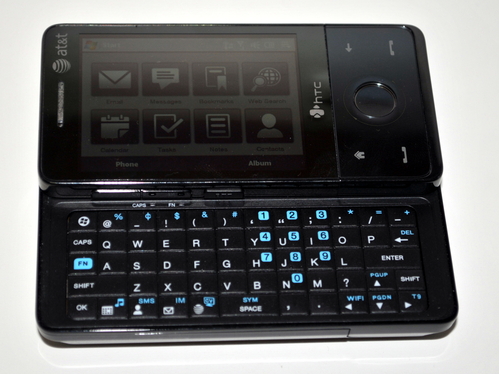
It has push to talk capabilities, and you can connect to just about anything with it. Bluetooth 2.0 ,HSDPA, Wi-Fi 802.11 b/g, AT&T Navigator / Google Maps, a Mini-USB for file transfers, and ActiveSync are all supported by this guy. The one thing that was lacking in the connectivity department was an infrared port which its older brother the HTC 8525 did have.
You can expect to find all the standard features of PDA's like a phone book, calendar, to-do list, browser (Internet Explorer & Opera), and calculator. The HTC also allows voice commands for automatic dialing and such.
For those of you who can't live without being in touch the phone offers SMS, EMS, MMS, E-Mail through POP3, IMAP4, SMTP, Exchange and Outlook. We are almost certain you will be able to connect to mostly any server to get your mail. If that's not enough, a bunch of chat clients like AOL, ICQ, Windows Live, and Yahoo are available at your disposal. It also offers T9 predictive text for quicker texting..
In the multimedia department the HTC Fuze allows you to select polyphonic or MP3 ring tones. You can choose your own themes to make the phone yours and choose from a variety of J2ME games. If your bored and have an unlimited data plan you can even stream some media with the AT&T Mobile TV or AT&T Video options. The Fuze is accompanied by the AT&T Music mp3 player as well as the RDS FM radio.
The 3.2 MP flash camera outperforms many phones including the above iPhone 3G. We enjoyed the Auto-Focus feature and extra bright flash. It allows for video recording with sound also, and both videos and pictures can be shared through email or messaging.
Heres a picture of our mascot Bailey we took with the Fuze to give you an idea of what you can expect.

Click here to see the full size image that the phone took.
We were not very impressed with the speaker phone. When the volume was all the way up it was a bit scratchy but it was bearable. Most other phones we have tested fail here too, and its just because the quality of speaker you can put in these phones while keeping the phones small is not so great. Not really something that should deter you from getting the phone though.
A cool feature that is pretty much standard in all smartphones now was the accelerometer. The accelerometer is amazing, it is integrated with some of the software installed like the phone for instance. It will allow you to mute a phone call by turning it face-down for instance. We loved Teeter, it is a game like the old Marble Madness for Nintendo, only you have to tilt the phone to make the little marble move. Caution it is highly addictive!
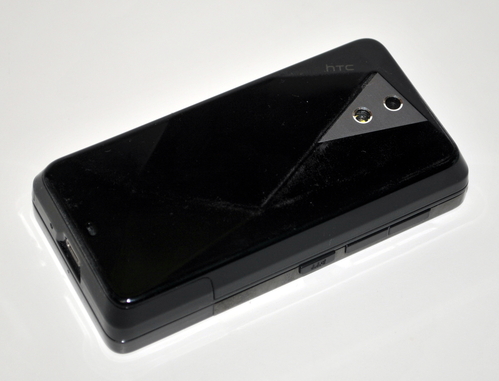
The HTC phone is real nice and shiny but if you are the type of person that doesn't like fingerprints on their stuff, this is probably not the phone for you. You just cant avoid having finger prints on this device, the shiny surface is also a very smooth so make sure you hold on tight cause it might slip out of your hands.
The controls on the phone are very intuitive so it only takes a couple of minutes to figure out how to get around. The button in the middle has a touch sensor around it that is used in some apps like photos for instance. The sensor allows you to zoom images in and out by simply moving your finger in a circular motion around the button.
On the left side it has the regular up / down volume buttons as well as the push to talk feature. on the right side there are no buttons but just a little hole for you to stick your stylus in. The stylus pen has a nice magnetic lock. A nice feature is that when you pull the stylus out it turns on the pda screen.
The phone uses a standard mini usb plug for charging and syncing with your pc.
IN A NUTSHELL
The Windows Mobile HTC Fuze is a pretty amazing phone that although a bit quirky, it is a true work horse. For those constantly on the go however, the battery life might become an issue.
IN THE BOX
- HTC Fuze with Stylus
- Instruction manual
- USB cable
- Headphone connector
- Extra stylus
- Active Sync software
- AC USB phone charger
THE GOOD
- Lot's of features
- Impressive camera with flash and auto focus
- Good reception
- Strong construction
- Big clear bright screen
THE BAD
- A bit pricey unless purchased with a contract. Most contracts are 2 years now.
- Sluggish when booting or if too many applications are open
- Still uses a stylus.
- Headphone jack not built into the phone (need a custom adapter that is included).
- AT&T adds too much software that just takes up space. It would have been preferred if they would allow you to install the applications you wanted.
Get yours at Amazon
MANUFACTURER
HTC
with it's glossy black finish made some of the people at our office turn their heads.THE HARDWARE
The HTC Fuze has an average footprint of 4.02 x 2.01 x 0.71 inches, with a weight of 5.82 ounces. You can expect up to get up to 7.4 hours of talk time per full charge with the factory 1,340 mAh lithium-ion battery. HTC also claims that the Fuze has about 460 hours of standby timem but who actually leaves their phone on standby for that long without charge anyway.
The mobile phone has a Qualcomm MSM7201A, 528MHz processor for a brain, a processor that is pretty much at top of the line of PDA products at press time. It also has 512MB of ROM and 288MB of RAM for memory. A mini SD card slot that supports up to 32 GB at the moment helps make this phone a media device. A real screen resolution of 640x480 resolution on the 2.8" touchscreen that is flush to the body, gives the phone that head-turning look. One small warning, the flush screen might make it more susceptible to scratches.
The construction is very solid. Even the slide-out keyboard does not jitter when pulled out, which makes the phone feel that much sturdier.
The HTC Fuze PDA Vs The Apple iPhone
THE SET UP
The Fuze was easy to set up. After powering it up for a few hours, when the device was booted up, it automatically recognized our 2GB mini SD card. The only thing we had to set up was the stylus screen alignment and input some basic user information.
OUR IMPRESSION
At first it was a little tricky to get where you wanted to go but after a couple of days of using the device you get used to the new touchscreen "TOUCHFLO" interface. Like all Windows devices we have seen in the past we felt that the phone was a bit sluggish at times even with the fancy processor. Mostly during boot up, but nevertheless a little unexpected from a new phone. Once the phone has completely booted, it picks up speed and is ready to do its job. This little sucker is a workhorse. The HTC Fuze
is a 3G tri-band HSDPA. It features a full QWERTY keyboard that comes in very handy for texting or editing a document in word. The keys are a little small for our taste but some of our reviewers didn't really mind it.Compared to the Windows Mobile interface, the layered add on application "TouchFlo" that HTC had installed on this device was more user-friendly.
It has push to talk capabilities, and you can connect to just about anything with it. Bluetooth 2.0 ,HSDPA, Wi-Fi 802.11 b/g, AT&T Navigator / Google Maps, a Mini-USB for file transfers, and ActiveSync are all supported by this guy. The one thing that was lacking in the connectivity department was an infrared port which its older brother the HTC 8525 did have.
You can expect to find all the standard features of PDA's like a phone book, calendar, to-do list, browser (Internet Explorer & Opera), and calculator. The HTC also allows voice commands for automatic dialing and such.
For those of you who can't live without being in touch the phone offers SMS, EMS, MMS, E-Mail through POP3, IMAP4, SMTP, Exchange and Outlook. We are almost certain you will be able to connect to mostly any server to get your mail. If that's not enough, a bunch of chat clients like AOL, ICQ, Windows Live, and Yahoo are available at your disposal. It also offers T9 predictive text for quicker texting..
In the multimedia department the HTC Fuze allows you to select polyphonic or MP3 ring tones. You can choose your own themes to make the phone yours and choose from a variety of J2ME games. If your bored and have an unlimited data plan you can even stream some media with the AT&T Mobile TV or AT&T Video options. The Fuze is accompanied by the AT&T Music mp3 player as well as the RDS FM radio.
The 3.2 MP flash camera outperforms many phones including the above iPhone 3G. We enjoyed the Auto-Focus feature and extra bright flash. It allows for video recording with sound also, and both videos and pictures can be shared through email or messaging.
Heres a picture of our mascot Bailey we took with the Fuze to give you an idea of what you can expect.
Click here to see the full size image that the phone took.
We were not very impressed with the speaker phone. When the volume was all the way up it was a bit scratchy but it was bearable. Most other phones we have tested fail here too, and its just because the quality of speaker you can put in these phones while keeping the phones small is not so great. Not really something that should deter you from getting the phone though.
A cool feature that is pretty much standard in all smartphones now was the accelerometer. The accelerometer is amazing, it is integrated with some of the software installed like the phone for instance. It will allow you to mute a phone call by turning it face-down for instance. We loved Teeter, it is a game like the old Marble Madness for Nintendo, only you have to tilt the phone to make the little marble move. Caution it is highly addictive!
The HTC
phone is real nice and shiny but if you are the type of person that doesn't like fingerprints on their stuff, this is probably not the phone for you. You just cant avoid having finger prints on this device, the shiny surface is also a very smooth so make sure you hold on tight cause it might slip out of your hands.The controls on the phone are very intuitive so it only takes a couple of minutes to figure out how to get around. The button in the middle has a touch sensor around it that is used in some apps like photos for instance. The sensor allows you to zoom images in and out by simply moving your finger in a circular motion around the button.
On the left side it has the regular up / down volume buttons as well as the push to talk feature. on the right side there are no buttons but just a little hole for you to stick your stylus in. The stylus pen has a nice magnetic lock. A nice feature is that when you pull the stylus out it turns on the pda screen.
The phone uses a standard mini usb plug for charging and syncing with your pc.
IN A NUTSHELL
The Windows Mobile HTC Fuze is a pretty amazing phone that although a bit quirky, it is a true work horse. For those constantly on the go however, the battery life might become an issue.
IN THE BOX
- HTC Fuze with Stylus
- Instruction manual
- USB cable
- Headphone connector
- Extra stylus
- Active Sync software
- AC USB phone charger
THE GOOD
- Lot's of features
- Impressive camera with flash and auto focus
- Good reception
- Strong construction
- Big clear bright screen
THE BAD
- A bit pricey unless purchased with a contract. Most contracts are 2 years now.
- Sluggish when booting or if too many applications are open
- Still uses a stylus.
- Headphone jack not built into the phone (need a custom adapter that is included).
- AT&T adds too much software that just takes up space. It would have been preferred if they would allow you to install the applications you wanted.
Get yours at Amazon
MANUFACTURER
HTC

Posted In: Technology
Halo SleepSack Review

The Halo SleepSack is heaven sent. It is a wearable blanket with a zippered front. It allows you and your baby to sleep better at night. When your baby is using the sleep sack, you will be able to rest peacefully knowing that your baby will not get tangled in blankets over night. Your baby will sleep comfortably because he or she will stay warm the whole night through. The sleep sack comes in different patterns and materials to suit your baby's style... If only they made them in adult sizes!
You can purchase your Halo Sleep sack on Amazon.
is heaven sent. It is a wearable blanket with a zippered front. It allows you and your baby to sleep better at night. When your baby is using the sleep sack, you will be able to rest peacefully knowing that your baby will not get tangled in blankets over night. Your baby will sleep comfortably because he or she will stay warm the whole night through. The sleep sack comes in different patterns and materials to suit your baby's style... If only they made them in adult sizes!You can purchase your Halo Sleep sack on Amazon
.

Posted In: Reviews
Nikon D300 Mini-Review
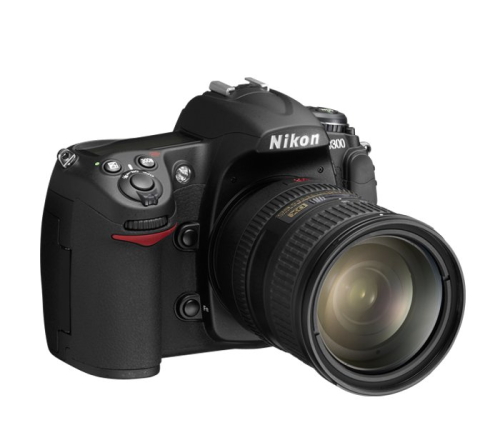
Although the Nikon D300 has been out on the market for some time now, we recently purchased one to use on our product photoshots. Our photographers do nothing but rave about it citing the Nikon D300 as a great amateur to semi-professional DSLR camera.
The Nikon D300 takes sharp images and displays stunning colors. The active D-lighting feature amazing: it can brighten up a subject that has been underexposed due to backlighting or insufficient flash illumination, or enhance contrast of an overexposed subject that otherwise looks too bright. For those of you who shoot sports, the Nikon D300 can shoot up to 6 frames per second out of the box. If you purchase the MB-D10 grip that will increase to 8 frames per second.
The camera also features a 3" LCD screen. The screen allows you to preview pictures you've just taken or use it as a view-finder like most point-and-shoot cameras. The controls are simple to use and we found it's menu to be very easy to navigate -- though it is important to point out some of the features are buried deep in the menu system.
The hot shoe allows for an external flash like the SB900 and will give you an amazing advantage to control the lighting. You can also purchase software to control the camera through the PC "Camera Control Pro". A wireless adapter is also available to shoot images wirelessly. Honestly the capabilities are endless with this one.
Some sample shots taken with the Nikon D300:





Images taken by Hector Gongora
IN THE BOX
- Nikon D300 (Body only)
- Battery and charger
- Instruction manual
THE GOOD
- Easy to use
- Amazing images
- Can get up to 8 FPS (with optional accessory)
- Great battery life
THE BAD
- Does not come with camera control software
WHERE TO BUY
- Amazon
-

Linksys BEFCMU10 Ethernet Cable Modem
The Nikon D300 takes sharp images and displays stunning colors. The active D-lighting feature amazing: it can brighten up a subject that has been underexposed due to backlighting or insufficient flash illumination, or enhance contrast of an overexposed subject that otherwise looks too bright. For those of you who shoot sports, the Nikon D300 can shoot up to 6 frames per second out of the box. If you purchase the MB-D10 grip that will increase to 8 frames per second.
The camera also features a 3" LCD screen. The screen allows you to preview pictures you've just taken or use it as a view-finder like most point-and-shoot cameras. The controls are simple to use and we found it's menu to be very easy to navigate -- though it is important to point out some of the features are buried deep in the menu system.
The hot shoe allows for an external flash like the SB900 and will give you an amazing advantage to control the lighting. You can also purchase software to control the camera through the PC "Camera Control Pro". A wireless adapter is also available to shoot images wirelessly. Honestly the capabilities are endless with this one.
Some sample shots taken with the Nikon D300:
Images taken by Hector Gongora
IN THE BOX
- Nikon D300 (Body only)
- Battery and charger
- Instruction manual
THE GOOD
- Easy to use
- Amazing images
- Can get up to 8 FPS (with optional accessory)
- Great battery life
THE BAD
- Does not come with camera control software
WHERE TO BUY
- Amazon
-
Linksys BEFCMU10 Ethernet Cable Modem

Posted In: Technology
Linksys WRT610N Simultaneous Dual-N Band Wireless Router Review
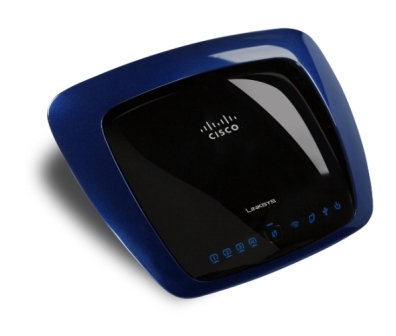
If you are in the market for a one stop shop router, look this way at the WRT610N Simultaneous Dual-N Band Wireless Router from Linksys .
.
In our tests we found the two simultaneous, separate, Wireless-N radio bands double your available bandwidth. The radios are compatible with all older technology like b and g networks so it wont hurt your pocket because you dont have to change all your equipment. This is great if you have laptops that are a few years old. It of course also works with the newer N technology and it does so simultaneously.
The router features a usb port that allows you to put an external usb hard drive or thumb drive. We tested this with an external usb hard drive and found it to be relatively easy to set up. The router allows you to set up a upnp server or even an ftp server that can be accessed from within your network or even through the web.
The 4-ports in the back are 10/100/1000 speeds so you can ultimately achieve connections that are up to 10 times faster than 10/100 connections. We feel this is the future of home networking since all new devices being introduced into the market support the gigabit speeds. One good example of this type of device is the very popular Plasy Station III or (PS3). The gigabit speeds are very noticeable when transfering large amounts of data from one device to another in a home network.
One thing to note is that the gigabit speeds will not make your internet any faster. Your bottelneck tends to be that of your links speed to the web via your internet service provider or ISP (upload / download speeds).
The Linksys WRT610N router features the LELA technology which is simply a push button setup to make connection simple, fast, and secure. In our trials we didn't attempt to use this as it was fairly easy to set it up with WAP2 security to give us our Wi-Fi advanced wireless security. The WRT610N has a powerful firewall that is also easily configured. It features access lists that can be programmed for specific times of day and everything.
Another cool feature was the Entertainment Optimized Network (EON), this technology allows you to prioritize your media traffic to optimize your experience. Lets say for example you are a gamer and grandpa came over to check his email on another computer in your network, you could easily set up the router to prioritize your gaming traffic and give granpa just the bandwith he needs to check emails from grandma...
We really enjoyed the setup as it was very simple to do and required minimal effort. The speeds were excellent on the wired sides and acceptable on the wireless side. Overall we liked the product and recommend it for anyone that needs the extra bandwith, or storage link features. We did however think that the $200.00 price tag was a bit much. In time the prices will go down and then it will make it an easy decision. For now the cheapest we have seen it is $159.00 on Amazon.
IN THE BOX
- Linksys WRT610N Simultaneous Dual-N Band Wireless Router
- Power adapter
- CD with installation software and manual.
THE GOOD
- Ease of set up
- Fast
- Aesthetically pleasing
- Simple ftp setup
- Easy upnp setup
- Straight forward graphical user interface
THE BAD
- When you grab the device your finger prints stay on it.
- Not stackable
- No way of changing https (secure) managment to a different port
- Did not get the distance we were expecting with wireless but it was acceptable.
WHERE TO BUY
-Amazon
-
. In our tests we found the two simultaneous, separate, Wireless-N radio bands double your available bandwidth. The radios are compatible with all older technology like b and g networks so it wont hurt your pocket because you dont have to change all your equipment. This is great if you have laptops that are a few years old. It of course also works with the newer N technology and it does so simultaneously.
The router features a usb port that allows you to put an external usb hard drive or thumb drive. We tested this with an external usb hard drive and found it to be relatively easy to set up. The router allows you to set up a upnp server or even an ftp server that can be accessed from within your network or even through the web.
The 4-ports in the back are 10/100/1000 speeds so you can ultimately achieve connections that are up to 10 times faster than 10/100 connections. We feel this is the future of home networking since all new devices being introduced into the market support the gigabit speeds. One good example of this type of device is the very popular Plasy Station III or (PS3). The gigabit speeds are very noticeable when transfering large amounts of data from one device to another in a home network.
One thing to note is that the gigabit speeds will not make your internet any faster. Your bottelneck tends to be that of your links speed to the web via your internet service provider or ISP (upload / download speeds).
The Linksys WRT610N
router features the LELA technology which is simply a push button setup to make connection simple, fast, and secure. In our trials we didn't attempt to use this as it was fairly easy to set it up with WAP2 security to give us our Wi-Fi advanced wireless security. The WRT610N has a powerful firewall that is also easily configured. It features access lists that can be programmed for specific times of day and everything.Another cool feature was the Entertainment Optimized Network (EON), this technology allows you to prioritize your media traffic to optimize your experience. Lets say for example you are a gamer and grandpa came over to check his email on another computer in your network, you could easily set up the router to prioritize your gaming traffic and give granpa just the bandwith he needs to check emails from grandma...
We really enjoyed the setup as it was very simple to do and required minimal effort. The speeds were excellent on the wired sides and acceptable on the wireless side. Overall we liked the product and recommend it for anyone that needs the extra bandwith, or storage link features. We did however think that the $200.00 price tag was a bit much. In time the prices will go down and then it will make it an easy decision. For now the cheapest we have seen it is $159.00 on Amazon
.IN THE BOX
- Linksys WRT610N Simultaneous Dual-N Band Wireless Router
- Power adapter
- CD with installation software and manual.
THE GOOD
- Ease of set up
- Fast
- Aesthetically pleasing
- Simple ftp setup
- Easy upnp setup
- Straight forward graphical user interface
THE BAD
- When you grab the device your finger prints stay on it.
- Not stackable
- No way of changing https (secure) managment to a different port
- Did not get the distance we were expecting with wireless but it was acceptable.
WHERE TO BUY
-Amazon
-

Posted In: Technology
Netgear GS608 8-Port Gigabit Desktop Switch Review
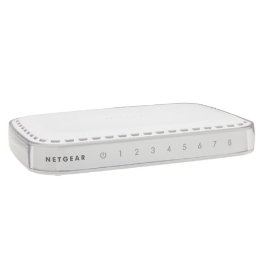
Need a gigabit switch? Make sure you take a look at the Netgear GS608 8-Port Gigabit Desktop Switch . We tested one of these at our labs on a mixed network and were very impressed and unlike most network switches, it has a sleek design, so it blends in with any surrounding easily.
In our tests we set up the switch with four gigabit PC's, two 100 full, and a DNS-321 NAS box running gigabit speed. The performance was superb when transferring files. We recorded a 23.4GB file copy transfer from the NAS box to one of the PC's running on the gigabit side at a little over one hour.The gigabit speed is noticeable, giving you up to ten time faster speeds when transferring large files from one computer or device to another. The GS608 features 8 Ethernet Gigabit auto-sensing ports so it reduces the amount of work you need to do. The switch requires no software installation, so it is easy to set up. You basically plug in the UTP cables and play.
It is also easy to see which devices are running at gigabit speeds by the lights in the front. If the numbers are solid green you know you are running gigabit if it is orange you are running at 100MB.
We loved the Netgear GS608's simplicity and more than anything its price. You can find the switch for about $49.00 on Amazon - more than fair price for the work it does.
IN THE BOX
GS608 8-port Ethernet switch
Vertical stand
Power adapter
Installation guide
2 year warranty/support information card
THE GOOD
- Ease of set up
- Fast
- Aesthetically pleasing
THE BAD
- Can't think of any
WHERE TO BUY
Amazon
. We tested one of these at our labs on a mixed network and were very impressed and unlike most network switches, it has a sleek design, so it blends in with any surrounding easily. In our tests we set up the switch with four gigabit PC's, two 100 full, and a DNS-321 NAS box running gigabit speed. The performance was superb when transferring files. We recorded a 23.4GB file copy transfer from the NAS box to one of the PC's running on the gigabit side at a little over one hour.The gigabit speed is noticeable, giving you up to ten time faster speeds when transferring large files from one computer or device to another. The GS608 features 8 Ethernet Gigabit auto-sensing ports so it reduces the amount of work you need to do. The switch requires no software installation, so it is easy to set up. You basically plug in the UTP cables and play.
It is also easy to see which devices are running at gigabit speeds by the lights in the front. If the numbers are solid green you know you are running gigabit if it is orange you are running at 100MB.
We loved the Netgear GS608's simplicity and more than anything its price. You can find the switch for about $49.00 on Amazon
- more than fair price for the work it does. IN THE BOX
GS608 8-port Ethernet switch
Vertical stand
Power adapter
Installation guide
2 year warranty/support information card
THE GOOD
- Ease of set up
- Fast
- Aesthetically pleasing
THE BAD
- Can't think of any
WHERE TO BUY
Amazon

Posted In: Technology
keep up to date:

choose a category:
- Accessories and Decor
- Art
- Books
- DIY
- Editorials
- Furniture
- Garden and Patio
- Gifts for Men
- Gifts for Women
- Go Green
- Health
- Home Automation
- Kitchen and Baths
- Lighting
- Miscellaneous
- Parenting
- Pets
- Reviews
- Site News
- Software
- Sponsor Thanks
- Technology
- Tools
- Toys and Games
- Walls and Floors
- YouTube Video Review

stuff you might have missed