
APC Back-UPS Pro Review
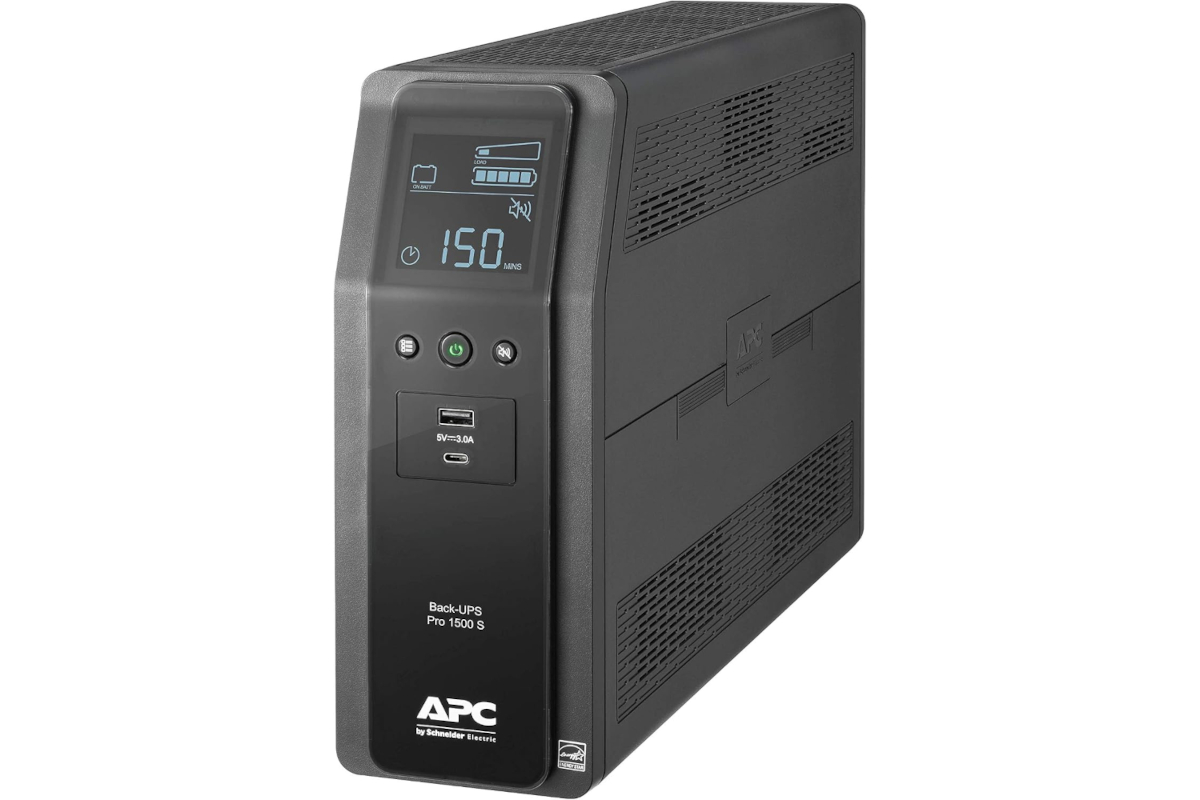
I've had the APC Back-UPS Pro 1500 S for about 2 years now, and I'm extremely happy with the purchase. It's kept my personal workstation and desktop gadgets safe from power voltage strikes, which is my main reason for owning one since we live in what's basically the lightning capital of the world. Our utility power itself is pretty reliable, so surge protection is really the primary job this unit is doing for me, with battery backup as a nice bonus for the occasional outage.
Outlets and how to use them
This unit gives you 10 outlets total. 4 of them are surge protection only, and the other 6 give you both surge protection and battery backup. That split is actually really useful once you think through how to use it. Something like a second or third monitor doesn't necessarily need battery power to keep running during an outage, so you can plug that into a surge only outlet and save your battery capacity for the components that matter most, like your PC itself, which extends how long you can keep working during a storm.
Capacity and runtime
This particular model is rated at 1500VA / 900W. Under about a 100W load, you're looking at a little over an hour of battery runtime, which is more than enough to ride out a short storm as long as you're not overloading the unit beyond what it's rated for. It's also a pure sine wave unit, meaning it filters and delivers clean power to your sensitive equipment rather than a rougher, simulated waveform, which matters more than people realize for modern power supplies and electronics.
Front panel ports and display
The front of the unit has both USB-C and USB-A ports, so you can charge your devices directly without needing a separate power brick plugged into an outlet. That's a small thing, but it comes in handy more often than you'd expect.
The LCD display up front is genuinely useful too. It shows your current load level so you know right away if you're trying to power too much equipment, a numerical runtime estimate so you know how many minutes of battery you have left based on your current draw, and a live battery health report so you're not left guessing whether the battery is still good.
Rear connections
On the back of the unit, you'll also find ports for gigabit ethernet and coax connections. Running your modem or ethernet line through those helps protect your cable modem or network connection from surges too, not just your outlets.
PowerChute software
One feature I really love is the PowerChute software. It comes with a cable where the ethernet style end connects to the UPS and the USB end connects to your computer, and it lets you monitor the UPS in real time from your PC. If the power goes out, you can program it to shut your computer down gracefully after a set amount of time instead of just letting the battery run out and cutting off abruptly. In my case, I know my setup can run about 50 minutes on battery, so I built in a safety buffer and set it to shut my PC down gracefully after 30 minutes without power. That protects against the kind of software and file corruption issues you can run into when a computer loses power the hard way. Windows in particular does not appreciate having the plug pulled on it.
Other things worth knowing
The battery inside is user replaceable, so when it eventually wears down after several years, you're not stuck replacing the whole unit, just the battery itself. It's also on the heavier side at around 30 pounds, so plan on giving it a permanent spot on the floor or a shelf rather than moving it around often. It does have an audible alarm during an outage or fault condition, which is genuinely useful for getting your attention, though worth knowing if you're placing it somewhere like a bedroom.
This unit also carries a 3 year warranty, so if anything does go wrong, you're covered. That said, it likely won't be necessary. Every unit goes through a quality control check at the factory specifically to avoid shipping something dead on arrival.
Why I trust the brand
I've been an APC customer for years, both at home and at work where we run them in our data center, and I genuinely believe in their products. Are they expensive? Yes. Are they worth it? Absolutely. When your job or your work depends on your equipment staying up, a power strike is the last thing you want to be worrying about, and that's exactly what an APC UPS takes off your plate.
The Good
- Pure sine wave output gives sensitive electronics genuinely clean power, not just backup power
- 10 outlets split between surge only and surge plus battery gives you flexibility in how you allocate battery runtime
- USB-C and USB-A charging ports up front mean one less power brick cluttering an outlet
- LCD display gives you load level, runtime, and battery health at a glance
- Gigabit ethernet and coax pass-through protects your network gear too, not just your outlets
- PowerChute software allows for automatic, graceful shutdowns instead of an abrupt power loss
- User replaceable battery extends the life of the unit well beyond the original battery
- 3 year warranty backed by a company with a long track record
The Bad
- Not cheap, this is a real investment rather than an impulse buy
- At around 30 pounds, it's not something you'll want to be moving around frequently
- Audible alarm during outages is useful but worth considering if it'll be placed somewhere you sleep
- 1500VA / 900W is plenty for a workstation setup, but heavier power users may need to size up
Where to buy
The APC Back-UPS Pro 1500 S (BR1500MS2) typically runs around $339.99 at major retailers. If you're serious about protecting your workstation from both surges and outages, especially if you deal with frequent storms like we do, this is one of those purchases that pays for itself the first time it actually saves your equipment.
Outlets and how to use them
This unit gives you 10 outlets total. 4 of them are surge protection only, and the other 6 give you both surge protection and battery backup. That split is actually really useful once you think through how to use it. Something like a second or third monitor doesn't necessarily need battery power to keep running during an outage, so you can plug that into a surge only outlet and save your battery capacity for the components that matter most, like your PC itself, which extends how long you can keep working during a storm.
Capacity and runtime
This particular model is rated at 1500VA / 900W. Under about a 100W load, you're looking at a little over an hour of battery runtime, which is more than enough to ride out a short storm as long as you're not overloading the unit beyond what it's rated for. It's also a pure sine wave unit, meaning it filters and delivers clean power to your sensitive equipment rather than a rougher, simulated waveform, which matters more than people realize for modern power supplies and electronics.
Front panel ports and display
The front of the unit has both USB-C and USB-A ports, so you can charge your devices directly without needing a separate power brick plugged into an outlet. That's a small thing, but it comes in handy more often than you'd expect.
The LCD display up front is genuinely useful too. It shows your current load level so you know right away if you're trying to power too much equipment, a numerical runtime estimate so you know how many minutes of battery you have left based on your current draw, and a live battery health report so you're not left guessing whether the battery is still good.
Rear connections
On the back of the unit, you'll also find ports for gigabit ethernet and coax connections. Running your modem or ethernet line through those helps protect your cable modem or network connection from surges too, not just your outlets.
PowerChute software
One feature I really love is the PowerChute software. It comes with a cable where the ethernet style end connects to the UPS and the USB end connects to your computer, and it lets you monitor the UPS in real time from your PC. If the power goes out, you can program it to shut your computer down gracefully after a set amount of time instead of just letting the battery run out and cutting off abruptly. In my case, I know my setup can run about 50 minutes on battery, so I built in a safety buffer and set it to shut my PC down gracefully after 30 minutes without power. That protects against the kind of software and file corruption issues you can run into when a computer loses power the hard way. Windows in particular does not appreciate having the plug pulled on it.
Other things worth knowing
The battery inside is user replaceable, so when it eventually wears down after several years, you're not stuck replacing the whole unit, just the battery itself. It's also on the heavier side at around 30 pounds, so plan on giving it a permanent spot on the floor or a shelf rather than moving it around often. It does have an audible alarm during an outage or fault condition, which is genuinely useful for getting your attention, though worth knowing if you're placing it somewhere like a bedroom.
This unit also carries a 3 year warranty, so if anything does go wrong, you're covered. That said, it likely won't be necessary. Every unit goes through a quality control check at the factory specifically to avoid shipping something dead on arrival.
Why I trust the brand
I've been an APC customer for years, both at home and at work where we run them in our data center, and I genuinely believe in their products. Are they expensive? Yes. Are they worth it? Absolutely. When your job or your work depends on your equipment staying up, a power strike is the last thing you want to be worrying about, and that's exactly what an APC UPS takes off your plate.
The Good
- Pure sine wave output gives sensitive electronics genuinely clean power, not just backup power
- 10 outlets split between surge only and surge plus battery gives you flexibility in how you allocate battery runtime
- USB-C and USB-A charging ports up front mean one less power brick cluttering an outlet
- LCD display gives you load level, runtime, and battery health at a glance
- Gigabit ethernet and coax pass-through protects your network gear too, not just your outlets
- PowerChute software allows for automatic, graceful shutdowns instead of an abrupt power loss
- User replaceable battery extends the life of the unit well beyond the original battery
- 3 year warranty backed by a company with a long track record
The Bad
- Not cheap, this is a real investment rather than an impulse buy
- At around 30 pounds, it's not something you'll want to be moving around frequently
- Audible alarm during outages is useful but worth considering if it'll be placed somewhere you sleep
- 1500VA / 900W is plenty for a workstation setup, but heavier power users may need to size up
Where to buy
The APC Back-UPS Pro 1500 S (BR1500MS2) typically runs around $339.99 at major retailers. If you're serious about protecting your workstation from both surges and outages, especially if you deal with frequent storms like we do, this is one of those purchases that pays for itself the first time it actually saves your equipment.


Posted In: Reviews, Technology
keep up to date:

choose a category:
- Accessories and Decor
- Art
- Books
- DIY
- Editorials
- Furniture
- Garden and Patio
- Gifts for Men
- Gifts for Women
- Go Green
- Health
- Home Automation
- Kitchen and Baths
- Lighting
- Miscellaneous
- Parenting
- Pets
- Reviews
- Site News
- Software
- Sponsor Thanks
- Technology
- Tools
- Toys and Games
- Walls and Floors
- YouTube Video Review

stuff you might have missed




Post Comment