Manfrotto - Bogen 488 Ball Head with RC2 Quick Release Review
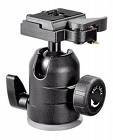
If you are looking for a small and affordable ball head for your DSLR stop right there - you just found it! The 488 from Manfrotto - Bogen is a remarkable piece of equipment for the price. Our photographer here at the Villa clued us in on this product when he purchased one for our studio.
This ball head, although small, is remarkably strong - it can hold up to 17.6 Lbs, which comfortably hold our studio's Nikon D300 or equivalent camera. The height of the head is 4.25 inches and it has a 3/8" female thread to connect to your tripod. The best part of this head is that it has a tilt of -90 degrees +90 degrees and a pan of 360 degrees, which has its own independent lock from the actual ball that holds your camera. This is great for producing panoramic shots. We liked the 488 over the 486 for its extra weight support and independent lock lever for the pan. If the pan is not important to you, then the 486 is an even cheaper alternative, but we figured for an extra 30 dollars the feature is worth it.
We didn't find any faults with the head, except that it could be a bit too heavy, but then again, that's what gives it its strength.
To sum it all up the Manfrotto - Bogen 488 RC2 is an easy to use affordable ball head that attaches firmly to any camera, features good stability, and a large range of motion.
THE GOOD
- Provides great stability
- Solid construction
- Great pan controls
THE BAD
- Somewhat heavy
WHERE TO BUY
We found the best prices at:
Amazon.com at $107.00 with free supersaver shipping.
Adorama, one of our favorite shops, has it for $110.00 + shipping.
B&H Photo has it for $109.95 plus shipping.
This ball head, although small, is remarkably strong - it can hold up to 17.6 Lbs, which comfortably hold our studio's Nikon D300 or equivalent camera. The height of the head is 4.25 inches and it has a 3/8" female thread to connect to your tripod. The best part of this head is that it has a tilt of -90 degrees +90 degrees and a pan of 360 degrees, which has its own independent lock from the actual ball that holds your camera. This is great for producing panoramic shots. We liked the 488 over the 486 for its extra weight support and independent lock lever for the pan. If the pan is not important to you, then the 486 is an even cheaper alternative, but we figured for an extra 30 dollars the feature is worth it.
We didn't find any faults with the head, except that it could be a bit too heavy, but then again, that's what gives it its strength.
To sum it all up the Manfrotto - Bogen 488 RC2
is an easy to use affordable ball head that attaches firmly to any camera, features good stability, and a large range of motion.THE GOOD
- Provides great stability
- Solid construction
- Great pan controls
THE BAD
- Somewhat heavy
WHERE TO BUY
We found the best prices at:
Amazon.com at $107.00 with free supersaver shipping.
Adorama, one of our favorite shops, has it for $110.00 + shipping.
B&H Photo has it for $109.95 plus shipping.


Posted In: Technology
Panasonic KX-TG3031 Line of Color Phones and Digital Answering Machines Review
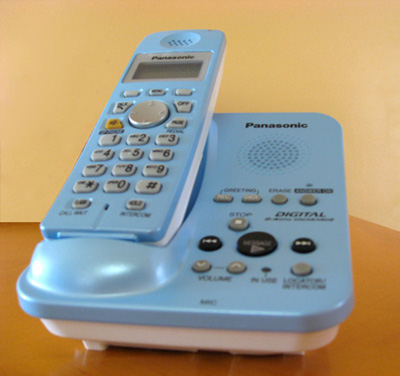
One key electronic device in your home that has probably not had a significant make-over in the last decade has been your landline cordless telephone. Panasonic recognizes that and recently introduced the KX-TG3031 line of 2.4 GHz cordless phones in the United States. The hook is that this line of cordless telephones will be available in a plethora of color choices appealing to the "I want choices" consumer. But does Panasonic succeed?
The color choices for the Panasonic KX-TG3031 Phone with Digital Answering Machine are separated into three very distinct categories: bold, fresh, and elegant. In the bold line you'll find very loud version of the colors green, orange, red, and violet. The fresh category on the other hand, contains much softer tones like pearl blue (pictured in our review), pearl pink, pearl yellow, and pearl violet. Lastly, the elegant line has a more chic attitude with the colors deep blue, copper, wine red, and moss green. Each one of these colors has matching handsets that you can purchase separately (models KX-TGA300). Needless to say should you desire to create a rainbow of colors in your home, you can opt for your main phone and digital answering machine to be pearl blue, one additional handset in pearl pink, and another in heaven-save-you, moss green. In total, your phone network can be made up of four different handsets.
The voice quality of the Panasoic KX-TG3031 is on par with other Panasonic phones. That is to say that voice quality was good and in our tests did not receive interfering from other wireless devices. Additionally, the phone did not interfere with said wireless devices.
Battery life on this phone is also good, with up to 14 days on stand-by and up to 5 hours of talk time. Once you've exhausted the battery, it will take about 7 hours for a full recharge. Of course, if you place the handset back on the cradle after use, you'll never notice. Like most modern handsets, the Panasonic KX-TG3031 supports caller ID so you can ignore your boss calling you at home. And while we are in the subject of features, there are seven ring tones total, but what is there is very good.
The Digital Answering Machine is capable of recording up to 12 minutes worth of messages which it stores in flash memory. Thankfully Panasonic allows you to delete messages even if you do not hear them, a feature that unfortunately some phone manufacturers have yet to implement.
In general the Panasonic KX-TG3031 color line of cordless telephones work well. The extensive option of colors is welcomed, but to be completely honest, we don't feel the phone design is at all interesting. That is of course a matter of taste, but in our opinion a bit of a disappointment that Panasonic didn't take a risk on the actual design of the phone. Furthermore, additional handsets retail for $49.95, about $20.00 more than similar phones, no doubt a premium for the choice of out-of-the-ordinary colors.
THE GOOD
- A lot of colors to choose from
- Solid voice quality
THE BAD
- The phone design leaves a lot to be desired
- Only seven ringtones
- Retails for more than similar phones
Manufacturer's Web Site | Buy Online
The color choices for the Panasonic KX-TG3031 Phone with Digital Answering Machine are separated into three very distinct categories: bold, fresh, and elegant. In the bold line you'll find very loud version of the colors green, orange, red, and violet. The fresh category on the other hand, contains much softer tones like pearl blue (pictured in our review), pearl pink, pearl yellow, and pearl violet. Lastly, the elegant line has a more chic attitude with the colors deep blue, copper, wine red, and moss green. Each one of these colors has matching handsets that you can purchase separately (models KX-TGA300). Needless to say should you desire to create a rainbow of colors in your home, you can opt for your main phone and digital answering machine to be pearl blue, one additional handset in pearl pink, and another in heaven-save-you, moss green. In total, your phone network can be made up of four different handsets.
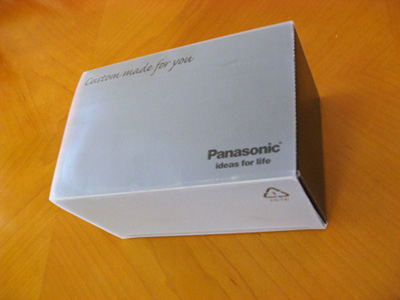
The Panasonic KX-TG3031 color phones come in very iPod-like packaging.
The voice quality of the Panasoic KX-TG3031 is on par with other Panasonic phones. That is to say that voice quality was good and in our tests did not receive interfering from other wireless devices. Additionally, the phone did not interfere with said wireless devices.
Battery life on this phone is also good, with up to 14 days on stand-by and up to 5 hours of talk time. Once you've exhausted the battery, it will take about 7 hours for a full recharge. Of course, if you place the handset back on the cradle after use, you'll never notice. Like most modern handsets, the Panasonic KX-TG3031 supports caller ID so you can ignore your boss calling you at home. And while we are in the subject of features, there are seven ring tones total, but what is there is very good.
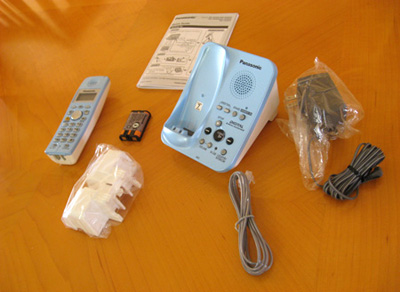
This is what you get with the Panasonic KX-TG3031
The Digital Answering Machine is capable of recording up to 12 minutes worth of messages which it stores in flash memory. Thankfully Panasonic allows you to delete messages even if you do not hear them, a feature that unfortunately some phone manufacturers have yet to implement.
In general the Panasonic KX-TG3031 color line of cordless telephones work well. The extensive option of colors is welcomed, but to be completely honest, we don't feel the phone design is at all interesting. That is of course a matter of taste, but in our opinion a bit of a disappointment that Panasonic didn't take a risk on the actual design of the phone. Furthermore, additional handsets retail for $49.95, about $20.00 more than similar phones, no doubt a premium for the choice of out-of-the-ordinary colors.
THE GOOD
- A lot of colors to choose from
- Solid voice quality
THE BAD
- The phone design leaves a lot to be desired
- Only seven ringtones
- Retails for more than similar phones
Manufacturer's Web Site | Buy Online

Posted In: Technology
Braun Tassimo TA 1400 Hot Beverage System Review
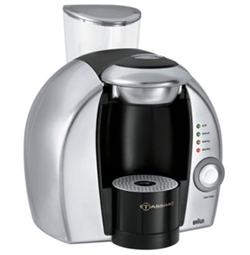
Though on the surface the Braun Tassimo looks like just another espresso / coffee machine, it is much more than that - it is a multi-purpose brewing machine, or what the manufacturer refers to as a hot beverage system. It is a good description to be sure, but what the description doesn't tell you is that the Braun Tassimo is one heck of a machine.
What Can the Braun Tassimo Do?
In an effort to be brief we'll just list what the machine can do: coffee, espresso, real milk-based lattes and cappuccinos, cafe crema, hot tea, tea latte, and hot chocolate. Surprised yet? We were.
This is how it All Works
T-Discs - that's what makes the Braun Tassimo unique. If you've ever used a pod/capsule-based coffee machine, then T-Discs will seem very familiar on the surface, but they are actually very different. Each T-Disc has a barcode imprinted on the top that tells the Tassimo how much water to inject through the T-Disc. The result of this process is an exact brew that has the same taste time and time again. Alternatively, the Tassimo also lets you manually control the brewing process by simply pressing and holding down a button. It is all about options.
Speaking of options, unlike other coffee and espresso machines, you have a wide selection of brands offering a multitude of flavors and types of beverages. Don't like Seattle's Best Coffee? No problem, you have a choice.
As of this writing the following companies offered at least one product under the Tassimo Label:
Gevalia
Seattle's Best Coffee
Maxwell House Cafe Collection
Mastro Lorenzo
Kenco Classic Blend
Carte Noire
Nabob 100% Colombian
Jacobs Kroenung
Twinings Tea
Suchard Hot Chocolate
Tazo
On the down side, like all other capsule-based coffee machines, the price of each T-Disc is significantly higher than if you were to purchase a bag of coffee at the supermarket. So, what you'll gain in speed and ease of clean up, you'll have to pay for with your wallet.
A Taste of the Tassimo
In the past we've always complained about the strength and flavor of capsule-based machines. Some of the espressos felt watered-down as if the amount of coffee in the pod was not sufficient compared to the amount of water being injected through the capsule. Not so with the Tassimo, the Gevalia espresso in particularly delivered a completely balanced espresso with a smooth, yet strong taste. We were also pleasantly surprised at the taste of the cappuccino, perhaps aided by the fact that the Tassimo uses real milk in their cappuccino T-Discs.
Of the different coffees (cafe Americano) we've tried, the taste of Carte Noire was exceptional and in this category the Gevalia performed well again. Of course if you are already a fan of any of the participating brands their T-Discs will probably not disappoint.
Though we are not experts (or even casual drinkers of Tea), and thus can't speak much on the matter, the Twinings Earl Grey Tea we tried was actually a nice introduction for us. Moreover the Suchard's Hot Chocolate T-Disc was one of the ones we were most excited about, and though it had a good taste, we would have preferred if the Tassimo had some support for milk for the hot chocolate as an option (the Tassimo uses a water-based recipe).
The Performance
The Braun Tassimo is not the fastest of the capsule-based brewing machines we've reviewed, that award belongs to the Nespresso brand of coffee machines, but it is still fast enough to brew an espresso in just 30 seconds, and coffee and tea in under 60 seconds. The machine will take approximately thirty seconds to warm up before it is ready for use.
Sadly, the Tassimo is missing a milk frother attachment, which is a standard feature in many other coffee machines. Though the cappuccinos are delicious and have some froth when using the cappuccino T-Discs, it would be nice to be able to have apply as much milk foam as desired. You'll want to keep this in mind before making a purchase.
Conclusion
The Braun Tassimo is easy to use, easy to clean and easy to recommend. With such a wide range of options and features it is truly in a field of its own. And even though this is as multi-purpose as it gets, the Tassimo performs extremely well in all categories, most importantly in the taste department.
Service Villa's Editor's Choice Award Winner.
THE GOOD
- Gives you a choice of flavors and brands
- Brews fast
- Easy clean up
- Does more than just coffee
- The machine is affordable considering what it can do
THE BAD
- T-Disc are on the pricey side
- Lacks a milk frother
Manufacturer's Web Site | Buy Online
What Can the Braun Tassimo Do?
In an effort to be brief we'll just list what the machine can do: coffee, espresso, real milk-based lattes and cappuccinos, cafe crema, hot tea, tea latte, and hot chocolate. Surprised yet? We were.
This is how it All Works
T-Discs - that's what makes the Braun Tassimo unique. If you've ever used a pod/capsule-based coffee machine, then T-Discs will seem very familiar on the surface, but they are actually very different. Each T-Disc has a barcode imprinted on the top that tells the Tassimo how much water to inject through the T-Disc. The result of this process is an exact brew that has the same taste time and time again. Alternatively, the Tassimo also lets you manually control the brewing process by simply pressing and holding down a button. It is all about options.
Speaking of options, unlike other coffee and espresso machines, you have a wide selection of brands offering a multitude of flavors and types of beverages. Don't like Seattle's Best Coffee? No problem, you have a choice.
As of this writing the following companies offered at least one product under the Tassimo Label:
Gevalia
Seattle's Best Coffee
Maxwell House Cafe Collection
Mastro Lorenzo
Kenco Classic Blend
Carte Noire
Nabob 100% Colombian
Jacobs Kroenung
Twinings Tea
Suchard Hot Chocolate
Tazo
On the down side, like all other capsule-based coffee machines, the price of each T-Disc is significantly higher than if you were to purchase a bag of coffee at the supermarket. So, what you'll gain in speed and ease of clean up, you'll have to pay for with your wallet.
A Taste of the Tassimo
In the past we've always complained about the strength and flavor of capsule-based machines. Some of the espressos felt watered-down as if the amount of coffee in the pod was not sufficient compared to the amount of water being injected through the capsule. Not so with the Tassimo, the Gevalia espresso in particularly delivered a completely balanced espresso with a smooth, yet strong taste. We were also pleasantly surprised at the taste of the cappuccino, perhaps aided by the fact that the Tassimo uses real milk in their cappuccino T-Discs.
Of the different coffees (cafe Americano) we've tried, the taste of Carte Noire was exceptional and in this category the Gevalia performed well again. Of course if you are already a fan of any of the participating brands their T-Discs will probably not disappoint.
Though we are not experts (or even casual drinkers of Tea), and thus can't speak much on the matter, the Twinings Earl Grey Tea we tried was actually a nice introduction for us. Moreover the Suchard's Hot Chocolate T-Disc was one of the ones we were most excited about, and though it had a good taste, we would have preferred if the Tassimo had some support for milk for the hot chocolate as an option (the Tassimo uses a water-based recipe).
The Performance
The Braun Tassimo is not the fastest of the capsule-based brewing machines we've reviewed, that award belongs to the Nespresso brand of coffee machines, but it is still fast enough to brew an espresso in just 30 seconds, and coffee and tea in under 60 seconds. The machine will take approximately thirty seconds to warm up before it is ready for use.
Sadly, the Tassimo is missing a milk frother attachment, which is a standard feature in many other coffee machines. Though the cappuccinos are delicious and have some froth when using the cappuccino T-Discs, it would be nice to be able to have apply as much milk foam as desired. You'll want to keep this in mind before making a purchase.
Conclusion
The Braun Tassimo is easy to use, easy to clean and easy to recommend. With such a wide range of options and features it is truly in a field of its own. And even though this is as multi-purpose as it gets, the Tassimo performs extremely well in all categories, most importantly in the taste department.
Service Villa's Editor's Choice Award Winner.
THE GOOD
- Gives you a choice of flavors and brands
- Brews fast
- Easy clean up
- Does more than just coffee
- The machine is affordable considering what it can do
THE BAD
- T-Disc are on the pricey side
- Lacks a milk frother
Manufacturer's Web Site | Buy Online

Posted In: Reviews
Nespresso Essenza C100 Espresso Machine Review
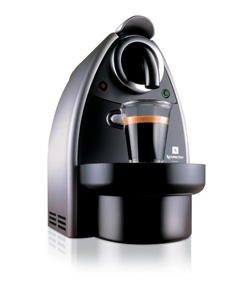
The Nespresso Essenza C100 is one of the more modestly priced Nespresso espresso machines retailing at around $229. Like all other Nespresso machines, the Nespresso Essenza C100 makes use of the Nespresso capsule system, which are small capsules filled with coffee for one-time brews -- you simply click a button and discard the used coffee.
What Does it Do
The machine has a 0.9 liter removable water tank which lets you keep enough water to brew espressos all day long. There are two buttons: one for pre-programmed espresso brewing and another for brewing lungos. If you'd like to overwrite a particular brew time, all you need to do is hold down the brew button for as long as you want to brew your particular espresso. The machine is missing a milk frother which is a bit of a let down, specially since even the most budget-friendly espresso machines include this feature.
Brewing with the Nespresso Essenza
Like the more expensive cousin of this machine, the Nespresso Le Cube, to brew a shot of espresso or lungo with your Essenza you lift the lever on top of the machine, place your Nespresso coffee blend capsule into the machine, pull down the lever, and press the brew button. It typically takes an espresso about 7 seconds from the time you press the espresso button till the last drip falls into our cup. The lungo takes roughly 14 seconds to brew. Unlike the Nespresso Le Cube however, the lever system is not as high-end.
Once you are done brewing your espresso, the coffee capsule blend falls into a capsule container that can hold up to 14 used capsules. So, clean up is done once every 14 brews when you remove the basket from the machine, throw the used capsules into a waste basket and wash the capsule container to ensure you keep things clean.
Taste It
As of this review, Nespresso offers 12 premium coffee blends (9 espresso, 3 lungo), each one with a different taste, aroma, and richness. This means that most tastes will be satisfied. Though the coffee was rich, we found that even the strongest blend, the Ristretto, was not strong enough to satisfy our taste. Strangely enough, the less potent Arpeggio espresso blend was our favorite, perhaps because each sip was bitter-sweet (we detected a hint of cocoa). Maybe we are used to the full flavor of a typical Cuban espresso, but we wished that Nespresso would provide a stronger bodied capsule blend for those of us who like our espresso really strong.
Individuals who prefer the taste of caffe americano enjoyed the Finezzo lungo blend and the lighter espresso blends like the Volluto, but did not like the stronger espresso blends like the Roma.
Conclusion
The Nespresso Essenza lacks a milk frother so it feels a bit incomplete, specially at $229. However, if you are looking for a fast espresso machine, it doesn't get any faster than this. If you are on a budget and love Nespresso coffee, we recommend this machine over the Le Cube. If you have a bit more money to spend, we recommend the Le Cube over the Essenza as it is a more nicely designed machine with better components and a sexier outer body.
THE GOOD
- A more affordable Nespresso
- Lighting fast brewing
- Easy clean up
- Great variety of espresso blends are available
THE BAD
- Overall, not the prettiest espresso machine
- Coffee pods are on the pricey side
- The strongest espresso blend isn't strong enough
- Lacks a frother
What Does it Do
The machine has a 0.9 liter removable water tank which lets you keep enough water to brew espressos all day long. There are two buttons: one for pre-programmed espresso brewing and another for brewing lungos. If you'd like to overwrite a particular brew time, all you need to do is hold down the brew button for as long as you want to brew your particular espresso. The machine is missing a milk frother which is a bit of a let down, specially since even the most budget-friendly espresso machines include this feature.
Brewing with the Nespresso Essenza
Like the more expensive cousin of this machine, the Nespresso Le Cube, to brew a shot of espresso or lungo with your Essenza you lift the lever on top of the machine, place your Nespresso coffee blend capsule into the machine, pull down the lever, and press the brew button. It typically takes an espresso about 7 seconds from the time you press the espresso button till the last drip falls into our cup. The lungo takes roughly 14 seconds to brew. Unlike the Nespresso Le Cube however, the lever system is not as high-end.
Once you are done brewing your espresso, the coffee capsule blend falls into a capsule container that can hold up to 14 used capsules. So, clean up is done once every 14 brews when you remove the basket from the machine, throw the used capsules into a waste basket and wash the capsule container to ensure you keep things clean.
Taste It
As of this review, Nespresso offers 12 premium coffee blends (9 espresso, 3 lungo), each one with a different taste, aroma, and richness. This means that most tastes will be satisfied. Though the coffee was rich, we found that even the strongest blend, the Ristretto, was not strong enough to satisfy our taste. Strangely enough, the less potent Arpeggio espresso blend was our favorite, perhaps because each sip was bitter-sweet (we detected a hint of cocoa). Maybe we are used to the full flavor of a typical Cuban espresso, but we wished that Nespresso would provide a stronger bodied capsule blend for those of us who like our espresso really strong.
Individuals who prefer the taste of caffe americano enjoyed the Finezzo lungo blend and the lighter espresso blends like the Volluto, but did not like the stronger espresso blends like the Roma.
Conclusion
The Nespresso Essenza lacks a milk frother so it feels a bit incomplete, specially at $229. However, if you are looking for a fast espresso machine, it doesn't get any faster than this. If you are on a budget and love Nespresso coffee, we recommend this machine over the Le Cube. If you have a bit more money to spend, we recommend the Le Cube over the Essenza as it is a more nicely designed machine with better components and a sexier outer body.
THE GOOD
- A more affordable Nespresso
- Lighting fast brewing
- Easy clean up
- Great variety of espresso blends are available
THE BAD
- Overall, not the prettiest espresso machine
- Coffee pods are on the pricey side
- The strongest espresso blend isn't strong enough
- Lacks a frother

Posted In: Reviews
Nespresso Le Cube C185 Espresso / Lungo Machine Review
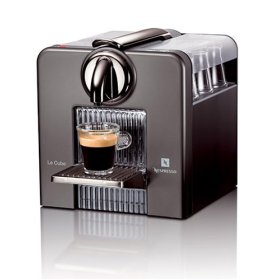
The Nespresso Le Cube C185 is a beautifully crafted capsule-based very 50s looking espresso machine designed by Antoine Cohen for Nespresso. The machine is capable of brewing both espresso and lungo (a single or double shot of espresso with typically twice the amount of water or a regular espresso). So with that in mind, let's have a look at how this beautiful machine performs.
Features
The Nespresso Le Cube is a streamlined machine. It has an on and off button and two pre-programmed buttons: espresso and a lungo. Don't be fooled, though the buttons are for the pre-programmed settings, if you are a control freak, by holding down either of the buttons you will be able to control the time of the brewing process. Like other capsule-based espresso machines, the Nespresso Le Cube has a water tank to pull water from. In the Le Cube's case, the water tank can hold up to one liter of water. Sadly missing on the Le Cube is the now industry standard milk frother.
Brewing with the Nespresso Le Cube
To brew a shot of espresso or lungo you lift the lever on top of the machine, place your Nespresso coffee blend capsule into the machine, pull down the lever, and press the brew button. It takes about 7 seconds from the time you press the espresso button till the last drip falls into our cup. The lungo takes roughly 14 seconds to brew. If you ever used a consumer espresso machine you are probably used to longer brew times, so the incredible speed of the Le Cube will leave you breathless.
Clean Up is Quick
Another sweet feature of the Le Cube is the used capsule container. Each time you brew an espresso, the used capsule falls into the capsule container. You can brew about 15 espresso shots before the machine alerts you to dump the the used capsules into the trash by activating a back light. At $0.49 cents a capsule however, convenience will come at a price, so if you are on a budget, you will want to keep this in mind.
The Taste Test
As of this review, Nespresso offers 12 premium coffee blends (9 espresso, 3 lungo), each one with a different taste, aroma, and richness. This means that most tastes will be satisfied. Though the coffee was rich, we found that even the strongest blend, the Ristretto, was not strong enough to satisfy our taste. Strangely enough, the less potent Arpeggio espresso blend was our favorite, perhaps because each sip was bitter-sweet (we detected a hint of cocoa). Maybe we are used to the full flavor of a typical Cuban espresso, but we wished that Nespresso would provide a stronger bodied capsule blend for those of us who like our espresso really strong.
Individuals who prefer the taste of caffe americano enjoyed the Finezzo lungo blend and the lighter espresso blends like the Volluto, but did not like the stronger espresso blends like the Roma.
The Brew is Concluded
All in all the Nespresso Le Cube is a great machine. It has a sweet minimalistic design we love and it brews coffee faster than any other consumer espresso product we've tried. And although we came away a bit disappointed at the strength of even the strongest espresso blend, Nespresso offers enough coffee variety to satisfy almost anyone.
THE GOOD
- Lighting fast brewing
- Easy clean up
- Great variety of espresso blends are available
THE BAD
- Coffee pods are on the pricey side
- The strongest espresso blend isn't strong enough
- Lacks a frother
Features
The Nespresso Le Cube is a streamlined machine. It has an on and off button and two pre-programmed buttons: espresso and a lungo. Don't be fooled, though the buttons are for the pre-programmed settings, if you are a control freak, by holding down either of the buttons you will be able to control the time of the brewing process. Like other capsule-based espresso machines, the Nespresso Le Cube has a water tank to pull water from. In the Le Cube's case, the water tank can hold up to one liter of water. Sadly missing on the Le Cube is the now industry standard milk frother.
Brewing with the Nespresso Le Cube
To brew a shot of espresso or lungo you lift the lever on top of the machine, place your Nespresso coffee blend capsule into the machine, pull down the lever, and press the brew button. It takes about 7 seconds from the time you press the espresso button till the last drip falls into our cup. The lungo takes roughly 14 seconds to brew. If you ever used a consumer espresso machine you are probably used to longer brew times, so the incredible speed of the Le Cube will leave you breathless.
Clean Up is Quick
Another sweet feature of the Le Cube is the used capsule container. Each time you brew an espresso, the used capsule falls into the capsule container. You can brew about 15 espresso shots before the machine alerts you to dump the the used capsules into the trash by activating a back light. At $0.49 cents a capsule however, convenience will come at a price, so if you are on a budget, you will want to keep this in mind.
The Taste Test
As of this review, Nespresso offers 12 premium coffee blends (9 espresso, 3 lungo), each one with a different taste, aroma, and richness. This means that most tastes will be satisfied. Though the coffee was rich, we found that even the strongest blend, the Ristretto, was not strong enough to satisfy our taste. Strangely enough, the less potent Arpeggio espresso blend was our favorite, perhaps because each sip was bitter-sweet (we detected a hint of cocoa). Maybe we are used to the full flavor of a typical Cuban espresso, but we wished that Nespresso would provide a stronger bodied capsule blend for those of us who like our espresso really strong.
Individuals who prefer the taste of caffe americano enjoyed the Finezzo lungo blend and the lighter espresso blends like the Volluto, but did not like the stronger espresso blends like the Roma.
The Brew is Concluded
All in all the Nespresso Le Cube is a great machine. It has a sweet minimalistic design we love and it brews coffee faster than any other consumer espresso product we've tried. And although we came away a bit disappointed at the strength of even the strongest espresso blend, Nespresso offers enough coffee variety to satisfy almost anyone.
THE GOOD
- Lighting fast brewing
- Easy clean up
- Great variety of espresso blends are available
THE BAD
- Coffee pods are on the pricey side
- The strongest espresso blend isn't strong enough
- Lacks a frother

Posted In: Technology
Magellan Maestro GPS 3100 Review
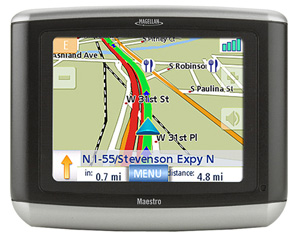
The Magellan Maestro 3100 GPS system is Magellan's budget friendly GPS unit in the Maestro family at an MSRP of $299.99. It is in essence a stripped down version of the Maestro 4040 aimed at the entry-level GPS user.
What's Included
In the box you'll find the Magellan Maestro 3100 GPS unit, windshield mount, car charger, wall charger (rare but nice addition), maps of the continental US, and application software. The unit itself is very portable, it weighs only 6.5 ounces (the iPhone in comparison weighs about 4.8 ounces) and 3.5-inch diagonal QVGA full-color, anti-glare, touch-screen display.
The First Steps
One of the most impressive aspects of this GPS is how fast it acquires a signal. By the time you bypass the Warning screen your GPS is already rocking and rolling. Even the Mio Digiwalker C310x, one of our favorite budget GPS systems, takes well a while to acquire a signal on a good day.
The first thing you'll notice is how beautiful the screen is on the Magellan Maestro 3100 GPS. The screen is bright and very colorful, helped perhaps by a slick looking user interface that is both simply and easy to use. There are three main buttons on the main screen: Show Map, Enter Address, and Points of Interest (POI). There is also an arrow to point you to the secondary GPS functionality such as a Trip Planner, Exit Points of Interests and User Options.
In general, the user interface for this device is welcoming and the information extremely easy to read. To enter an address for example the Magellan Maestro 3100 gives you three options Enter a City, Enter a Zip Code or Select a Previous City. As you type the address letters that will not be needed disappear. So for instance, if you wanted to San Francisco, as you type San Franc, letters other than "i-s-c-o" disappear. The one drawback to this system is that, say you enter the street 11th (11th Street) if will give you every variation of 11th without allowing you to narrow down your search (11th Avenue, 11th Place... etc...) so you are forced to scroll through about 2 screens of results.
The Maps and Points of Interest
The biggest blunder here for this GPS is the lack of POIs, featuring only 750,000 a lot of businesses were missing completely. We were really disappointed when we were parked directly in front of a blockbuster that has been in business in our neighborhood for over 10 years, typed in Blockbuster, POIs within current location and received NO results. We expanded the results to over 100 miles and there were still no Blockbusters to be found.
The map on the other hand was good. We took a weekend drive to Southwest Florida where there is a lot of new construction going on and all the streets were correctly labeled and displayed. There was however one big issue: The city (or town I suppose) of Matlacha, Florida was not found in the database of this device. It is really a shame that the database in the Magellan Maestro 3100 GPS could be so incomplete.
The actual map software on the other hand was nice. The display shows you the map, the direction of the next turn and how far it is, the speed you are traveling at (very accurate), the name of the upcoming turn, the street you are traveling on, the direction you are headed, volume controls, and zoom controls. One really cool feature in the Magellan Maestro 3100 GPS is what Magellan calls TrueView -- it is a pop-up visual of the upcoming turn. On one side it shows you an arrow of where your turn will go and on the other side it shows an overhead map. The TrueView is activated about 500 feet before your turn and then goes away at about 300 feet. In addition, the names of all the streets surrounding your route are really easy to read on the map.
Another major issue was that the device does not allow you to find POIs as you are driving. Meaning, if you wanted to search for a Best Buy mid route, the device will NOT allow you to do a search. You are forced to cancel your route before you can do any search. This is extremely frustrating as sometimes you need to alter your course as you are driving. Not all is lost in the world of POI in this GPS though. One feature we really liked in Magellan Maestro 3100 GPS is the "Exit POI" feature. This feature allows you to see what Points of Interest are available near the upcoming express way exit. If you are looking for gas this is an easy way to see if there is anything coming up.
Loading Times
One last key problem we found with the Magellan Maestro 3100 were the loading times. Calculating routes, even small ones, took a very long time. In addition, when routes are recalculated it takes longer than similar GPSs in the market at the same price range.
The Bottom Line
The Magellan Maestro 3100 GPS unit has a beautiful bright screen and the display resolution is one of the nicest we've seen. The user-interface is also one of the most consumer friendly on the market and that that makes this a GPS for entry-level consumers. However, the system has an incomplete POI database and very limited POI functionality as you drive. In addition the Magellan Maestro 3100 takes a signficant amount of time calculating routes which can be annoying at times. If you want to get to where you want to go, this GPS will do the job, however, if you want a more complete GPS experience, the Magellan Maestro 3100 falls short.
THE GOOD
- Beautiful screen
- Easy to use interface
- Fast Signal acquisition
- Recalculates route
THE BAD
- Outdated POI database
- Lacking some basic features
- Slow calculations
- No POI function while driving
- Small battery life (3 hours on lowest screen brightness)
What's Included
In the box you'll find the Magellan Maestro 3100 GPS unit, windshield mount, car charger, wall charger (rare but nice addition), maps of the continental US, and application software. The unit itself is very portable, it weighs only 6.5 ounces (the iPhone in comparison weighs about 4.8 ounces) and 3.5-inch diagonal QVGA full-color, anti-glare, touch-screen display.
The First Steps
One of the most impressive aspects of this GPS is how fast it acquires a signal. By the time you bypass the Warning screen your GPS is already rocking and rolling. Even the Mio Digiwalker C310x, one of our favorite budget GPS systems, takes well a while to acquire a signal on a good day.
The first thing you'll notice is how beautiful the screen is on the Magellan Maestro 3100 GPS. The screen is bright and very colorful, helped perhaps by a slick looking user interface that is both simply and easy to use. There are three main buttons on the main screen: Show Map, Enter Address, and Points of Interest (POI). There is also an arrow to point you to the secondary GPS functionality such as a Trip Planner, Exit Points of Interests and User Options.
In general, the user interface for this device is welcoming and the information extremely easy to read. To enter an address for example the Magellan Maestro 3100 gives you three options Enter a City, Enter a Zip Code or Select a Previous City. As you type the address letters that will not be needed disappear. So for instance, if you wanted to San Francisco, as you type San Franc, letters other than "i-s-c-o" disappear. The one drawback to this system is that, say you enter the street 11th (11th Street) if will give you every variation of 11th without allowing you to narrow down your search (11th Avenue, 11th Place... etc...) so you are forced to scroll through about 2 screens of results.
The Maps and Points of Interest
The biggest blunder here for this GPS is the lack of POIs, featuring only 750,000 a lot of businesses were missing completely. We were really disappointed when we were parked directly in front of a blockbuster that has been in business in our neighborhood for over 10 years, typed in Blockbuster, POIs within current location and received NO results. We expanded the results to over 100 miles and there were still no Blockbusters to be found.
The map on the other hand was good. We took a weekend drive to Southwest Florida where there is a lot of new construction going on and all the streets were correctly labeled and displayed. There was however one big issue: The city (or town I suppose) of Matlacha, Florida was not found in the database of this device. It is really a shame that the database in the Magellan Maestro 3100 GPS could be so incomplete.
The actual map software on the other hand was nice. The display shows you the map, the direction of the next turn and how far it is, the speed you are traveling at (very accurate), the name of the upcoming turn, the street you are traveling on, the direction you are headed, volume controls, and zoom controls. One really cool feature in the Magellan Maestro 3100 GPS is what Magellan calls TrueView -- it is a pop-up visual of the upcoming turn. On one side it shows you an arrow of where your turn will go and on the other side it shows an overhead map. The TrueView is activated about 500 feet before your turn and then goes away at about 300 feet. In addition, the names of all the streets surrounding your route are really easy to read on the map.
Another major issue was that the device does not allow you to find POIs as you are driving. Meaning, if you wanted to search for a Best Buy mid route, the device will NOT allow you to do a search. You are forced to cancel your route before you can do any search. This is extremely frustrating as sometimes you need to alter your course as you are driving. Not all is lost in the world of POI in this GPS though. One feature we really liked in Magellan Maestro 3100 GPS is the "Exit POI" feature. This feature allows you to see what Points of Interest are available near the upcoming express way exit. If you are looking for gas this is an easy way to see if there is anything coming up.
Loading Times
One last key problem we found with the Magellan Maestro 3100 were the loading times. Calculating routes, even small ones, took a very long time. In addition, when routes are recalculated it takes longer than similar GPSs in the market at the same price range.
The Bottom Line
The Magellan Maestro 3100 GPS unit has a beautiful bright screen and the display resolution is one of the nicest we've seen. The user-interface is also one of the most consumer friendly on the market and that that makes this a GPS for entry-level consumers. However, the system has an incomplete POI database and very limited POI functionality as you drive. In addition the Magellan Maestro 3100 takes a signficant amount of time calculating routes which can be annoying at times. If you want to get to where you want to go, this GPS will do the job, however, if you want a more complete GPS experience, the Magellan Maestro 3100 falls short.
THE GOOD
- Beautiful screen
- Easy to use interface
- Fast Signal acquisition
- Recalculates route
THE BAD
- Outdated POI database
- Lacking some basic features
- Slow calculations
- No POI function while driving
- Small battery life (3 hours on lowest screen brightness)

Posted In: Technology
Sunbeam Rocket Grill Review
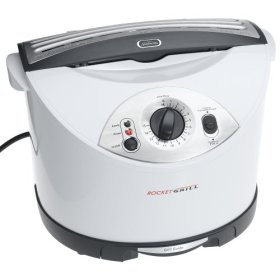
The Sunbeam Rocket Grill is a new comer to the onslaught of grilling machines in the consumer market. Like other machines before it, the Rocket Grill claims to reduce fat while maintaining flavor. The hook being that it does it at record speeds. We took the machine through some tests to see how well the Rocket Grill performed, so let's have a look.
The whole Sunbeam Rocket Grill package consists of the Rocket Grill unit, 36 Parchment Bags, Stainless Steel Grilling Tongs, a Grill Guide, and a Sunbeam Rocket Grill Cook Book with some enticing recipes. From the included cook book we pulled one of the recipes to do our tests: the Bacon-Wrapped BBQ Chicken.
Depending on what kind of food you are going to be cooking (fresh or frozen) will determine how much time you'll need to set the Rocket Grill to cook for. The included Grill Guide aids you in this process as it tells you how many minutes to set the timer for based on which food you are trying to make. For example, if you have two 2 servings of fresh chicken, you'll need to set the timer to 8 minutes. Alternatively, if you have one frozen hamburger that you wish to cook medium-rare, the grilling time would be 5 minutes. The Grill Guide is an incredibly handy tool that you will not want to lose, and because of this the product designers were smart enough to include a small compartment in the bottom of the unit to store it.
One of the big drawbacks of using a microwave oven or other fat-reducing grilling machines is that the flavor of the meat is typically lost when you cook it. This is not the case for the Rocket Grill and the secret is in the parchment bags that you use to cook your food.
About Those Parchment Bags
To cook your food you place the desired serving into a parchment bag. Then you anchor the parchment bag on two hooks on top of the machine and close the grill gate. The parchment bag hangs as two grill presses cook your food for the pre-determined amount of time. Here is the genius part: Hanging the parchment paper allows the fat to drip into a special compartment within the bag while retaining most of the moisture in the food to keep it tender and flavorful. The fat from the bacon in our recipe filled about 1/5th of the bottom of our parchment bag as a lot of the fat in the meat was released during the grilling process.
After the meat was done cooking (more about that in a minute), all you need to do is release the bag parchment bag from the hooks and remove your food with the included Stainless Steel Grilling Tongs. As you can hopefully imagine by now, the cleaning process was easy: you take your bag and just toss it in the garbage. It doesn't get any easier than that.
Our only real gripe with the whole parchment bag system is that the bags are one-time use only, so be ready to pony up for replacements. Just like the razor business model, here too you'll be paying a hefty price for replacements. For about $15 dollars you can net 36 replacement parchment bags at most online retailers and from the Sunbeam web site itself. Keep this in mind if you are considering buying a Rocket Grill and don't forget that you will also need to pay shipping and handling charges each time you make a purchase.
The End Result
So, how well did the food fair? We were shocked at how good the final product tasted. We are frankly used to the dry taste of chicken when we use other fat-reducing grilling machines, but the chicken and bacon tasted really good. Not only that, but we were surprised that the chicken was soft and tender, and the bacon crispy. We would even go as far as saying that it does a better job than using a non-stick pan since there is very little risk of over-cooking the chicken (something most of us have not yet mastered).
We've been singing the graces of the Rocket Grill for most of the review, but it is worth mentioning that there is inconsistency as far as timing in the included cook book and that of the Grill Guide. The cook book said to line up all the chicken in the parchment bag and grill it for 4 minutes. In our tests however, we had to grill the chicken twice in order to achieve the desired result: a fully-cooked chicken and crispy bacon. In total it took the Rocket Grill about 8 minutes to get there, the amount of time the Grill Guide said to use to begin with. We are not entirely sure why the cook book said one thing and the Grill Guide another so be sure to look at the Grill Guide when making your cooking time decision.
It All Grills Down To This
The Sunbeam Rocket Grill is an amazing cooking device. It is an evolution in the world of fat-reducing grills. It nailed every thing the machine was set out to do in our tests: it cooked food fast, it cooked it well, it removed unwanted fat from the meat, and it kept in the flavor of the food. Though the cost of the Sunbeam Rocket Grill Replacement Bags will add up over time, they are part of the reason you'll have virtually no clean up every time you use the machine. At $129.99, the Sun Beam Rocket Grill is a product we wholeheartedly recommend for anyone who is in the market for a fat-reducing grill, and for that we give it our Editor's Choice Award.
THE GOOD
- The Sunbeam Rocket Grill requires virtually no clean up.
- Grills food to perfection in a ridiculous amount of time.
- Very easy to use.
- Reduces fat during the cooking process.
- Reducing the fat does not reduce the flavor of the food.
THE BAD
- Replacement parchment bags are expensive - $14.99 for a set of 36.
- The recipe book and grilling guide do not follow the same time frame.
The whole Sunbeam Rocket Grill package consists of the Rocket Grill unit, 36 Parchment Bags, Stainless Steel Grilling Tongs, a Grill Guide, and a Sunbeam Rocket Grill Cook Book with some enticing recipes. From the included cook book we pulled one of the recipes to do our tests: the Bacon-Wrapped BBQ Chicken.
Depending on what kind of food you are going to be cooking (fresh or frozen) will determine how much time you'll need to set the Rocket Grill to cook for. The included Grill Guide aids you in this process as it tells you how many minutes to set the timer for based on which food you are trying to make. For example, if you have two 2 servings of fresh chicken, you'll need to set the timer to 8 minutes. Alternatively, if you have one frozen hamburger that you wish to cook medium-rare, the grilling time would be 5 minutes. The Grill Guide is an incredibly handy tool that you will not want to lose, and because of this the product designers were smart enough to include a small compartment in the bottom of the unit to store it.
One of the big drawbacks of using a microwave oven or other fat-reducing grilling machines is that the flavor of the meat is typically lost when you cook it. This is not the case for the Rocket Grill and the secret is in the parchment bags that you use to cook your food.
About Those Parchment Bags
To cook your food you place the desired serving into a parchment bag. Then you anchor the parchment bag on two hooks on top of the machine and close the grill gate. The parchment bag hangs as two grill presses cook your food for the pre-determined amount of time. Here is the genius part: Hanging the parchment paper allows the fat to drip into a special compartment within the bag while retaining most of the moisture in the food to keep it tender and flavorful. The fat from the bacon in our recipe filled about 1/5th of the bottom of our parchment bag as a lot of the fat in the meat was released during the grilling process.
After the meat was done cooking (more about that in a minute), all you need to do is release the bag parchment bag from the hooks and remove your food with the included Stainless Steel Grilling Tongs. As you can hopefully imagine by now, the cleaning process was easy: you take your bag and just toss it in the garbage. It doesn't get any easier than that.
Our only real gripe with the whole parchment bag system is that the bags are one-time use only, so be ready to pony up for replacements. Just like the razor business model, here too you'll be paying a hefty price for replacements. For about $15 dollars you can net 36 replacement parchment bags at most online retailers and from the Sunbeam web site itself. Keep this in mind if you are considering buying a Rocket Grill and don't forget that you will also need to pay shipping and handling charges each time you make a purchase.
The End Result
So, how well did the food fair? We were shocked at how good the final product tasted. We are frankly used to the dry taste of chicken when we use other fat-reducing grilling machines, but the chicken and bacon tasted really good. Not only that, but we were surprised that the chicken was soft and tender, and the bacon crispy. We would even go as far as saying that it does a better job than using a non-stick pan since there is very little risk of over-cooking the chicken (something most of us have not yet mastered).
We've been singing the graces of the Rocket Grill for most of the review, but it is worth mentioning that there is inconsistency as far as timing in the included cook book and that of the Grill Guide. The cook book said to line up all the chicken in the parchment bag and grill it for 4 minutes. In our tests however, we had to grill the chicken twice in order to achieve the desired result: a fully-cooked chicken and crispy bacon. In total it took the Rocket Grill about 8 minutes to get there, the amount of time the Grill Guide said to use to begin with. We are not entirely sure why the cook book said one thing and the Grill Guide another so be sure to look at the Grill Guide when making your cooking time decision.
It All Grills Down To This
The Sunbeam Rocket Grill is an amazing cooking device. It is an evolution in the world of fat-reducing grills. It nailed every thing the machine was set out to do in our tests: it cooked food fast, it cooked it well, it removed unwanted fat from the meat, and it kept in the flavor of the food. Though the cost of the Sunbeam Rocket Grill Replacement Bags will add up over time, they are part of the reason you'll have virtually no clean up every time you use the machine. At $129.99, the Sun Beam Rocket Grill is a product we wholeheartedly recommend for anyone who is in the market for a fat-reducing grill, and for that we give it our Editor's Choice Award.
THE GOOD
- The Sunbeam Rocket Grill requires virtually no clean up.
- Grills food to perfection in a ridiculous amount of time.
- Very easy to use.
- Reduces fat during the cooking process.
- Reducing the fat does not reduce the flavor of the food.
THE BAD
- Replacement parchment bags are expensive - $14.99 for a set of 36.
- The recipe book and grilling guide do not follow the same time frame.

Posted In: Reviews
Oster Fusion Blender Review
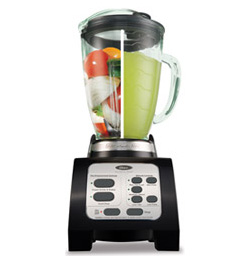
The Oster Fusion is a marriage between a blender and a food processor. It is Oster's unique take on the crowded blender/food processor market. And while we admit we were somewhat adamant at what the product tried to be at first, after we took the product for a spin we were incredible surprised at how well the machine performed.
The Oster Fusion comes equipped with a 6 cup glass jar for the blender, a food processor bowl, food processing stainless steel blades, a slicer/shredder blade, a 6-point star blade for blending, and the base where the powerful 600-watt motor is housed. Yeah, a 600-watt motor -- this sucker crushes through ice like an ice-breaking ship. More about that later.
There are five different levels of manual controls: low and max pulse, medium blend, and Max/Ice Crush. There are also two automatic controls: Frozen Drinks & Shakes and Food Chop for processing food. And course, there is the on/off button along with a stop button to immediately halt any of the automatic or manual controls.
So, enough about the specs, let's dig into the product itself.
The Oster Fusion Blends Your Soul
I'll get right to the point: The Oster Fusion blender is incredible. We weren't expecting a do-it-all blender to do what this blender did so well. We are ready to put our reputation on the line by saying that the Oster Fusion Blender is the best consumer blender on the market period. We were absolutely amazed at how well the blender crushed through ice. We made pi?a coladas and loaded the blender with cream of coconut,pineapple juice, and a whole tray of ice cubes. We hit the automatic blender button and sat back and saw the machine blend the smoothest pi?a colada we ever had. I don't exaggerate when I say that each one of us came away stunned by how fast and well this machine blended. Amazing. Simply amazing.
The way the blender works is ingenious. The six extremely sharp blades cut through the ice cube, then after a couple of seconds, the blades spin backwards pulling the ice back in for more ice massacre. This happens three to four times during the automatic Frozen Drinks & Shakes cycle then the machine blends what is left as normal. After it is done what is left is a creamy smooth mix without a single stranded ice cube.
That's not to say the machine does not have its problems. The manual controls are missing the powerful reverse control that makes the automatic system so powerful, so if you want to have that capability you'll miss it when going manual. Another problem we found is that both the 6-cup glass jar for the blender and the food processor bowl do not snap to the motor base. This makes the bowl float a top of the base as you process or blend and when you run the machine at high velocities it feels as if the bowl will shoot right out of the base and spiral towards your face. I was scared more times than I like to admit when we were slicing food with the Max Pulse control.
Slicing and Dice
Speaking of the slicer, it feels as if this addition to the product was an afterthought. Though the Oster Fusion sliced through whatever we presented, it will never replace the need for a traditional slicer as a traditional slicer will give you infinitely more control while slicing. The shredder though limited, proved to be very useful when we shredded green apples.
Process Like Your Life Depended on It
The food processor attachment does a good job at processing food, but again the fact the bowl seems a bit unstable as you process food left us wondering if this function was added on late in the product's cycle. As a nice bonus however, the food processor attachment comes with a food shoot, something a lot of the smaller more affordable food processors do not include.
Final Thoughts
All in all, The Oster Fusion is without a doubt one of the best blenders in the consumer market. Though the food processor and slicing features seem like an afterthought, the blender is amazing. At a retail price of $69.99 this blender is absolutely worth it.
The Oster Fusion comes equipped with a 6 cup glass jar for the blender, a food processor bowl, food processing stainless steel blades, a slicer/shredder blade, a 6-point star blade for blending, and the base where the powerful 600-watt motor is housed. Yeah, a 600-watt motor -- this sucker crushes through ice like an ice-breaking ship. More about that later.
There are five different levels of manual controls: low and max pulse, medium blend, and Max/Ice Crush. There are also two automatic controls: Frozen Drinks & Shakes and Food Chop for processing food. And course, there is the on/off button along with a stop button to immediately halt any of the automatic or manual controls.
So, enough about the specs, let's dig into the product itself.
The Oster Fusion Blends Your Soul
I'll get right to the point: The Oster Fusion blender is incredible. We weren't expecting a do-it-all blender to do what this blender did so well. We are ready to put our reputation on the line by saying that the Oster Fusion Blender is the best consumer blender on the market period. We were absolutely amazed at how well the blender crushed through ice. We made pi?a coladas and loaded the blender with cream of coconut,pineapple juice, and a whole tray of ice cubes. We hit the automatic blender button and sat back and saw the machine blend the smoothest pi?a colada we ever had. I don't exaggerate when I say that each one of us came away stunned by how fast and well this machine blended. Amazing. Simply amazing.
The way the blender works is ingenious. The six extremely sharp blades cut through the ice cube, then after a couple of seconds, the blades spin backwards pulling the ice back in for more ice massacre. This happens three to four times during the automatic Frozen Drinks & Shakes cycle then the machine blends what is left as normal. After it is done what is left is a creamy smooth mix without a single stranded ice cube.
That's not to say the machine does not have its problems. The manual controls are missing the powerful reverse control that makes the automatic system so powerful, so if you want to have that capability you'll miss it when going manual. Another problem we found is that both the 6-cup glass jar for the blender and the food processor bowl do not snap to the motor base. This makes the bowl float a top of the base as you process or blend and when you run the machine at high velocities it feels as if the bowl will shoot right out of the base and spiral towards your face. I was scared more times than I like to admit when we were slicing food with the Max Pulse control.
Slicing and Dice
Speaking of the slicer, it feels as if this addition to the product was an afterthought. Though the Oster Fusion sliced through whatever we presented, it will never replace the need for a traditional slicer as a traditional slicer will give you infinitely more control while slicing. The shredder though limited, proved to be very useful when we shredded green apples.
Process Like Your Life Depended on It
The food processor attachment does a good job at processing food, but again the fact the bowl seems a bit unstable as you process food left us wondering if this function was added on late in the product's cycle. As a nice bonus however, the food processor attachment comes with a food shoot, something a lot of the smaller more affordable food processors do not include.
Final Thoughts
All in all, The Oster Fusion is without a doubt one of the best blenders in the consumer market. Though the food processor and slicing features seem like an afterthought, the blender is amazing. At a retail price of $69.99 this blender is absolutely worth it.

Posted In: Technology
Oster 4207 Electric Wine Opener Review
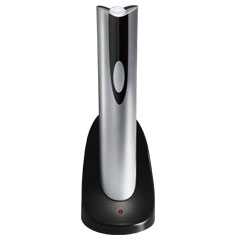
An electric wine opener is exactly as the name implies, an electronic version of the manual wine opener we all know. The Oster 4207 Electric Wine Opener package comes with a foil cutter for removing seals, a cradle to recharge the product and of course, the electronic wine opener unit itself.
So, how exactly does the Oster Electronic Wine Opener work? First you use the included external foil cutter to remove the seal on the bottle. Then you place the bottom of the electric wine opener on the mouth of the bottle. You apply a bit of pressure so the opener sinks in, then press and hold a button to activate the motors. About 3 seconds later you remove the electric wine opener and you are done. A full charge will let you open approximately 30 bottles of wine.
In our tests the Oster 4207 Electronic Wine Opener performed well. It was capable of drilling into corks made out of cork oak as well as those made out of compressed cork chips with barely any effort at all. The manual stated that the unit might have issues with small corks or plastic corks, however we did not find that to be the case. We were capable of removing small and plastic corks as well as regular sized corks without a problem. But note, just because we did not have an issue in our tests does not mean you will not have an issue. Remember: different companies use different types of plastics, your results might vary.
As for the ergonomics, we were a bit disappointed at the size of the unit. Though the wine opener is slim and attractive, it is also very tall -- roughly the size of a bottle of wine -- hardly something you can take with you on the go without it adding much bulk. If you are short on counter space, keep this in mind as this is a unit you will want to display on your kitchen counter.
The question is thus, who could use an electric wine opener? For the every day wine drinker this product is certainly useful. It will save you time and needless effort each time you open a savory bottle of wine. The unit will also look cool on your counter space (provided you have space). And if you own a business where wine is served daily, the electronic wine opener is also a wise recommendation. In the end the Oster 4207 Electronic Wine Opener does what it is set out to do and it does it well: it lets you open wine bottles faster and easier.
So, how exactly does the Oster Electronic Wine Opener work? First you use the included external foil cutter to remove the seal on the bottle. Then you place the bottom of the electric wine opener on the mouth of the bottle. You apply a bit of pressure so the opener sinks in, then press and hold a button to activate the motors. About 3 seconds later you remove the electric wine opener and you are done. A full charge will let you open approximately 30 bottles of wine.
In our tests the Oster 4207 Electronic Wine Opener performed well. It was capable of drilling into corks made out of cork oak as well as those made out of compressed cork chips with barely any effort at all. The manual stated that the unit might have issues with small corks or plastic corks, however we did not find that to be the case. We were capable of removing small and plastic corks as well as regular sized corks without a problem. But note, just because we did not have an issue in our tests does not mean you will not have an issue. Remember: different companies use different types of plastics, your results might vary.
As for the ergonomics, we were a bit disappointed at the size of the unit. Though the wine opener is slim and attractive, it is also very tall -- roughly the size of a bottle of wine -- hardly something you can take with you on the go without it adding much bulk. If you are short on counter space, keep this in mind as this is a unit you will want to display on your kitchen counter.
The question is thus, who could use an electric wine opener? For the every day wine drinker this product is certainly useful. It will save you time and needless effort each time you open a savory bottle of wine. The unit will also look cool on your counter space (provided you have space). And if you own a business where wine is served daily, the electronic wine opener is also a wise recommendation. In the end the Oster 4207 Electronic Wine Opener does what it is set out to do and it does it well: it lets you open wine bottles faster and easier.

Posted In: Technology
Mio Digiwalker C310X GPS Review
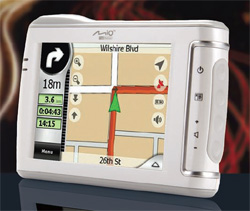
The Mio Digiwalker C310X by Mio Technology Limited is a bit of an anomaly in the world of GPS. It is jam-packed with features typically found in units at twice its price. But with all the features come a bit of confusion as you don't quite know what to do with the unit when you initially turn it on, specially if you've never used a GPS in your life. But after about one hour of getting to know your new toy, you'll begin to see why the Mio Digiwalker C310X is hands down one of the best GPS values on the market.
In the package you will find the GPS holder, windshield mount, car charger, USB cable, application CD and map DVD (containing maps of the entire US including Hawaii and Alaska), and of course, the C310X itself -- basically everything you need to take this sucker on the road.
THE HARDWARE
One of the best things about the Mio Digiwalker C310X is the unit's portability. Many of the current GPS we've seen on the market are clunky beasts -- even from the major GPS manufacturers. The Tom Tom One, considered one of the more portable GPS units around is actually less portable that the C310X because it has a rounded hump on the back of the unit that adds depth. The Mio C310X is only 0.78 inches deep and weighs only 6 ounces making it easy to carry around in your pocket or purse. The battery life is also quite significant capable of keeping this unit alive for up to 5 hours after a single charge. The 3.5 TFT display is vibrant and sports a touch screen and and up to 65k colors.
THE PERFORMANCE
I was shocked to see how well this GPS performed. As keyed in your destination, the information would almost immediately be narrowed down and calculations of routes and distances was done at significant speeds. I was surprised that the system took just under thirty seconds to calculate a route between Miami to San Francisco. Nice. As for accuracy, the Mio C310 was very reliable, leading us to the right location throughout our tests.
THE FEATURES
One of the features many GPS manufacturers tout is the ability for their GPS unit to call out the name of the street you are supposed to make your next turn. That feature is missing in the C310X. At first we felt that the lack of the "text-to-speech" feature would be detrimental, but in real-world use, we liked the way the Mio Digiwalker C310X works best. The C310X will command you to "take your next right at 100 yards" making it easier to identify exactly which street you should make your next turn. This is particularly useful when the street signs are missing or hidden from driver view. We like the way it works so much in fact, that we recommend all GPS manufacturers make the "text-to-speech" feature optional in all their future units.
Another feature we loved was the ability to create an itinerary. This means you can add different points of interest or addresses to your trip before you head out and there is no need for you to touch the device again. Should you want to make changes to your itinerary, you can easily remove, add or edit with a couple of simple on-screen button presses.
You can also make changes to your trip on the fly. If you want to avoid tolls, take the shortest route or avoid highways, the Mio Digiwalker C310X has plenty of options that let you do so. And since recalculations are done so fast in this unit, it is easy to go from one to another to see which route you like best.
The Mio C310X also comes pre-loaded with POIs (points of interest) which can be easily accessed through the menu system. In a trip to Orlando we put this feature to the test and it performed extremely well. We were able to pull-up a list of movie theaters around our then current location along with the theater's phone number. One phone call later and we were able to get the movie times. One simple route-to location button push and in a matter of seconds we were on our way. Sadly we did not find a way to add or edit our own points of interest to the GPS. Another let down was that the system would not allow us to select more than two favorites. The unit unnecessarily restricts you to home and work with no option to add any extra favorite locations. For example, it would have been useful to add my parent's house as a favorite since a lot of road trips start there. We are not sure if Mio will provide Mio owners with an update to allow us to add more information to the device via a download upgrade in the future.
Another problem we had with the C310X was that the unit asks that you enter the current date and time each time the unit runs out of batteries. We are not entirely sure why it does this, but it makes no sense that the information could not be stored in the unit's internal memory.
AN MP3 PLAYER TOO?
The Mio Digiwalker C310X also comes with an MP3 player. Though not required or necessary, it can be useful if you still do not have a propper MP3 player of your own. The MP3s are played from the SD card slot if you have an SD card preloaded with MP3s in the unit. The player is solid enough, with lots of options and as good as a sound quality you will get via the speaker that comes with the system. The graphic interface though is a bit clunky specially if you have thick fingers -- you'll have trouble select the correct song from the list more times than you would like.
Lastly, the C310X supports up to 16 languages including English, French, Spanish, Dutch, and Italian along with a variety of different voices so just about anyone should be able to use this machine.
OUR VERDICT
If you are in the market for a GPS this system is loaded with features you find in more expensive GPS units, at a more affordable price. Not only that, but the unit is ultra-portable, extremely accurate, and well crafted. With features like those, the Mio Digiwalker C310X is just easy for us to highly recommend.
In the package you will find the GPS holder, windshield mount, car charger, USB cable, application CD and map DVD (containing maps of the entire US including Hawaii and Alaska), and of course, the C310X itself -- basically everything you need to take this sucker on the road.
THE HARDWARE
One of the best things about the Mio Digiwalker C310X
is the unit's portability. Many of the current GPS we've seen on the market are clunky beasts -- even from the major GPS manufacturers. The Tom Tom One, considered one of the more portable GPS units around is actually less portable that the C310X because it has a rounded hump on the back of the unit that adds depth. The Mio C310X is only 0.78 inches deep and weighs only 6 ounces making it easy to carry around in your pocket or purse. The battery life is also quite significant capable of keeping this unit alive for up to 5 hours after a single charge. The 3.5 TFT display is vibrant and sports a touch screen and and up to 65k colors.THE PERFORMANCE
I was shocked to see how well this GPS performed. As keyed in your destination, the information would almost immediately be narrowed down and calculations of routes and distances was done at significant speeds. I was surprised that the system took just under thirty seconds to calculate a route between Miami to San Francisco. Nice. As for accuracy, the Mio C310 was very reliable, leading us to the right location throughout our tests.
THE FEATURES
One of the features many GPS manufacturers tout is the ability for their GPS unit to call out the name of the street you are supposed to make your next turn. That feature is missing in the C310X. At first we felt that the lack of the "text-to-speech" feature would be detrimental, but in real-world use, we liked the way the Mio Digiwalker C310X works best. The C310X will command you to "take your next right at 100 yards" making it easier to identify exactly which street you should make your next turn. This is particularly useful when the street signs are missing or hidden from driver view. We like the way it works so much in fact, that we recommend all GPS manufacturers make the "text-to-speech" feature optional in all their future units.
Another feature we loved was the ability to create an itinerary. This means you can add different points of interest or addresses to your trip before you head out and there is no need for you to touch the device again. Should you want to make changes to your itinerary, you can easily remove, add or edit with a couple of simple on-screen button presses.
You can also make changes to your trip on the fly. If you want to avoid tolls, take the shortest route or avoid highways, the Mio Digiwalker C310X has plenty of options that let you do so. And since recalculations are done so fast in this unit, it is easy to go from one to another to see which route you like best.
The Mio C310X also comes pre-loaded with POIs (points of interest) which can be easily accessed through the menu system. In a trip to Orlando we put this feature to the test and it performed extremely well. We were able to pull-up a list of movie theaters around our then current location along with the theater's phone number. One phone call later and we were able to get the movie times. One simple route-to location button push and in a matter of seconds we were on our way. Sadly we did not find a way to add or edit our own points of interest to the GPS. Another let down was that the system would not allow us to select more than two favorites. The unit unnecessarily restricts you to home and work with no option to add any extra favorite locations. For example, it would have been useful to add my parent's house as a favorite since a lot of road trips start there. We are not sure if Mio will provide Mio owners with an update to allow us to add more information to the device via a download upgrade in the future.
Another problem we had with the C310X was that the unit asks that you enter the current date and time each time the unit runs out of batteries. We are not entirely sure why it does this, but it makes no sense that the information could not be stored in the unit's internal memory.
AN MP3 PLAYER TOO?
The Mio Digiwalker C310X also comes with an MP3 player. Though not required or necessary, it can be useful if you still do not have a propper MP3 player of your own. The MP3s are played from the SD card slot if you have an SD card preloaded with MP3s in the unit. The player is solid enough, with lots of options and as good as a sound quality you will get via the speaker that comes with the system. The graphic interface though is a bit clunky specially if you have thick fingers -- you'll have trouble select the correct song from the list more times than you would like.
Lastly, the C310X supports up to 16 languages including English, French, Spanish, Dutch, and Italian along with a variety of different voices so just about anyone should be able to use this machine.
OUR VERDICT
If you are in the market for a GPS this system is loaded with features you find in more expensive GPS units, at a more affordable price. Not only that, but the unit is ultra-portable, extremely accurate, and well crafted. With features like those, the Mio Digiwalker C310X is just easy for us to highly recommend.

Posted In: Technology
keep up to date:

choose a category:
- Accessories and Decor
- Art
- Books
- DIY
- Editorials
- Furniture
- Garden and Patio
- Gifts for Men
- Gifts for Women
- Go Green
- Health
- Home Automation
- Kitchen and Baths
- Lighting
- Miscellaneous
- Parenting
- Pets
- Reviews
- Site News
- Software
- Sponsor Thanks
- Technology
- Tools
- Toys and Games
- Walls and Floors
- YouTube Video Review

stuff you might have missed