iClever 6-Port 50W 10A USB Travel Wall Charger Review
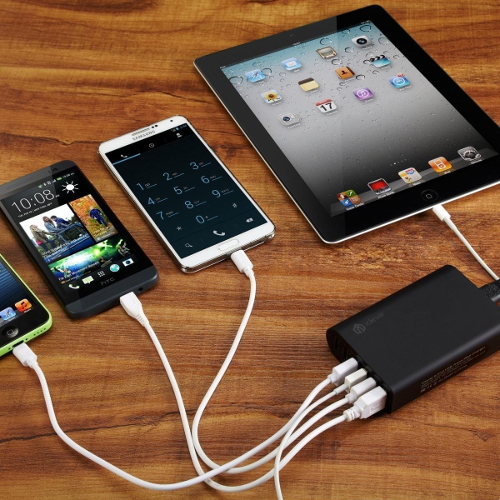
We recently received this unit for review and have been using it for a little over a month. At first we didn't really see much use for this device but it grew on us. The 6 port iClever USB Travel Wall Charger
features 6 usb ports all with the SmartID technology that identifies what type of device and charges the device at up to 2.4 amps. The device is capable of having all 6 ports produce the same output current which means you can charge multiple tablet devices or phones simultaneously.
We were able to test charging two ipads, a note 4 , and an iPhone simultaneously while still having several ports available for charging other devices. The devices all charged up as quickly as they would have with the charger they came with. The exception being the note 4 which didn't identify the charger as a fast charger but still charged at the regular speed. Note that Samsung has a new technology that allows for quicker charging. Aside from that we were very pleased with the device.
We feel this device comes in handy for travellers specially when you can only find one outlet in the airport but might need to charge your family or co-workers phone(s) or tablet(s). We noticed it's usefulness today as one we had to go to a hospital and were faced with the only one wall outlet available dilemma. The iClever did it's job and we were even able to let a stranger plug in his kids tablet so that he can continue playing his Rayman jungle game. In this instance the three devices plugged into the iClever Travel Charger were not only able to continue to be used but actually charged even as the devices were being used. This was the moment we realized what a great investment the product was.
The iClever USB Travel Wall Charger
has a small footprint but can get easily tossed around because it doesn't weigh much. It's a bit larger than a stack of cards and has a 5 foot power cord which is long enough.
You will need to provide your own usb cables as none are provided with this device. Finally the device does have an indicator light that let's you know when it has power and is available for charging.
The Good
-Good build, feels lie a quality product
- The price is right. Currently $25.99 on Amazon
- Ports can be used simultaneously
The Bad
- Couldn't fast charge newer samsung devices ( it was able to charge just at the regular speed)
- Device should be a little heavier to not allow it to be pulled around too easily
features 6 usb ports all with the SmartID technology that identifies what type of device and charges the device at up to 2.4 amps. The device is capable of having all 6 ports produce the same output current which means you can charge multiple tablet devices or phones simultaneously.
We were able to test charging two ipads, a note 4 , and an iPhone simultaneously while still having several ports available for charging other devices. The devices all charged up as quickly as they would have with the charger they came with. The exception being the note 4 which didn't identify the charger as a fast charger but still charged at the regular speed. Note that Samsung has a new technology that allows for quicker charging. Aside from that we were very pleased with the device.
We feel this device comes in handy for travellers specially when you can only find one outlet in the airport but might need to charge your family or co-workers phone(s) or tablet(s). We noticed it's usefulness today as one we had to go to a hospital and were faced with the only one wall outlet available dilemma. The iClever did it's job and we were even able to let a stranger plug in his kids tablet so that he can continue playing his Rayman jungle game. In this instance the three devices plugged into the iClever Travel Charger were not only able to continue to be used but actually charged even as the devices were being used. This was the moment we realized what a great investment the product was.
The iClever USB Travel Wall Charger
has a small footprint but can get easily tossed around because it doesn't weigh much. It's a bit larger than a stack of cards and has a 5 foot power cord which is long enough.
You will need to provide your own usb cables as none are provided with this device. Finally the device does have an indicator light that let's you know when it has power and is available for charging.
The Good
-Good build, feels lie a quality product
- The price is right. Currently $25.99 on Amazon
- Ports can be used simultaneously
The Bad
- Couldn't fast charge newer samsung devices ( it was able to charge just at the regular speed)
- Device should be a little heavier to not allow it to be pulled around too easily


Posted In: Technology
iClever Bluetooth Portable Speaker Review
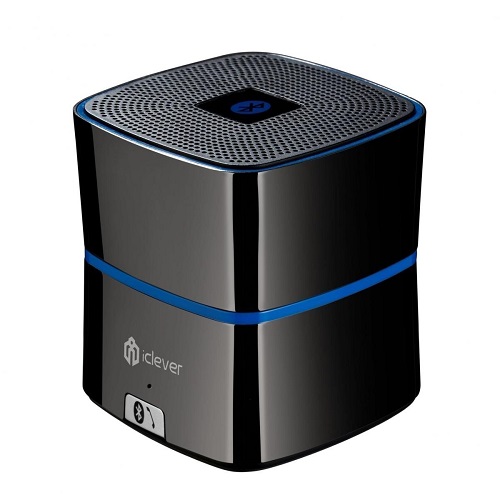
We tested the iClever Portable Bluetooth Speaker for a few weeks and were very surprised by the sound quality that came from this little speaker. The speaker seemed to do well with highs and lows and did a good job at filling a small to medium sized room. That being said you can't expect this little speaker to sound like a 5.1 surround sound system but we were happy with it.
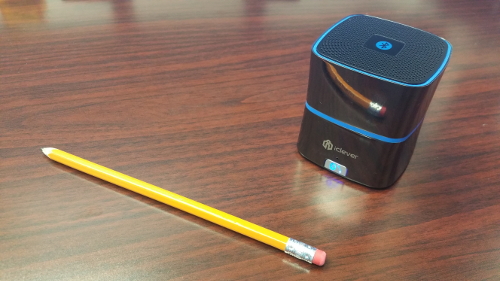
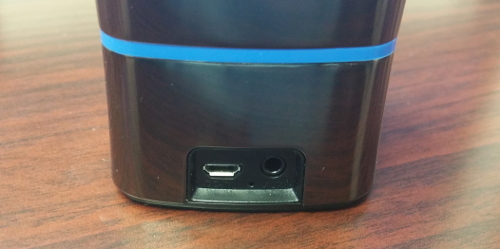
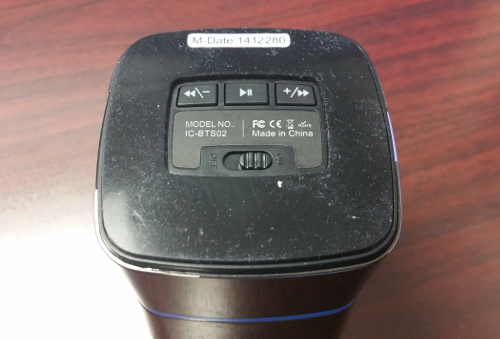
The Speaker has buttons on its underside to play, pause, rewind, and forward. It also has rubber footing to allow it from slipping off of any surface. There is a Bluetooth sync button on its front with a blue led that lets you know when your device is synced. Finally on its back side it has the micro usb port for charging and the 3.5mm aux port.
We were able to pair the speaker with both an iPhone 5s and a Samsung Galaxy Note 4. Both phones were able to connect to the speaker via Bluetooth with no problem. The speaker automatically connects to the last device it was connected to automatically which was pretty neat because typically you will just use it with one device. The iClever Portable Bluetooth Speaker also features a 3.5mm audio port for non-Bluetooth devices.
We were able to use this speaker for phone calls in an office environment and experienced no issues and clear phone calls. The Bluetooth 4.0 chipset allows for fast transmission and low power consumption. During our testing we were able to get 7 - 8 hours of playtime consistently. The range was outstanding even through walls. We were able to have our phone charging in one room and the speaker in another about 25 feet away with a wall in between with no issues. Honestly we didn't think it would work but were pleasantly surprised.
The speaker has a great build that gives it the look and feel of a quality product. The shiny sexy shell is actually really nice and is sure to turn some heads.
Get your iClever Mini Portable Bluetooth Speaker on Amazon.
The Good
- Low cost
- Great Sound
- Bluetooth 4.0 and fully backward compatible with older versions
- 3.5 mm aux plug for connecting older devices
- 3.5 mm cable included
- micro usb charging cable included
The Bad
- Charger is not included
The Speaker has buttons on its underside to play, pause, rewind, and forward. It also has rubber footing to allow it from slipping off of any surface. There is a Bluetooth sync button on its front with a blue led that lets you know when your device is synced. Finally on its back side it has the micro usb port for charging and the 3.5mm aux port.
We were able to pair the speaker with both an iPhone 5s and a Samsung Galaxy Note 4. Both phones were able to connect to the speaker via Bluetooth with no problem. The speaker automatically connects to the last device it was connected to automatically which was pretty neat because typically you will just use it with one device. The iClever Portable Bluetooth Speaker also features a 3.5mm audio port for non-Bluetooth devices.
We were able to use this speaker for phone calls in an office environment and experienced no issues and clear phone calls. The Bluetooth 4.0 chipset allows for fast transmission and low power consumption. During our testing we were able to get 7 - 8 hours of playtime consistently. The range was outstanding even through walls. We were able to have our phone charging in one room and the speaker in another about 25 feet away with a wall in between with no issues. Honestly we didn't think it would work but were pleasantly surprised.
The speaker has a great build that gives it the look and feel of a quality product. The shiny sexy shell is actually really nice and is sure to turn some heads.
Get your iClever Mini Portable Bluetooth Speaker on Amazon.
The Good
- Low cost
- Great Sound
- Bluetooth 4.0 and fully backward compatible with older versions
- 3.5 mm aux plug for connecting older devices
- 3.5 mm cable included
- micro usb charging cable included
The Bad
- Charger is not included

Posted In: Technology
Intocircuit Power Mini 3000mAh Review
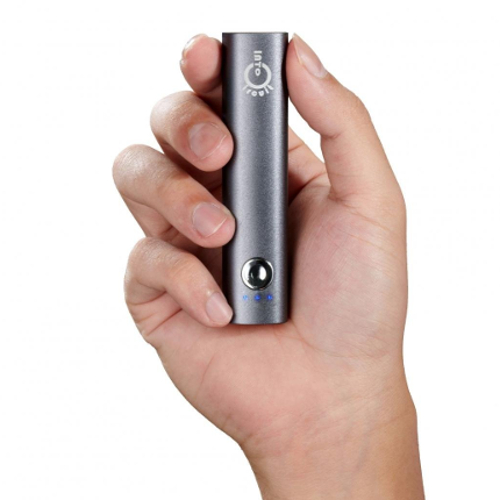
Need some emergency power for your cell phone? This little stick will fit in your pocket and deliver 3000mAh of juice. We recently gave this little guy a test on a Galaxy Note 4. The device was able to power up a completely dead phone and charge the 3400mah battery to over 50% in a two hour time frame. Given that this will be for emergency purposes only we feel this is more than enough power for any emergency situation where your phone is left dry. Note that on phones with smaller power demands it will give a bigger charge. The Note 4 is one of the largest phones on the market today with thigh demand for power.
The inito circuit also features a pretty cool little led flash-light to help you in the dark. You can get your very own Intocircuit Power Mini 3000mAh on Amazon
.
The inito circuit also features a pretty cool little led flash-light to help you in the dark. You can get your very own Intocircuit Power Mini 3000mAh on Amazon
.

Posted In: Technology
VeraEdge by Vera formerly Mi Casa Verde Review
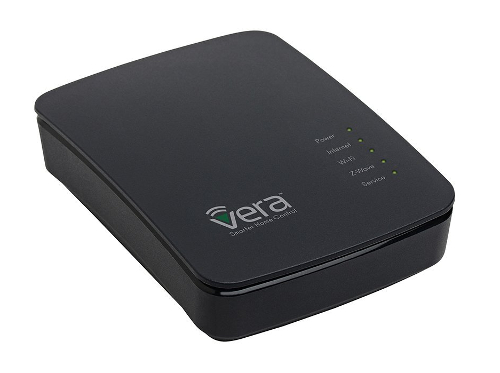
The VeraEdge Home Controller is a new device that was created to replace both the Vera 3 and the Vera lite by Vera formerly known as Mi Casa Verde. They have been in the business for quite some time and have a well established community and forum base. We find the Vera controller to offer a fairly affordable device that will allow control of devices like door locks, sensors, thermostats, dimmers, etc. The VeraEdge is capable of talking the z-wave plus as well as wifi protocols. The Vera Edge is an open system that allows you the owner / user to take it over and do as you will, it is the main thing that sets this device apart from all the others such as smarthings and the former revolv hub. With the Vera Edge you will not need to replace any of your home wiring to make it talk to your devices. It will use your existing wiring and all communication is done wireless.
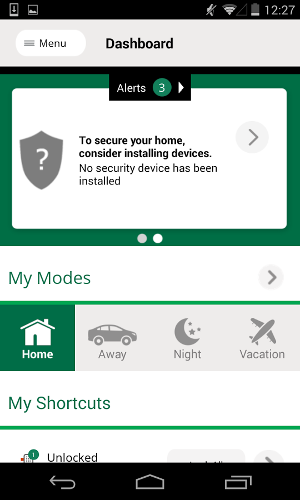
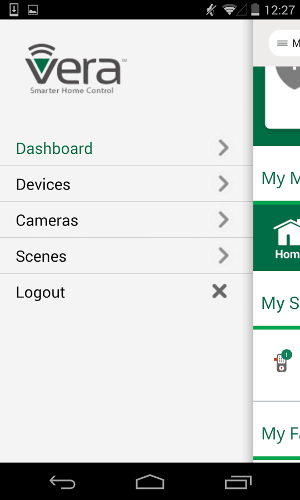
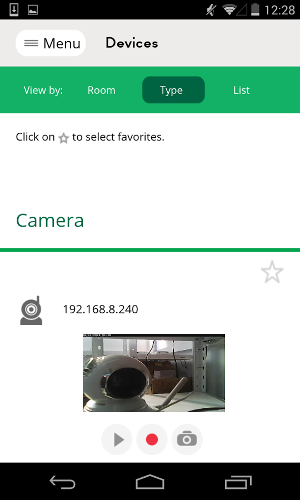
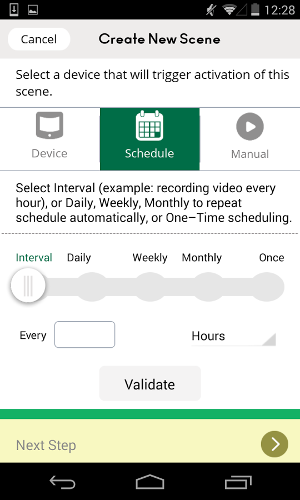
Just like all its competitors it features apps for iPhone and Android devices alike. The user interface is simple to use and is easy to navigate.
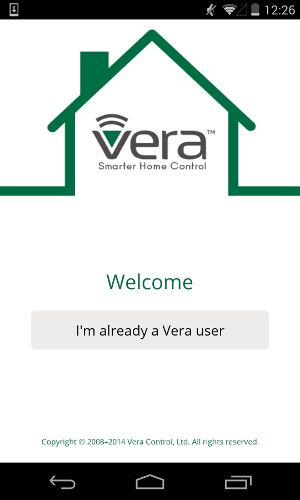
Here are some screen shots of the Android app, the apple iOS version is very similar.
Welcome screen Vera Controller
Dashboard screen Vera Controller
Menu screen Vera Controller
Device screen Vera Controller
Scene screen Vera Controller
We recently reviewed the VeraLight and were excited when we heard of its replacement so we quickly placed an order. After receiving our VeraEdge Home Controller we plugged it in to our network and started setting it up. Just like the Vera Light, it did not include any instructions but instead pointed you to the website to set up the device. The initial set up was fairly easy however we could see how someone with no knowledge could get stuck in a few steps (when pairing devices such as switches and door locks). A few You Tube searches could fix this but we don't feel you should need to do that. Our experience has not been so good with the plug-ins but the issue based on forums seems to be that the new UI7 user interface is new and still needs some work. Most of the plug-ins we tried have been written for the older UI. An example of a plugin that we used and loved is the weather underground plugin. The plugin allows you to get weather information into your vera that you can use to trigger scenes. For example, if it is over 85 degrees outside turn on sprinkler pump so your dog can have some water to refresh.
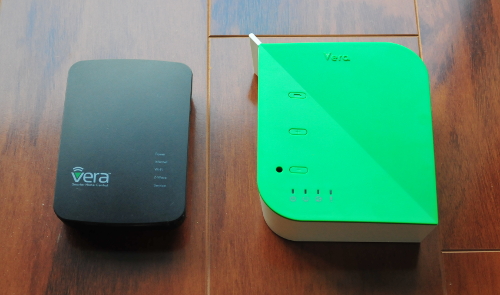
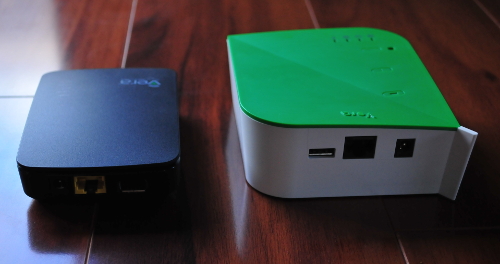
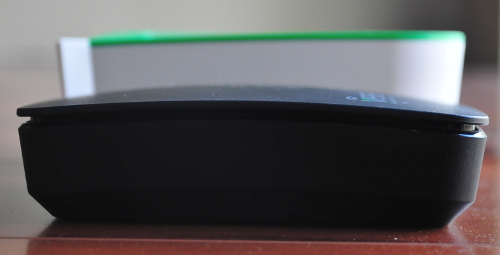
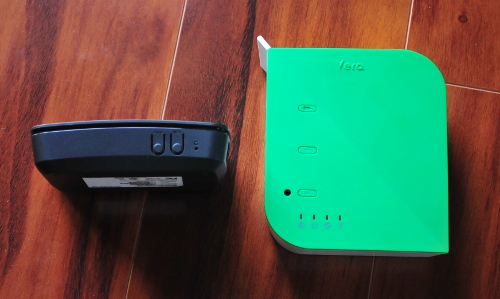
Here are some images of the different physical features of the veraedge vs veralite.
Veralite vs Veraedge Footprint
Veralite vs Veraedge ports Ethernet USB and power same on both units
Veralite vs Veraedge Height footprint
Veralite +, -, battery, and reset vs Veraedge sync (same as + and - on veralite), WPS, and reset
One of the most popular features that set the Vera systems apart is its plug-ins that allow it to talk with devices such as thermostats like the nest via plug-ins. It is also capable of talking with DSC alarm controllers via an envisalink module that is to be attached to the alarm and a plug-in on the Vera side. This and many more plug-ins are available and if you are the techy type you can create your very own plugins using Lua and luup code. The possibilities really are endless with this device.
We wouldn't necessarily call this little guy a router but if plugged in to a cable modem for instance it is capable of dishing out DHCP addresses. You will not be able to reserve IP addresses or set up any port forwarding so if you need this functionality get yourself a real router.
When we received the unit there were a few bugs like the USB port was unusable for logging if you are developing and the IP couldn't be set statically but Vera has sent an update recently that fixed those issues. There seems to be a somewhat decent support system.
The pairing of devices is easy however they removed the battery option that the veralight had to take the unit close to the devices for pairing without a power adapter. If for some reason you aren't able to pair from where your unit is installed, you will need to unplug everything take the unit and power adapter to plug it in to power next to your door lock for instance. In our case the two wall switches worked flawlessly via the app and original install location. We did have an issue pairing with one device that was further away so we plugged the Vera to power next to that device and hit the sync button on the side of device and when flashing rapidly we controlled our z-wave device. Once you see the vera flash rapidly your device is paired and you can unplug ant take back to desired location. (not anywhere in the manual had to you tube this hence my point above)
We have had the unit for about three weeks now and it works great. No hiccups so far except fro the plug-ins but that�s not really Vera's issue since they didn't write the plug-ins. All in all we really like the flexibility the device allows. We enjoy the open framework and love the fact that you don�t need to connect to external devices to control your equipment at home even if your internet is out.. In the case of smarthings or revolv, if you loose your Internet for whatever reason, you cant control your devices even if you are home and your wireless router is working properly.
Breakdown of difference between Vera controllers

The Good
- Good price for functionality
- information stays on the hub.
- No internet required to control from within your wifi network.
- Plugins allow it to work with many other types of devices such as those that have wifi html interface. DSC Alarm Panel with the EYEZ-ON EVL-3
 and Nest thermostat are two of the more popular plugins.
The Bad
- The instructions are not very clear on how to add devices. (Once you figure it out it is actually very easy)
- Only supports z-wave plus and wifi protocol we wish it also did zigbee
- At the moment the device seems somewhat buggy
- Many of the plugins do not funtion properly
Get your very own VeraEdge Home Controller on Amazon.
is a new device that was created to replace both the Vera 3 and the Vera lite by Vera formerly known as Mi Casa Verde. They have been in the business for quite some time and have a well established community and forum base. We find the Vera controller to offer a fairly affordable device that will allow control of devices like door locks, sensors, thermostats, dimmers, etc. The VeraEdge is capable of talking the z-wave plus as well as wifi protocols. The Vera Edge is an open system that allows you the owner / user to take it over and do as you will, it is the main thing that sets this device apart from all the others such as smarthings and the former revolv hub. With the Vera Edge you will not need to replace any of your home wiring to make it talk to your devices. It will use your existing wiring and all communication is done wireless. Just like all its competitors it features apps for iPhone and Android devices alike. The user interface is simple to use and is easy to navigate.
Here are some screen shots of the Android app, the apple iOS version is very similar.
Welcome screen Vera Controller
Dashboard screen Vera Controller
Menu screen Vera Controller
Device screen Vera Controller
Scene screen Vera Controller
We recently reviewed the VeraLight and were excited when we heard of its replacement so we quickly placed an order. After receiving our VeraEdge Home Controller
we plugged it in to our network and started setting it up. Just like the Vera Light, it did not include any instructions but instead pointed you to the website to set up the device. The initial set up was fairly easy however we could see how someone with no knowledge could get stuck in a few steps (when pairing devices such as switches and door locks). A few You Tube searches could fix this but we don't feel you should need to do that. Our experience has not been so good with the plug-ins but the issue based on forums seems to be that the new UI7 user interface is new and still needs some work. Most of the plug-ins we tried have been written for the older UI. An example of a plugin that we used and loved is the weather underground plugin. The plugin allows you to get weather information into your vera that you can use to trigger scenes. For example, if it is over 85 degrees outside turn on sprinkler pump so your dog can have some water to refresh. Here are some images of the different physical features of the veraedge vs veralite.
Veralite vs Veraedge Footprint
Veralite vs Veraedge ports Ethernet USB and power same on both units
Veralite vs Veraedge Height footprint
Veralite +, -, battery, and reset vs Veraedge sync (same as + and - on veralite), WPS, and reset
One of the most popular features that set the Vera systems apart is its plug-ins that allow it to talk with devices such as thermostats like the nest via plug-ins. It is also capable of talking with DSC alarm controllers via an envisalink module that is to be attached to the alarm and a plug-in on the Vera side. This and many more plug-ins are available and if you are the techy type you can create your very own plugins using Lua and luup code. The possibilities really are endless with this device.
We wouldn't necessarily call this little guy a router but if plugged in to a cable modem for instance it is capable of dishing out DHCP addresses. You will not be able to reserve IP addresses or set up any port forwarding so if you need this functionality get yourself a real router.
When we received the unit there were a few bugs like the USB port was unusable for logging if you are developing and the IP couldn't be set statically but Vera has sent an update recently that fixed those issues. There seems to be a somewhat decent support system.
The pairing of devices is easy however they removed the battery option that the veralight had to take the unit close to the devices for pairing without a power adapter. If for some reason you aren't able to pair from where your unit is installed, you will need to unplug everything take the unit and power adapter to plug it in to power next to your door lock for instance. In our case the two wall switches worked flawlessly via the app and original install location. We did have an issue pairing with one device that was further away so we plugged the Vera to power next to that device and hit the sync button on the side of device and when flashing rapidly we controlled our z-wave device. Once you see the vera flash rapidly your device is paired and you can unplug ant take back to desired location. (not anywhere in the manual had to you tube this hence my point above)
We have had the unit for about three weeks now and it works great. No hiccups so far except fro the plug-ins but that�s not really Vera's issue since they didn't write the plug-ins. All in all we really like the flexibility the device allows. We enjoy the open framework and love the fact that you don�t need to connect to external devices to control your equipment at home even if your internet is out.. In the case of smarthings or revolv, if you loose your Internet for whatever reason, you cant control your devices even if you are home and your wireless router is working properly.
Breakdown of difference between Vera controllers
The Good
- Good price for functionality
- information stays on the hub.
- No internet required to control from within your wifi network.
- Plugins allow it to work with many other types of devices such as those that have wifi html interface. DSC Alarm Panel
with the EYEZ-ON EVL-3 and Nest thermostat are two of the more popular plugins.The Bad
- The instructions are not very clear on how to add devices. (Once you figure it out it is actually very easy)
- Only supports z-wave plus and wifi protocol we wish it also did zigbee
- At the moment the device seems somewhat buggy
- Many of the plugins do not funtion properly
Get your very own VeraEdge Home Controller on Amazon.

Posted In: Technology
iClever Himbox HB01 Bluetooth 4.0 Hands-Free Review
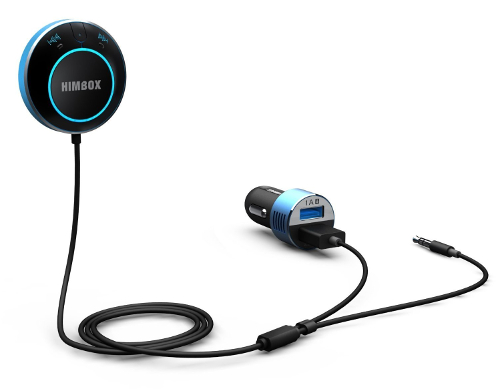
So you have a car with an older radio that has an aux port but no Bluetooth? You may want to give this little guy a try. We were recently given a demo unit to review and were pleasantly surprised. The device itself is about the size of a dollar coin. It plugs in to your auxiliary port in your car and gets its power from a usb port. The device does come with an adapter for your 12 volt cigarette adapter and even has an extra 2Amp port for your phone charger. When on, the device has led's that light up the panel. It features fully backward compatible Bluetooth 4.0 for full-speed transmission and low power consumption. The panel gives you control over your device allowing you to fast forward, rewind, and stop your media. The HB01 also comes with a magnetic base that you can stick to your car so that your HB01 stays firmly in one place while still allowing you to remove it and handle.
We have been using the device for about two weeks now on a Honda Accord 2007 non stop. The iClever Himbox HB01 Bluetooth Car Kit on Amazon does a great job at transmitting media from your phone. We used a Samsung Galaxy Note 4 to connect. We decided not to use the factory radio but instead use apps from our phone, and set the phone to automatically connect to the Himbox HB01, it did an outstanding job automatically connecting to HB01. Once connected You are able to use the HB01 as hands-free solution for answering and receiving phone calls and streaming music from your Bluetooth-enabled phones. The media sounded excellent and not once did we have a hiccup of any type. The audio was clear and sounded as clear as if it was coming from the head unit in the car. We did find that when using it to talk on the phone, although we were able to listen to the conversation with no problem, the folks on the other end did complain of road noise despite the echo and noise cancelling technology. When the car was stopped, they person on the other end of the phone said it sounded great. One thing to note is that the iClever Himbox HB01 Bluetooth Car Kit on Amazon has to be placed close to the driver seat so that it can pick up your voice. Although they could improve the road noise filtering we think $29 is a great price to add this functionality to your car.
The Good
- Great Price
- Small and easy to conceal
- Easy to install and pair with any media streaming device / phone
- Extra port on 12 volt adapter
- Eliminates need to install a new expensive stereo system in your car
- The cables are very skinny which makes it easy to hide
- magnetic cradle for himbox included so it stays in one place
The Bad
- Quality of voice call not that great while driving
Purchase your iClever Himbox HB01 Bluetooth Car Kit on Amazon
Himbox HB01
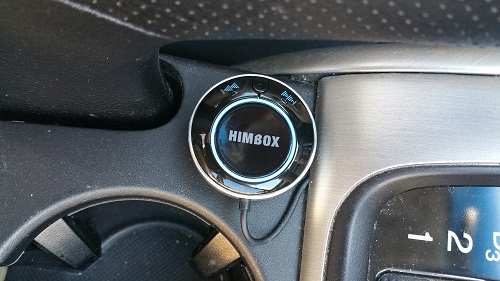
We have been using the device for about two weeks now on a Honda Accord 2007 non stop. The iClever Himbox HB01 Bluetooth Car Kit on Amazon
does a great job at transmitting media from your phone. We used a Samsung Galaxy Note 4 to connect. We decided not to use the factory radio but instead use apps from our phone, and set the phone to automatically connect to the Himbox HB01, it did an outstanding job automatically connecting to HB01. Once connected You are able to use the HB01 as hands-free solution for answering and receiving phone calls and streaming music from your Bluetooth-enabled phones. The media sounded excellent and not once did we have a hiccup of any type. The audio was clear and sounded as clear as if it was coming from the head unit in the car. We did find that when using it to talk on the phone, although we were able to listen to the conversation with no problem, the folks on the other end did complain of road noise despite the echo and noise cancelling technology. When the car was stopped, they person on the other end of the phone said it sounded great. One thing to note is that the iClever Himbox HB01 Bluetooth Car Kit on Amazon has to be placed close to the driver seat so that it can pick up your voice. Although they could improve the road noise filtering we think $29 is a great price to add this functionality to your car.The Good
- Great Price
- Small and easy to conceal
- Easy to install and pair with any media streaming device / phone
- Extra port on 12 volt adapter
- Eliminates need to install a new expensive stereo system in your car
- The cables are very skinny which makes it easy to hide
- magnetic cradle for himbox included so it stays in one place
The Bad
- Quality of voice call not that great while driving
Purchase your iClever Himbox HB01 Bluetooth Car Kit on Amazon
Himbox HB01

Posted In: Technology
Vera Mi Casa Verde VeraLite Home Controller review
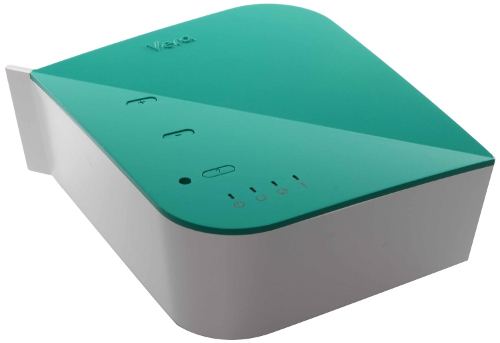
Home automation is the talk of the town nowadays. It doesn't matter where you go, you will see it in every home improvement store. There are so many flavors out there that it is hard to choose just which route to take. We would like to introduce you to a controller that wont break the bank and works pretty darn well. The Mi Casa Verde Veralite Home Controller by Vera (previously known as Mi Casa Verde) has been out on the market for quite some time. This controller just recently went on sale for about $99 due to the fact that Vera is ready to start selling its newer big brother, the Vera Edge, very soon. The Veralite supports the popular z-wave protocol that is one of if not the most popular protocol for home automation today in the US.
The interesting thing about z-wave is how the devices create a mesh network in your home which means that the more devices you have the better the communication will be between all of your devices.
The Veralite has a small footprint and an easy to use interface. It will allow you to control door locks, garage doors, lights, windows shades, thermostats, sprinklers, and many other devices. The veralite also allows you to view video camera streams which we thought was pretty neat.
The veralite controller does not require a monthly subscription service and is a dream come true for the techy type of person because it allows for creation of plugins and or use of community plug-ins such as one made for DSC alarms that will allow you to control your alarm and all z-wave devices from one simple interface.
The one feature that we loved that sets it aside from it's competitors such as the Wink Connected Home Hub , Iris Smart Hub
 , Smartthings Hub, and the Revolv
  are that this device does not need to interact with a server on the web to control your devices. The controller stores all the information needed within your home so if you lose your internet at home you can technically still control your devices via your internal wifi connection. Vera also has the Mi Casa Verde Vera3
 which is a little more powerful and has a builtin wifi router with 4 ethernet ports. Both devices have apps for both iPhone and Android native apps. Get your very own Vera controller on Amazon.
Here are some screenshots of the Android app, the apple iOS version is very similar.
Welcome screen Vera Controller
Dashboard screen Vera Controller
Menu screen Vera Controller
Device screen Vera Controller
Scene screen Vera Controller
The Good
- Just recently went on sale and sells for as little as $99.00
- information stays on the hub.
- No internet required to control from within your wifi network.
- Plugins allow it to work with many other types of devices such as those that have wifi html interface. DSC Alarm Panelwith the EYEZ-ON EVL-3 and Nest thermostat are two of the more popular plugins.
The Bad
- The instrucions are not very clear on how to add devices. (Once you figure it out it is actually very easy)
- Only supports z-wave protocol
by Vera (previously known as Mi Casa Verde) has been out on the market for quite some time. This controller just recently went on sale for about $99 due to the fact that Vera is ready to start selling its newer big brother, the Vera Edge, very soon. The Veralite supports the popular z-wave protocol that is one of if not the most popular protocol for home automation today in the US. The interesting thing about z-wave is how the devices create a mesh network in your home which means that the more devices you have the better the communication will be between all of your devices.
The Veralite has a small footprint and an easy to use interface. It will allow you to control door locks, garage doors, lights, windows shades, thermostats, sprinklers, and many other devices. The veralite also allows you to view video camera streams which we thought was pretty neat.
The veralite controller does not require a monthly subscription service and is a dream come true for the techy type of person because it allows for creation of plugins and or use of community plug-ins such as one made for DSC alarms that will allow you to control your alarm and all z-wave devices from one simple interface.
The one feature that we loved that sets it aside from it's competitors such as the Wink Connected Home Hub
, Iris Smart Hub, Smartthings Hub, and the Revolv are that this device does not need to interact with a server on the web to control your devices. The controller stores all the information needed within your home so if you lose your internet at home you can technically still control your devices via your internal wifi connection. Vera also has the Mi Casa Verde Vera3 which is a little more powerful and has a builtin wifi router with 4 ethernet ports. Both devices have apps for both iPhone and Android native apps. Get your very own Vera controller on Amazon.Here are some screenshots of the Android app, the apple iOS version is very similar.
Welcome screen Vera Controller
Dashboard screen Vera Controller
Menu screen Vera Controller
Device screen Vera Controller
Scene screen Vera Controller
The Good
- Just recently went on sale and sells for as little as $99.00
- information stays on the hub.
- No internet required to control from within your wifi network.
- Plugins allow it to work with many other types of devices such as those that have wifi html interface. DSC Alarm Panel
with the EYEZ-ON EVL-3 and Nest thermostat are two of the more popular plugins.The Bad
- The instrucions are not very clear on how to add devices. (Once you figure it out it is actually very easy)
- Only supports z-wave protocol

Posted In: Tools
Joie Roundy Egg Ring Review
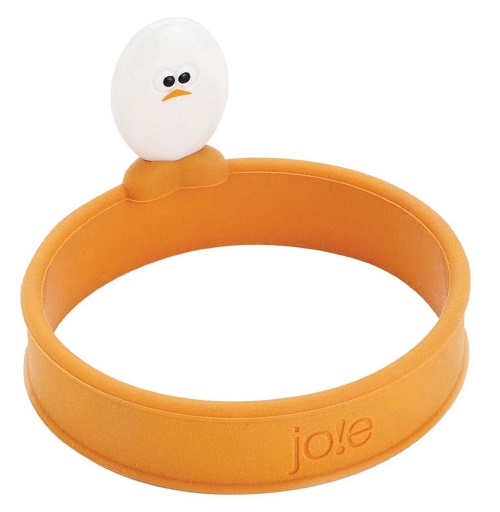
Here is a little kitchen gadget that is sure to turn some heads. I have always wanted to try to make some breakfast sandwiches at home for my wife and kids, but how could I make those perfect eggs like they make in the restaurants? Well I went off on a little hunt and found this little guy in a local Bed Bath and Beyond. The Joie Roundy Egg Ring was under five dollars so I figured I would give it a shot. I couldn't have made a better investment .
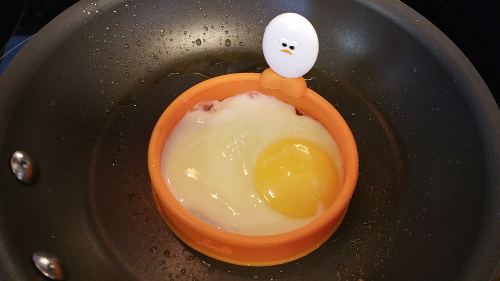
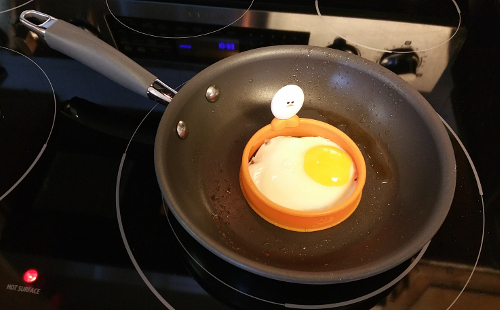
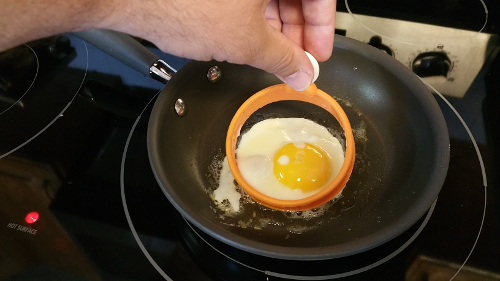
This little silicone egg ring makes some perfect looking and tasting eggs and who doesn't love the little egg smiling at you while you are cooking? The silicone is great because it doesn't scratch your pans or stick to your eggs. It washes easily and is easy to store just about anywhere. Best of all I made my wife happy by giving her restaurant style breakfast at home. You know what they say, happy wife happy life! We really loved this little gizmo. We used a small amount of butter to get the eggs not to stick to the pan and started to cook. Check out our first shot at a sausage egg and cheese Muffin. Get your very own Joie Roundy Egg Ring on amazon.
Joie Egg Ring Cooking the egg
Joie Egg Ring Cooked Egg
Joie Egg Ring Not sticking to Egg
Egg Muffin Sandwich using Joie Egg Ring

was under five dollars so I figured I would give it a shot. I couldn't have made a better investment . This little silicone egg ring makes some perfect looking and tasting eggs and who doesn't love the little egg smiling at you while you are cooking? The silicone is great because it doesn't scratch your pans or stick to your eggs. It washes easily and is easy to store just about anywhere. Best of all I made my wife happy by giving her restaurant style breakfast at home. You know what they say, happy wife happy life! We really loved this little gizmo. We used a small amount of butter to get the eggs not to stick to the pan and started to cook. Check out our first shot at a sausage egg and cheese Muffin. Get your very own Joie Roundy Egg Ring on amazon
.Joie Egg Ring Cooking the egg
Joie Egg Ring Cooked Egg
Joie Egg Ring Not sticking to Egg
Egg Muffin Sandwich using Joie Egg Ring

Posted In: Tools
Hide those pesky wires with a Wiremold Kit
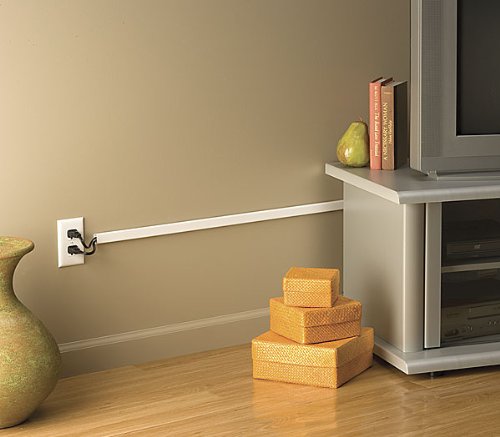
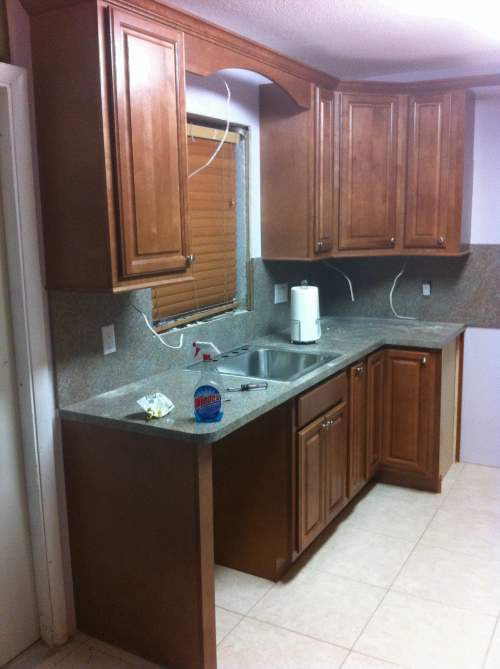
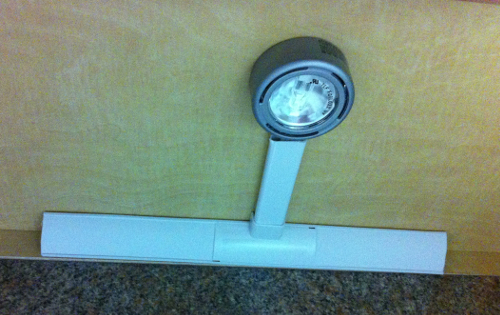
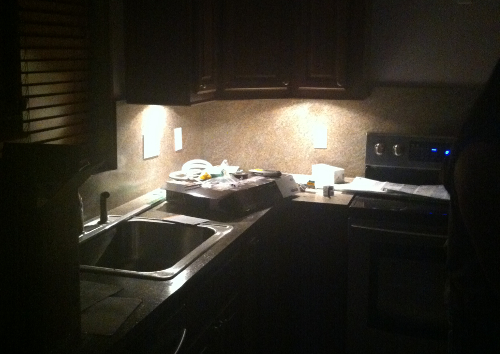
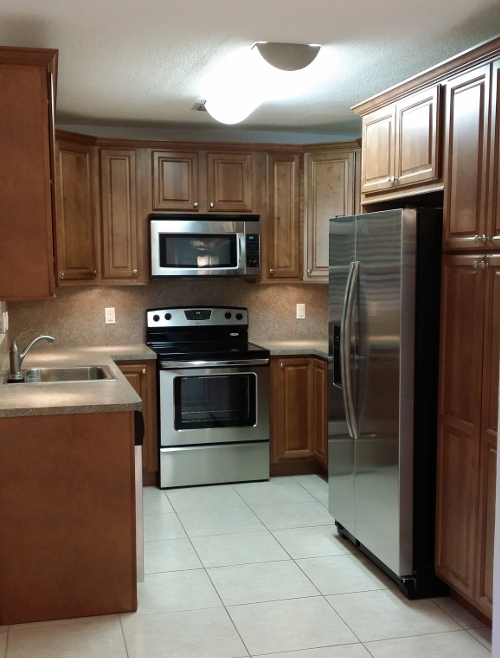
You have probably installed a computer, TV, or some electronic device in your lifetime and hated all those cables that are required to make it function. We for one came across this Wiremold Cord Cover Kit when updating our kitchen. We decided to put some under cabinet lighting but wanted to make sure that the cables were not visible. The wiremolds aren't too expensive and come in an assortment of styles and shapes. Take a look at our install below and see for yourself how much cleaner the installation looks after it is complete.
Before Wiremolds Were installed
Wiremold installed
Wiremolds first look at night
Wiremold in finished kitchen
You can get your very own wiremolds at your local hardware store or order them online on Amazon
when updating our kitchen. We decided to put some under cabinet lighting but wanted to make sure that the cables were not visible. The wiremolds aren't too expensive and come in an assortment of styles and shapes. Take a look at our install below and see for yourself how much cleaner the installation looks after it is complete. Before Wiremolds Were installed
Wiremold installed
Wiremolds first look at night
Wiremold in finished kitchen
You can get your very own wiremolds at your local hardware store or order them online on Amazon

Posted In: Reviews
Wubbanub Animal Baby Pacifier Review

I'm a father of two and didn't come across these pacifiers until my newborn son kept throwing up all his formula. Shortly after his birth the doctors diagnosed him with pyloric stenosis which is an abnormal narrowing of the valve at the outlet from the stomach, preventing normal passage of food into the small intestine. Not the best way to get introduced to a product but it was because of it that we came to know about Wubbanub Pacifiers. Three Years later I am happy to announce that my son is doing great after the operation at 9 days old and another a week later to take care of an infection. My son was given a Wubbanub pacifier shortly after the first surgery to sooth him. My son loved his little pacifier and so did his parents. The Wubbanub pacifiers are one piece BPA, PVC and Phthalate Free. The sucker is made wih a Soothie� medical grade, latex free pacifier. One of the things we loved most was that our baby wouldn't loose his pacifier because he knew intuitively that it was attached to his little red dog that he can hold and hug. The Wubbanub pacifiers are soft and cuddly so your kids will love them. The fact that the pacifiers have a small animal attached makes them easier to see therefore harder to leave behind or lose.
Here is a picture of my son shortly after the operation enjoying his wubbanub pacifier.

Get your very own Wubbanub on Amazon
Pacifiers. Three Years later I am happy to announce that my son is doing great after the operation at 9 days old and another a week later to take care of an infection. My son was given a Wubbanub pacifier shortly after the first surgery to sooth him. My son loved his little pacifier and so did his parents. The Wubbanub pacifiers are one piece BPA, PVC and Phthalate Free. The sucker is made wih a Soothie� medical grade, latex free pacifier. One of the things we loved most was that our baby wouldn't loose his pacifier because he knew intuitively that it was attached to his little red dog that he can hold and hug. The Wubbanub pacifiers are soft and cuddly so your kids will love them. The fact that the pacifiers have a small animal attached makes them easier to see therefore harder to leave behind or lose.Here is a picture of my son shortly after the operation enjoying his wubbanub pacifier.
Get your very own Wubbanub on Amazon

Posted In: Reviews
OpenDNS review - A safer web for your home
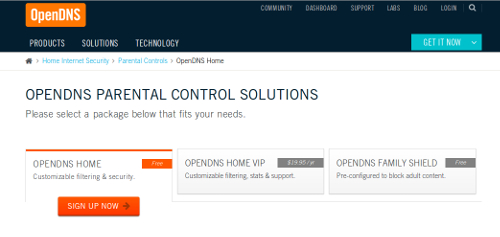
If you want to protect your family from what is the web, make sure you read this! I have two little ones at home that are growing at an immensely rapid rate, or at least that's how it seems. From time to time my wife and I allow them to watch cartoons or tv shows on our tablet devices or laptop. It turns out that the little ones are very curious and end up opening all the applications on the devices. In order to protect those little minds, from going places that they shouldn't, we tried looking for applications to lock the devices. We couldn't find any application that would allow access to the few apps we didn't mind them accessing without blocking everything. After some searching we came across OpenDNS.
So what is OpenDNS? OpenDNS is an open domain name server. Believe it or not, you used a domain name server (DNS) to get yourself to this website. Your service provider directs you to their own DNS, this server translates text you provide into an address so that your browser knows where to go on the world wide web. You can think of DNS as a mailman, for instance you type your website URL on your favorite browser and the mailman delivers your package, or takes you to the web site you want to go to.
Having said that, we made the super simple configuration on our home router and in a matter of seconds we were protected against all adult-related sites, illegal activity, social networking sites, video sharing sites, and general time-wasters that we didn't want our family reaching. OpenDNS is doing the hard work of intercepting requests to only the sites you don't want your family going to from your dashboard as shown below.
OpenDNS Dashboard
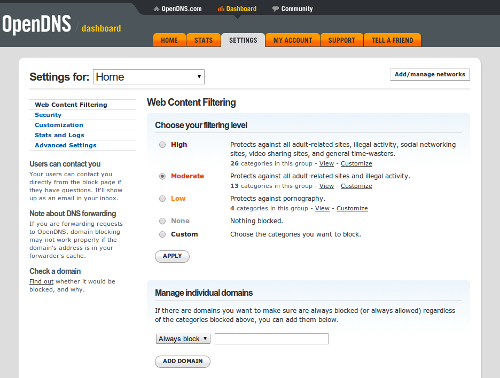
The beauty of OpenDNS is that it lets you the parent take control and be as conservative as you wish. The configuration can be done on each individual computer or on the home wireless router (easier). They provide detailed instructions and its as easy as changing a few number on your routers configuration. Not only does Opendns provide security but as a side benefit, the OpenDNS is typically a lot faster than the DNS your service provider gives you which will get you to the places you do want to go faster.
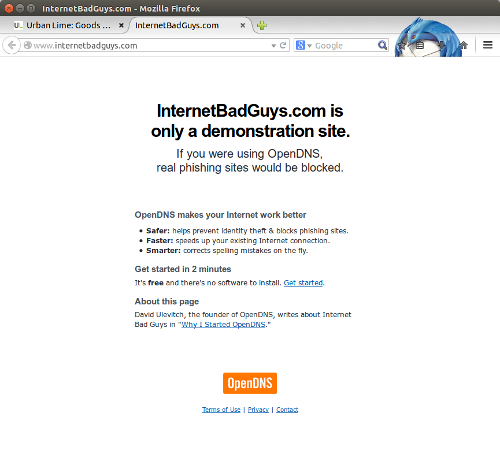
If your family gets to a site you deemed they shouldnt be seeing, they will see the following webpage. I love the peace of mind this gives me knowing that my family is safe.
OpenDNS Blocked Site
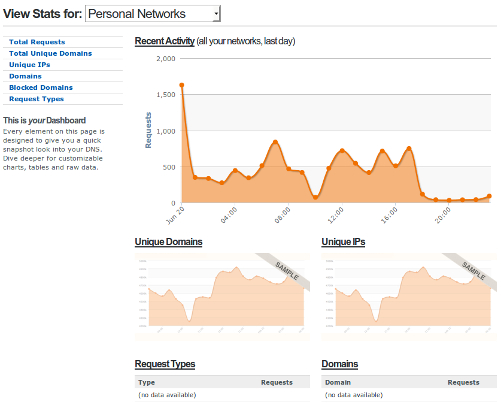
OpenDNS also provides you with logs and stats if you want to see where the family is going and ultimatley tweak your settings, It really is up to you. You can also turn off logging if you are paranoid about them collecting your data. For the not so computer savy they have an option that applies default filters so you don't have to do any thinking! Got to love it. The best part is that its FREE!
OpenDNS Stats
Get started with OpenDNShere.
The Good
- It's FREE
- It Works
- Easy configuration
- Allows you as much control as you want.
- Faster than your service providers DNS
The Bad
- It may block sites you didnt want blocked ( we havent experienced this and have been using for over 2 months)
Other Resources
Another resource on internet safety you may want to look into can be found at backgroundchecks.org. This link has a toolbox of 120 tools and tricks for the concerned parent to keep their child safe online.
So what is OpenDNS? OpenDNS is an open domain name server. Believe it or not, you used a domain name server (DNS) to get yourself to this website. Your service provider directs you to their own DNS, this server translates text you provide into an address so that your browser knows where to go on the world wide web. You can think of DNS as a mailman, for instance you type your website URL on your favorite browser and the mailman delivers your package, or takes you to the web site you want to go to.
Having said that, we made the super simple configuration on our home router and in a matter of seconds we were protected against all adult-related sites, illegal activity, social networking sites, video sharing sites, and general time-wasters that we didn't want our family reaching. OpenDNS is doing the hard work of intercepting requests to only the sites you don't want your family going to from your dashboard as shown below.
OpenDNS Dashboard
The beauty of OpenDNS is that it lets you the parent take control and be as conservative as you wish. The configuration can be done on each individual computer or on the home wireless router (easier). They provide detailed instructions and its as easy as changing a few number on your routers configuration. Not only does Opendns provide security but as a side benefit, the OpenDNS is typically a lot faster than the DNS your service provider gives you which will get you to the places you do want to go faster.
If your family gets to a site you deemed they shouldnt be seeing, they will see the following webpage. I love the peace of mind this gives me knowing that my family is safe.
OpenDNS Blocked Site
OpenDNS also provides you with logs and stats if you want to see where the family is going and ultimatley tweak your settings, It really is up to you. You can also turn off logging if you are paranoid about them collecting your data. For the not so computer savy they have an option that applies default filters so you don't have to do any thinking! Got to love it. The best part is that its FREE!
OpenDNS Stats
Get started with OpenDNShere.
The Good
- It's FREE
- It Works
- Easy configuration
- Allows you as much control as you want.
- Faster than your service providers DNS
The Bad
- It may block sites you didnt want blocked ( we havent experienced this and have been using for over 2 months)
Other Resources
Another resource on internet safety you may want to look into can be found at backgroundchecks.org. This link has a toolbox of 120 tools and tricks for the concerned parent to keep their child safe online.

Posted In: Tools
keep up to date:

choose a category:
- Accessories and Decor
- Art
- Books
- DIY
- Editorials
- Furniture
- Garden and Patio
- Gifts for Men
- Gifts for Women
- Go Green
- Health
- Home Automation
- Kitchen and Baths
- Lighting
- Miscellaneous
- Parenting
- Pets
- Reviews
- Site News
- Software
- Sponsor Thanks
- Technology
- Tools
- Toys and Games
- Walls and Floors
- YouTube Video Review

stuff you might have missed