
iMagnet Cradle-less Universal Phone Mount Review
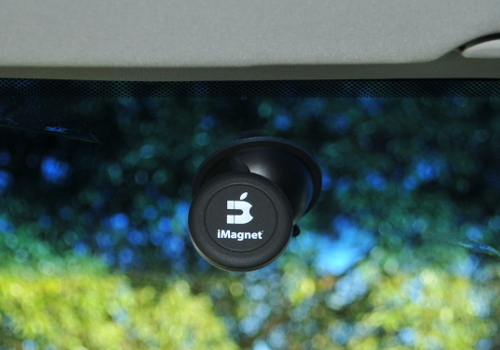
If you are on the market for a car mount for your new smartphone or electronic device, take a look at the iMagnet. The unique design of the iMagnet allows for a Cradle-less mount of practically anything. The desing is strong enought to hold even todays larger phones like the Samsung Note3 or Sony Xperia.
The iMagnet is a strong magnetic base that adheres itself to a slim metalic plate that goes either between your phone and the case or attached via a sticker directly to the rear of the device. We have been using the iMagnet for about a month now and not once has the phone fallen off. We did notice that if the magnetic circle is not directly in the middle of the phone, it causes the phone to flop to one side but this is more user error than anything. We are really impressed with the power of both the suction cup that attaches to any smooth surface and the strenght of the magnet.
Shown below is the iMagnet being used with the Galaxy Note 3 from Samsung. It is one of the larger phones out in the market today and it grips on to this phone without any issues.
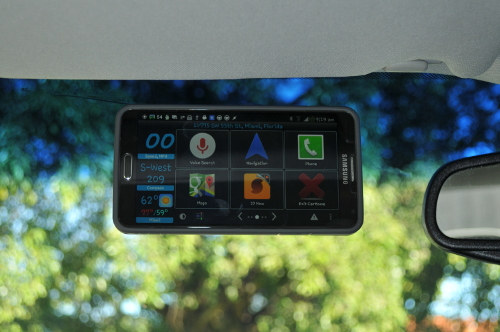
This is the rear view of the iMagnet used on the Note 3 with a Spigen Bounce case. It was also tested with the Spigen Neo Hybrid with equal results.
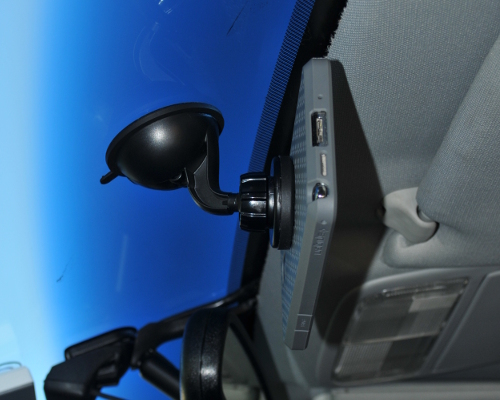
This is a shot from the rear of the iMagnet also on the Note 3 mounted on the windshield of an automobile.
The Good
- Strong magnet capable of working on even larger phones.
- No clunky cradel that obstructs view
- Simple and effective design
- Sold with three plates two with adhesive backing (rectangular) and one round to put between your phone and case. (All three can be used beteen phone and case.)
- Easy One handed operation
- Priced well
- Comes with a one year warranty
The Bad
- The mount does not allow for much maneuvering
- Does not mount well on surfaces that are pourous (such as dashboard which tend to have a porous material)
- Bad Name choice, makes it seem like the mount only works on iphones when in fact it works with anything.
All in all we recommend the product and are very happy with it. You can get your very own iMagnet on Amazon.
The iMagnet
is a strong magnetic base that adheres itself to a slim metalic plate that goes either between your phone and the case or attached via a sticker directly to the rear of the device. We have been using the iMagnet for about a month now and not once has the phone fallen off. We did notice that if the magnetic circle is not directly in the middle of the phone, it causes the phone to flop to one side but this is more user error than anything. We are really impressed with the power of both the suction cup that attaches to any smooth surface and the strenght of the magnet.Shown below is the iMagnet being used with the Galaxy Note 3 from Samsung. It is one of the larger phones out in the market today and it grips on to this phone without any issues.
This is the rear view of the iMagnet used on the Note 3 with a Spigen Bounce
case. It was also tested with the Spigen Neo Hybrid with equal results.This is a shot from the rear of the iMagnet also on the Note 3 mounted on the windshield of an automobile.
The Good
- Strong magnet capable of working on even larger phones.
- No clunky cradel that obstructs view
- Simple and effective design
- Sold with three plates two with adhesive backing (rectangular) and one round to put between your phone and case. (All three can be used beteen phone and case.)
- Easy One handed operation
- Priced well
- Comes with a one year warranty
The Bad
- The mount does not allow for much maneuvering
- Does not mount well on surfaces that are pourous (such as dashboard which tend to have a porous material)
- Bad Name choice, makes it seem like the mount only works on iphones when in fact it works with anything.
All in all we recommend the product and are very happy with it. You can get your very own iMagnet on Amazon
.


Posted In: Technology
LG HBS 730 Tone Plus Review

If you are looking for wireless headphones or a bluetooth earpiece for your cell phone or other device make sure to take a look at the LG HBS-730 Tone +. I tried out a plantroncs headset first and although they looked nice and are a little more compact, they just didn't fit my head correctly and were uncomfortable. I ran across the HBS-730 and gave it a try.
The wireless functionality is great and gives you freedom from wires getting snagged and having your earpiece pulled from your ears forcefully. Overall we are very happy with the purchase of this set. We paid $44 dollars on Amazon and they are well worth that price. We use them primarily as an extension of our phone for meetings and when we are doing something that reqires both hands around the office. We are very impressed with the sound quality, the life of the batteries, and the overall comfort of the unit. You can realistically have the HBS-730 on all day and not realize it. The unit is not bulky and conforms to your neck. The HBS-730 can be paired with up to two devices.
Upon turning the LG Tone + on, it tells you what the battery level is and lets you know when it is connected to your phone or media player. The controls for the volume and changing the media playing are very easy to navigate once you get used to them.
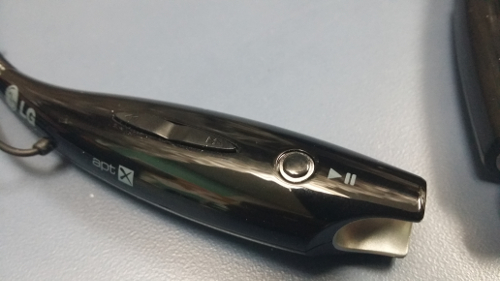
The only thing we didn't like was the power button seems a little cheap compared to the rest of the unit.
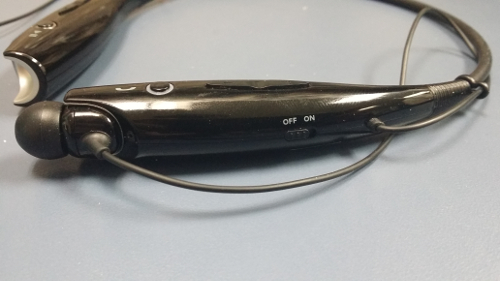
The HBS-730 does not work well when it is far from the source. We tested the unit with a Samsung Galaxy Note 3 inside a car while the car was being washed. The phone was placed on the drivers seat and was getting its music source from Pandora. The LG tone disconnected every once in a while when we walked away from the car. We would say 10 - 12 feet more or less. When we walked back the unit automagically reconnected and started playing music again. This was the other thing we didn't like of the HBS-730.
When close to the unit or in our pockets the audio was very clear and deffinitley shows improvment over the older LG HBS-700. The bluetooth 3.0 deffinitley shows its strength here. All in all the unit performed very well for phone calls and works amazingly well when you have the LG HBS-730 close to its source or in your pocket or purse.
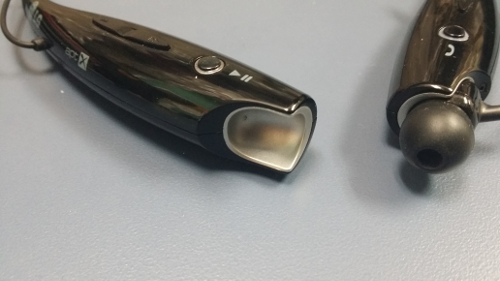
Trying to figure out how the earbuds are kept in place while not in use? Its actually pretty cool. They have little magnets behind the earbuds that lock in to place when not in use.
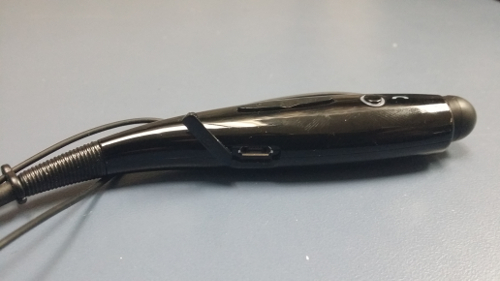
One more thing to look at is the micro usb charging port, you have to love that it doesnt use a non standard charging cable.
We would deffinitley recommend the device as there are not many competitors that offer all of the options at a similar price. Buy your LG Tone Plus HBS-730 now on Amazon.
The Good
- Great Battery Life (10 hours of listening/15 hours of talk time)
- Clean Crisp Clear Audio
- Good quality controls
- Controls are easy to operate
- Not too expensive compared to similar units
- Uses same micro USB charger as many phones
- Noise Reduction and Echo Cancellation
- Built in apt-X technology (CD quality sound over Bluetooth)
- Text Message reading through LG"s BT reader App for Android OS
The Bad
- Didn't Like the main power switch. (Feels Flimsy)
- Not a stable connection when over 12 feet away
and gave it a try. The wireless functionality is great and gives you freedom from wires getting snagged and having your earpiece pulled from your ears forcefully. Overall we are very happy with the purchase of this set. We paid $44 dollars on Amazon
and they are well worth that price. We use them primarily as an extension of our phone for meetings and when we are doing something that reqires both hands around the office. We are very impressed with the sound quality, the life of the batteries, and the overall comfort of the unit. You can realistically have the HBS-730 on all day and not realize it. The unit is not bulky and conforms to your neck. The HBS-730 can be paired with up to two devices. Upon turning the LG Tone +
on, it tells you what the battery level is and lets you know when it is connected to your phone or media player. The controls for the volume and changing the media playing are very easy to navigate once you get used to them.The only thing we didn't like was the power button seems a little cheap compared to the rest of the unit.
The HBS-730
does not work well when it is far from the source. We tested the unit with a Samsung Galaxy Note 3 inside a car while the car was being washed. The phone was placed on the drivers seat and was getting its music source from Pandora. The LG tone disconnected every once in a while when we walked away from the car. We would say 10 - 12 feet more or less. When we walked back the unit automagically reconnected and started playing music again. This was the other thing we didn't like of the HBS-730. When close to the unit or in our pockets the audio was very clear and deffinitley shows improvment over the older LG HBS-700. The bluetooth 3.0 deffinitley shows its strength here. All in all the unit performed very well for phone calls and works amazingly well when you have the LG HBS-730
close to its source or in your pocket or purse. Trying to figure out how the earbuds are kept in place while not in use? Its actually pretty cool. They have little magnets behind the earbuds that lock in to place when not in use.
One more thing to look at is the micro usb charging port, you have to love that it doesnt use a non standard charging cable.
We would deffinitley recommend the device as there are not many competitors that offer all of the options at a similar price. Buy your LG Tone Plus HBS-730 now on Amazon
.The Good
- Great Battery Life (10 hours of listening/15 hours of talk time)
- Clean Crisp Clear Audio
- Good quality controls
- Controls are easy to operate
- Not too expensive compared to similar units
- Uses same micro USB charger as many phones
- Noise Reduction and Echo Cancellation
- Built in apt-X technology (CD quality sound over Bluetooth)
- Text Message reading through LG"s BT reader App for Android OS
The Bad
- Didn't Like the main power switch. (Feels Flimsy)
- Not a stable connection when over 12 feet away

Posted In: Tools
Aqua Illumination Director aquarium lighting controller Review
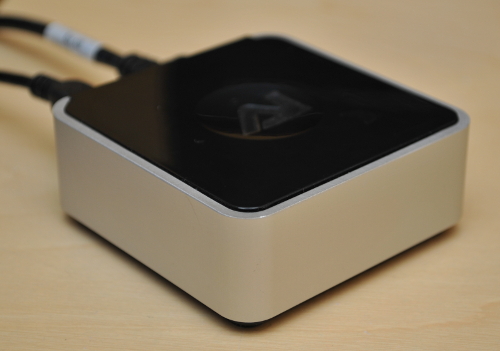
AI Director is a new web based controller for LED aquarium lighting made by Aqua Illumination. This new controller will take the place of the regular controller. It features a web interface and has wired or wireless (wireless dongle is included but not shown) connectivity to your home network.
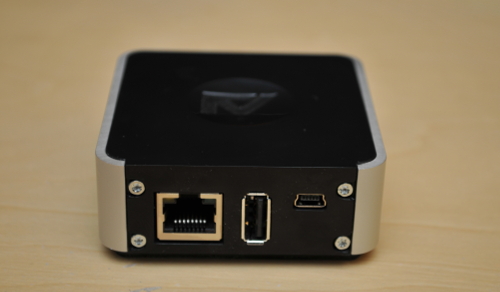
The controller has the ability to connect to a web based service from AI that also allows you to connect remotely. We were able to get onto the beta program and got our hands on one of the controllers to control our two Vega lights that we have over an all glass 92 gallon aquarium.
It has been about two months now since we received our AI director. At first we were very disappointed with the controller, being that it was a BETA program we thought we would hang in there. It had very clumsy controls and had bugs that really made it useless. You couldn't even save your presets very easily and would find yourself resetting the controller time and time again and reprogramming it from scratch.
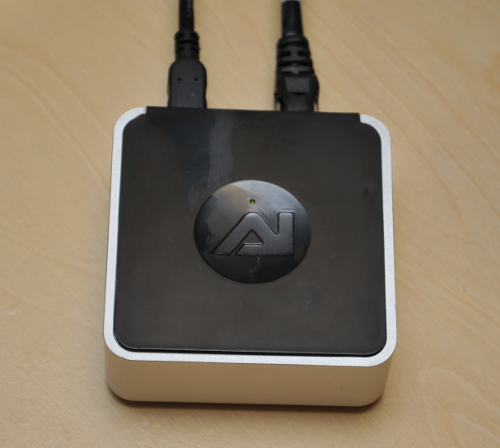
Well how things change, just a few software updates later and we feel like we have a new product. This thing although in BETA, is working flawlessly now. We have been running the controller without resetting it for about a month now and it works perfectly with out Vega's.
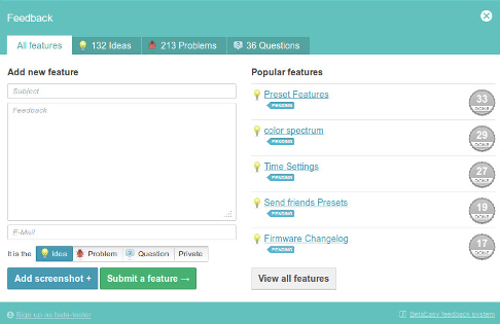
The Director features a built in feedback panel that lets you submit bug reports and or feature requests. So far the AI crew is pretty good at responding and making your bugs go away. The controller just like its predecessor allows you to simulate lighting and cloud cover. It also features coral acclimation programs and in a future update, AI promises to add a feature that will mimic the weather that is happening in your area. We can't wait for that to happen.
This director has unlimited potential and we hear rumors that they may eventually add the capability to add a webcam so you can see what is going on in your tank while you are away.
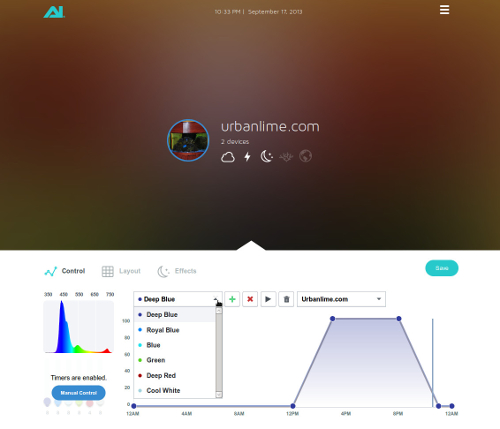
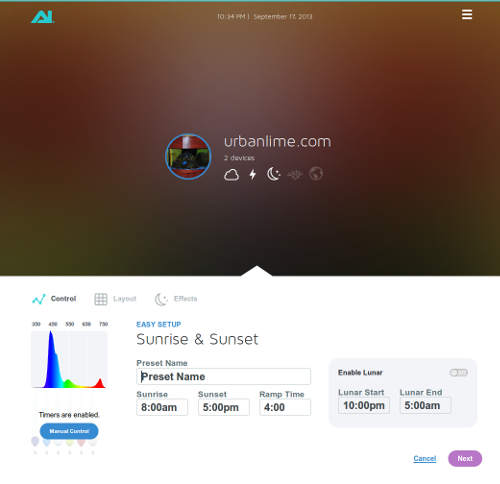
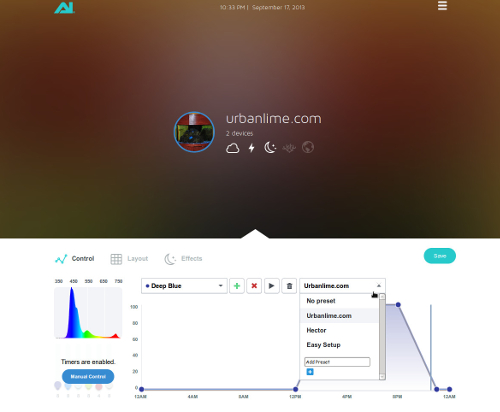
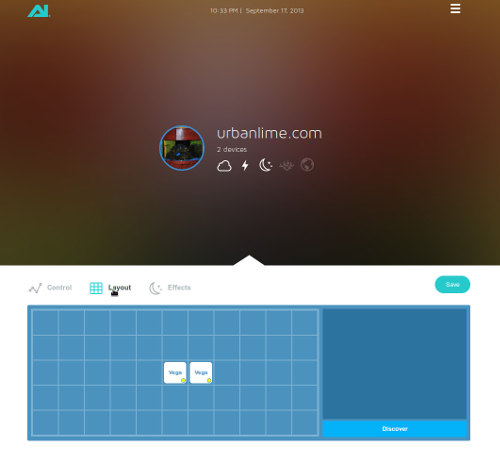
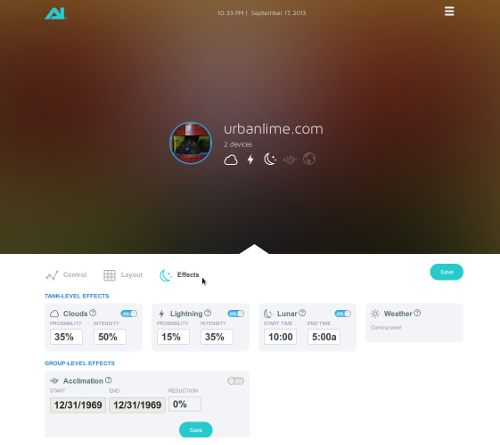
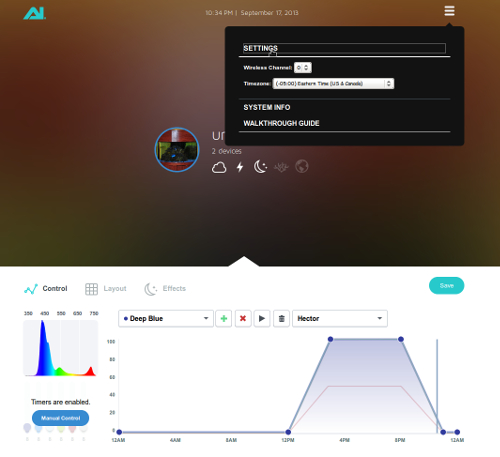
Here you will find some screen shots of our actual setup. Note that the colors on the interface change based on the picture you upload to the director of your aquarium, we thought it was a pretty nifty idea.
Graphical User Interface Screenshots
Automatic Control Scheduling
Manual Control Screen
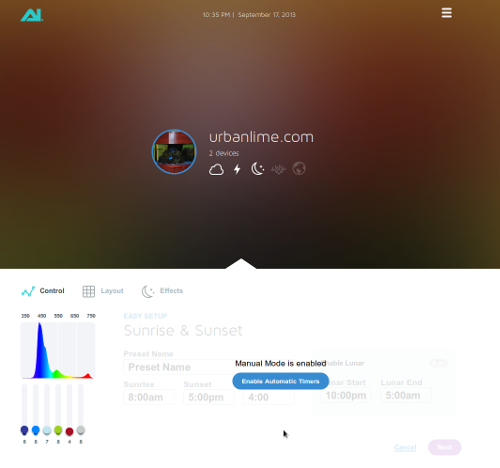
Easy Setup
Multiple Custom Presets
Lighting Layout Configuration Tool
Lighting Effects Configuration
Beta Feedback Tool
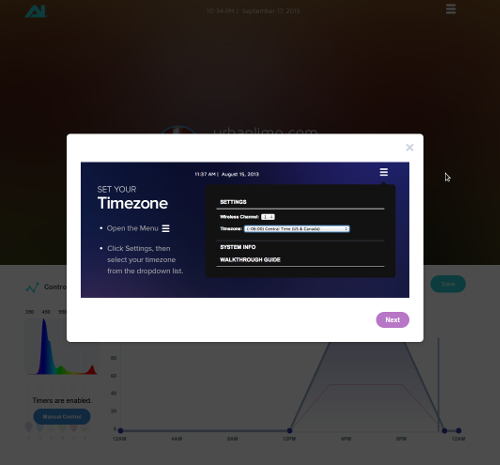
Timezone Configuration
Guided Manual Screen
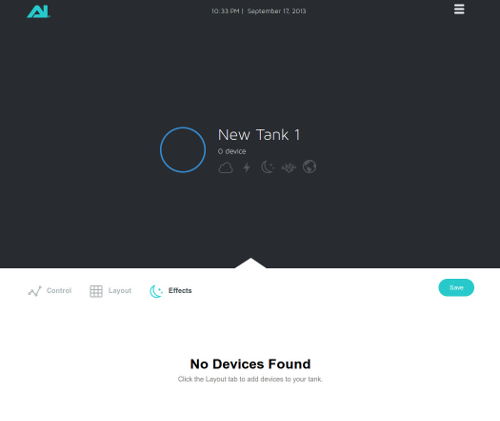
Ready to control multiple Tanks
At the moment the Director is still in BETA and not for sale but when available will be sold via Amazon. We are really happy with the director and found it to be a great investment.
The controller has the ability to connect to a web based service from AI that also allows you to connect remotely. We were able to get onto the beta program and got our hands on one of the controllers to control our two Vega
lights that we have over an all glass 92 gallon aquarium. It has been about two months now since we received our AI director. At first we were very disappointed with the controller, being that it was a BETA program we thought we would hang in there. It had very clumsy controls and had bugs that really made it useless. You couldn't even save your presets very easily and would find yourself resetting the controller time and time again and reprogramming it from scratch.
Well how things change, just a few software updates later and we feel like we have a new product. This thing although in BETA, is working flawlessly now. We have been running the controller without resetting it for about a month now and it works perfectly with out Vega's
. The Director features a built in feedback panel that lets you submit bug reports and or feature requests. So far the AI crew is pretty good at responding and making your bugs go away. The controller just like its predecessor allows you to simulate lighting and cloud cover. It also features coral acclimation programs and in a future update, AI promises to add a feature that will mimic the weather that is happening in your area. We can't wait for that to happen.
This director has unlimited potential and we hear rumors that they may eventually add the capability to add a webcam so you can see what is going on in your tank while you are away.
Here you will find some screen shots of our actual setup. Note that the colors on the interface change based on the picture you upload to the director of your aquarium, we thought it was a pretty nifty idea.
Graphical User Interface Screenshots
Automatic Control Scheduling
Manual Control Screen
Easy Setup
Multiple Custom Presets
Lighting Layout Configuration Tool
Lighting Effects Configuration
Beta Feedback Tool
Timezone Configuration
Guided Manual Screen
Ready to control multiple Tanks
At the moment the Director is still in BETA and not for sale but when available will be sold via Amazon
. We are really happy with the director and found it to be a great investment.

Posted In: Technology
Makey Makey Original Invention Kit Review
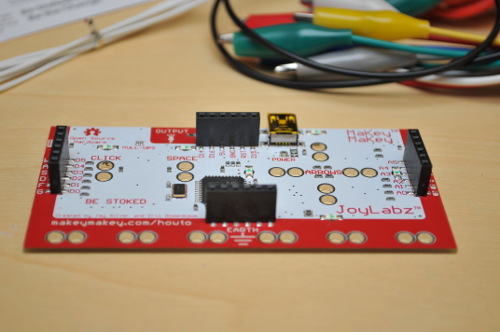
How cool is this? The Makey Makey has been making kids and grown ups alike invent new contraptions every day for quite some time now. We were able to get our hands on one of these kits and we can't even describe how much fun we had with it.
The MaKey MaKey Original Invention Kit is a simple little printed circuit board that interfaces with your computer and acts like a human interface device. Basically it takes the place of certain keys and or mouse clicks without using the actual keyboard or mouse. The Makey Makey kit comes with a 6ft USB cable, 7 alligator clips, and 6 connector wires that will help you create some pretty interesting projects.
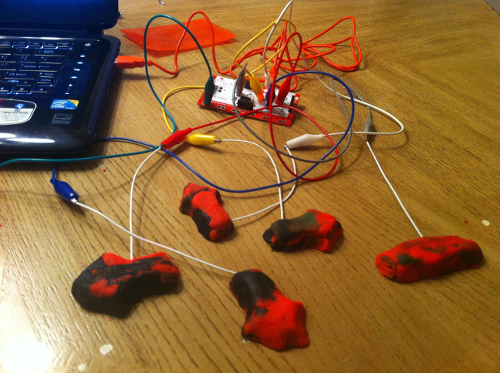
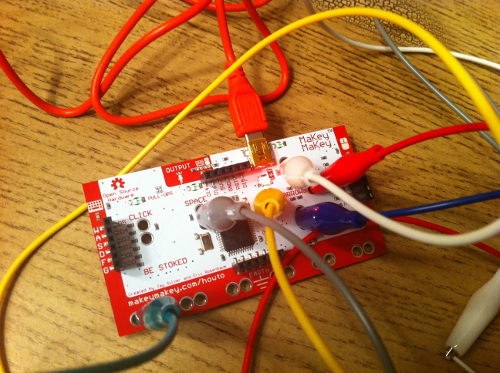
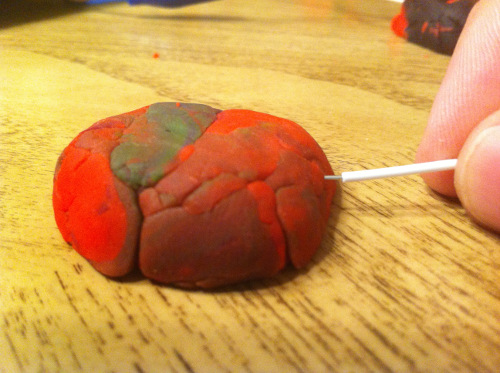
Out of the box it took us just 15 minutes to set up our first testing invention. I put my daughter (6 years old) up to the test and had her help me with setting this up. It was a basic control pad made of play-dough buttons so I had her use the pins that I hooked up to alligator clips and insert them into the play-dough. A short search on Google gave us a web based pacman game that was perfect for testing. The MaKey MaKey Original Invention Kit worked like a charm and it was funny to see how much fun my daughter and I were having playing pac-man through play-dough.
These are a few pictures of our trial run but check out the videos of some of the things you can do with your very own Makey Makey.
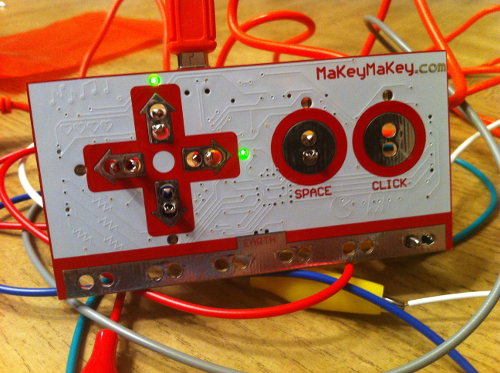
The Makey Make works on Windows, Mac and Linux so there is no excuse to not let your imagination run wild.
Check Out the Makey Makey videos
Where can I get my own makey makey? You can either buy your makey makey through Amazon, or you can also order one via the Makey Makey website at makeymakey.com.
The MaKey MaKey Original Invention Kit
is a simple little printed circuit board that interfaces with your computer and acts like a human interface device. Basically it takes the place of certain keys and or mouse clicks without using the actual keyboard or mouse. The Makey Makey kit comes with a 6ft USB cable, 7 alligator clips, and 6 connector wires that will help you create some pretty interesting projects.Out of the box it took us just 15 minutes to set up our first testing invention. I put my daughter (6 years old) up to the test and had her help me with setting this up. It was a basic control pad made of play-dough buttons so I had her use the pins that I hooked up to alligator clips and insert them into the play-dough. A short search on Google gave us a web based pacman game that was perfect for testing. The MaKey MaKey Original Invention Kit
worked like a charm and it was funny to see how much fun my daughter and I were having playing pac-man through play-dough. These are a few pictures of our trial run but check out the videos of some of the things you can do with your very own Makey Makey.
The Makey Make works on Windows, Mac and Linux so there is no excuse to not let your imagination run wild.
Check Out the Makey Makey videos
Where can I get my own makey makey? You can either buy your makey makey through Amazon
, or you can also order one via the Makey Makey website at makeymakey.com.

Posted In: Toys and Games
Scosche Passport Review
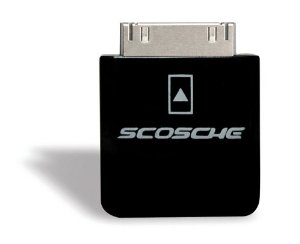
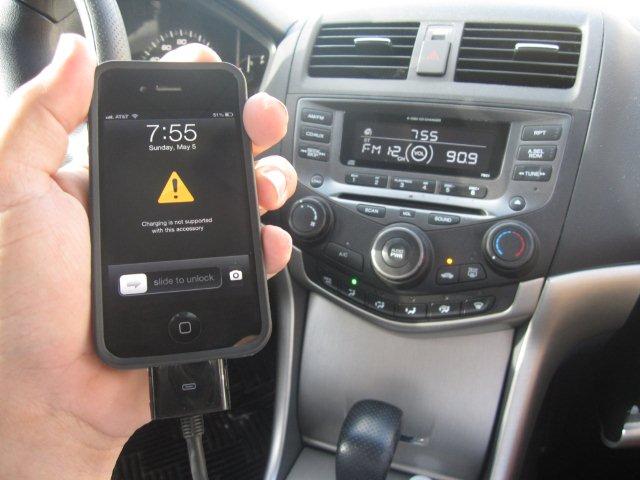
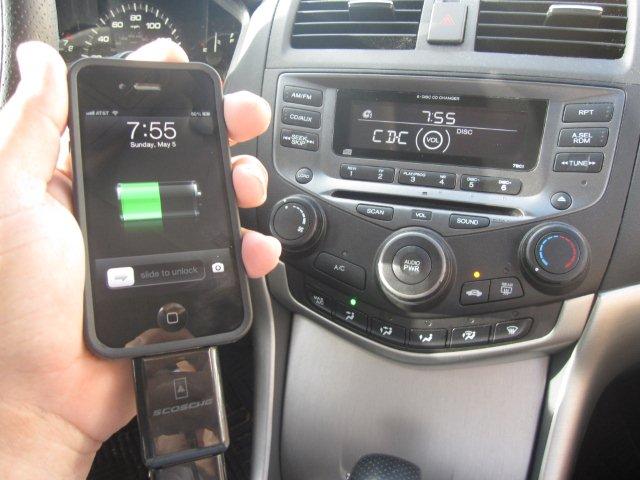
Do you have an older model vehicle with an iphone accessory cable that doesn't work with newer generation phones like the iphone 4? We had the same issue with an iphone 4 in a 2007 model Honda Accord. The device would work from time to time but would never charge and prompt with a message stating that the accessory was not compatible with the phone. We found the Scosche Passport adapter that made our incompatible accessory cable work flawlessly to charge the phone and allow playback via the cars factory radio.
Before Scosche
After Scosche
The Scosche Passport is compatible with the iPod nano 4G, iPod touch 2G, iPhone 3G. In a nut shell it allows accessories that do not support USB charging to work with iPod and iPhone, it also allows car integration accessories that do not support charging to work with the iPhone 3G and September 2008-released iPods. The pass-through port allows for easy plug-and-play installation with mostly all older accessory devices. The Scosche Passport is compatible with several aftermarket auto head-units so it is not limited to Honda radios.
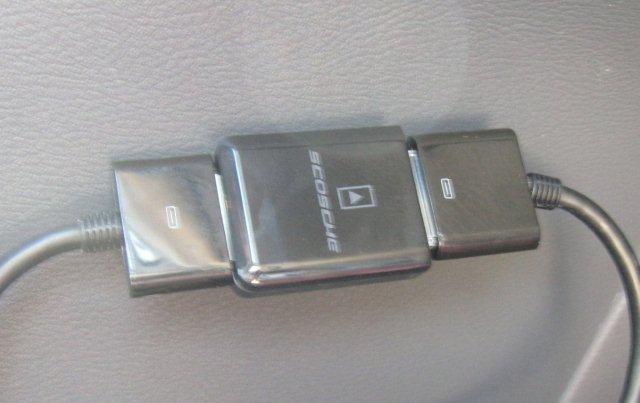
We didn't like the adapter being so big so we added an extension cable to our car unit and put the Scosche inline. The adapter still works great.
Get your Scosche Adapter on Amazon
adapter that made our incompatible accessory cable work flawlessly to charge the phone and allow playback via the cars factory radio. Before Scosche
After Scosche
The Scosche Passport
is compatible with the iPod nano 4G, iPod touch 2G, iPhone 3G. In a nut shell it allows accessories that do not support USB charging to work with iPod and iPhone, it also allows car integration accessories that do not support charging to work with the iPhone 3G and September 2008-released iPods. The pass-through port allows for easy plug-and-play installation with mostly all older accessory devices. The Scosche Passport is compatible with several aftermarket auto head-units so it is not limited to Honda radios.We didn't like the adapter being so big so we added an extension cable to our car unit and put the Scosche inline. The adapter still works great.
Get your Scosche Adapter on Amazon

Posted In: Technology
Bamboo Duo Stylus Pen Review
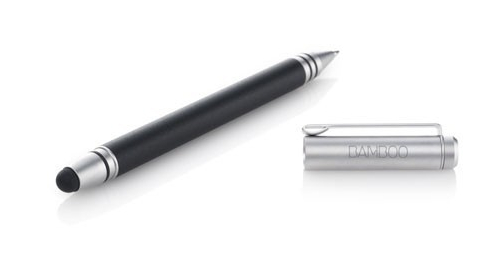
If you are looking for a good quality stylus and pen combination, your search is over. We gave the Bamboo Duo stylus a try and were very happy with the results. The duo is a nice looking pen stylus combo, it has a nice solid feel to it and writes well on both sides. The pen is a fine tip black ink cartridge that is refillable.
The Bamboo Duo is about average thickness of a pen and also has an average length so you wont feel awkward holding this little guy. The stylus side of the duo is very accurate on the iPad 3 that we tested and also works well on iPhone devices although we didn't really think it was very useful on such a small screen. We tried notability, bamboo, and paper apps and are excited to report that this stylus was very responsive and allowed for great control and accuracy. We loved the preciseness we archived while using the stylus. The stylus tip can also be interchanged if necessary so you will never have to throw this stylus away. One thing to note is that since the stylus side of the tip is not protected, dropping it will more than likely cause you to dent the metal casing that goes around the stylus tip. (Unfortunately we dropped our and dented it but we are still happy with the results.)
PROS
- Sturdy construction
- Refillable ink
- Replaceable stylus tip
- Offered in various colors
- Works on most screens
CONS
- Pricey (They often go for half price on Amazon)
- The stylus tip does not have a protective cover
Get your Bamboo Duo Stylus on Amazon
a try and were very happy with the results. The duo is a nice looking pen stylus combo, it has a nice solid feel to it and writes well on both sides. The pen is a fine tip black ink cartridge that is refillable. The Bamboo Duo is about average thickness of a pen and also has an average length so you wont feel awkward holding this little guy. The stylus side of the duo is very accurate on the iPad 3 that we tested and also works well on iPhone devices although we didn't really think it was very useful on such a small screen. We tried notability, bamboo, and paper apps and are excited to report that this stylus was very responsive and allowed for great control and accuracy. We loved the preciseness we archived while using the stylus. The stylus tip can also be interchanged if necessary so you will never have to throw this stylus away. One thing to note is that since the stylus side of the tip is not protected, dropping it will more than likely cause you to dent the metal casing that goes around the stylus tip. (Unfortunately we dropped our and dented it but we are still happy with the results.)
PROS
- Sturdy construction
- Refillable ink
- Replaceable stylus tip
- Offered in various colors
- Works on most screens
CONS
- Pricey (They often go for half price on Amazon)
- The stylus tip does not have a protective cover
Get your Bamboo Duo Stylus on Amazon

Posted In: Toys and Games
iMito MX1 Smart TV Mini PC
So you probably got a great deal on that new 55 inch led tv, but noticed that you really couldn't do much but plug in the cable box, and maybe a video game console.
You probably want to play games, surf the web, or stream videos and music directly from your tv. Well, now you can with the iMito MX1. You can basically make your TV a giant tablet as long as it has a free HDMI port.
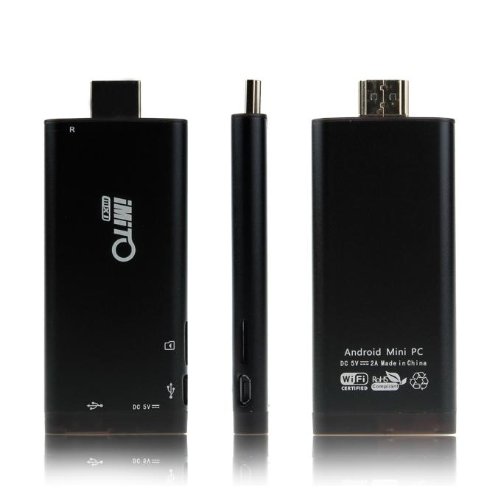
The iMito MX1 mini pc is a bout three times as large as a regular usb stick and has an aluminum housing. We were able to play with one for a little while and it works just like an android tablet, and does it really well. In fact it runs Android 4.1 Jelly Bean so if you have played with any android device it will be super easy to use. The Google Play Store is installed by default which allows for download of many applications. The device has built in bluetooth, XBMC, and 802.11 b/g/n wifi support.
The iMito MX1 is powered by an included power supply. It doesn't come with a keyboard or mouse but any bluetooth keyboard or mouse should work. We didn't have any issues connecting ours and have sometimes seen them being sold as bundles together. We liked it so much that we would recommend this product over trying to buy a high end TV with the web features. For the super geek, the iMito can be flashed with the latest roms for the hottest features. We really like this device and for $60.00 you just can't go wrong.
Things to note are that you must connect it to some HID (human interface device) which will cost you a little more depending on how fancy you want to get.
Note that although the MX1 comes with 1GB internal RAM memory it has a slot for a micro SD card that supports up to 32 GB.
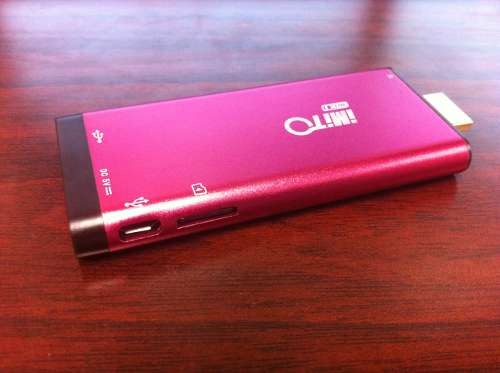
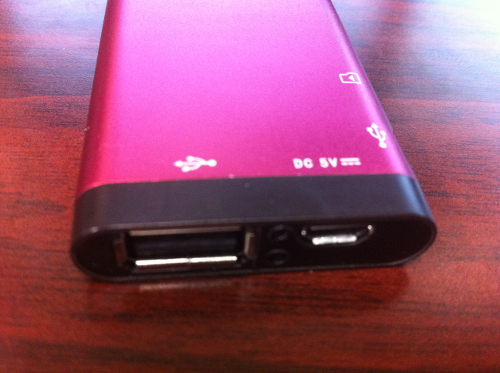
Here is the USB and power ports. Note the HDMI port on the other side.
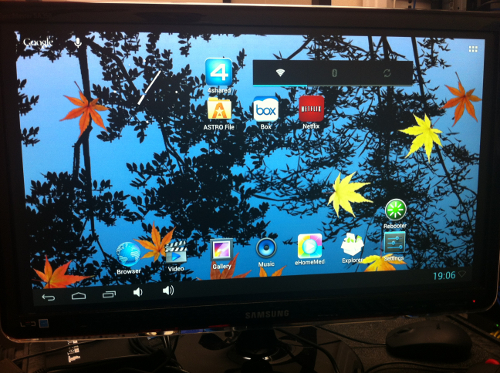
Here is a screenshot of the iMito MX1. Note that this iMito was modified so your screens may vary.
Get Your iMito MX1 mini pc on Amazon
You probably want to play games, surf the web, or stream videos and music directly from your tv. Well, now you can with the iMito MX1. You can basically make your TV a giant tablet as long as it has a free HDMI port.
The iMito MX1 mini pc
is a bout three times as large as a regular usb stick and has an aluminum housing. We were able to play with one for a little while and it works just like an android tablet, and does it really well. In fact it runs Android 4.1 Jelly Bean so if you have played with any android device it will be super easy to use. The Google Play Store is installed by default which allows for download of many applications. The device has built in bluetooth, XBMC, and 802.11 b/g/n wifi support. The iMito MX1 is powered by an included power supply. It doesn't come with a keyboard or mouse but any bluetooth keyboard or mouse should work. We didn't have any issues connecting ours and have sometimes seen them being sold as bundles together. We liked it so much that we would recommend this product over trying to buy a high end TV with the web features. For the super geek, the iMito can be flashed with the latest roms for the hottest features. We really like this device and for $60.00 you just can't go wrong.
Things to note are that you must connect it to some HID (human interface device) which will cost you a little more depending on how fancy you want to get.
Note that although the MX1 comes with 1GB internal RAM memory it has a slot for a micro SD card that supports up to 32 GB.
Here is the USB and power ports. Note the HDMI port on the other side.
Here is a screenshot of the iMito MX1. Note that this iMito was modified so your screens may vary.
Get Your iMito MX1 mini pc
on Amazon

Posted In: Technology
Polar RS 100 Hear Monitor Review

If you are looking for an entry level Heart Rate Monitor we highly recommend the Polar RS100 Heart Rate Monitor and Stopwatch . The watch is very comfortable to wear and has a nicely laid out display. The watch will help you track your personal heart rate target zones and features OwnZone technology that listens to your heart to set the correct heart zones that fit you. This will help you get the most out of your workouts.
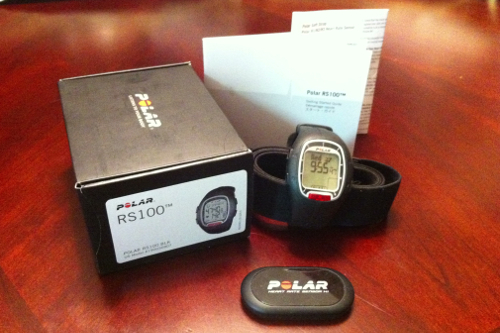
The watch not only displays your heart rate but will also track calories burned which was a feature we liked. The transmitter is to be worn on your chest and although at first we thought it would be uncomfortable, once you put it on, you wont even notice it is there.
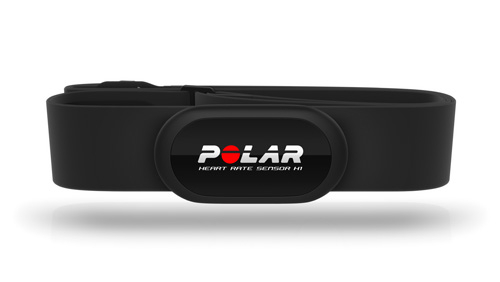
The Heart Rate Sensor that is included with the watch is also compatible with gym equipment in fitness clubs (of course the equipment must be compatible with Polar products). According to Polar the transmitter has coded heart rate transmission to avoid cross-talk. We found the watch to be very accurate at tracking hear rate during our tests.
The Polar RS 100 retails for about $120 USD but we purchased our on Amazon for about half the price. It is well worth the price. We have linked the video from Polars website that will help you make a decision and help you get started once you purchase your watch.
Polar RS 100 Heart Rate Monitor Setup
THE GOOD
- Large Display
- Backlit
- Calorie Counter
- Works with Gym Equipment
THE BAD
- We really couldn't find anything we didn't like. The feature rich entry watch works well and is currently priced very low.
IN THE BOX
- One RS 100 Heart Rate Monitor Watch
- One Heart Rate Sensor Strap
- One Heart Rate Sensor
- One Manual
WHERE TO BUY
Amazon
MANUFACTURER
Polar USA
. The watch is very comfortable to wear and has a nicely laid out display. The watch will help you track your personal heart rate target zones and features OwnZone technology that listens to your heart to set the correct heart zones that fit you. This will help you get the most out of your workouts.The watch not only displays your heart rate but will also track calories burned which was a feature we liked. The transmitter is to be worn on your chest and although at first we thought it would be uncomfortable, once you put it on, you wont even notice it is there.
The Heart Rate Sensor that is included with the watch is also compatible with gym equipment in fitness clubs (of course the equipment must be compatible with Polar products). According to Polar the transmitter has coded heart rate transmission to avoid cross-talk. We found the watch to be very accurate at tracking hear rate during our tests.
The Polar RS 100 retails for about $120 USD but we purchased our on Amazon for about half the price. It is well worth the price. We have linked the video from Polars website that will help you make a decision and help you get started once you purchase your watch.
Polar RS 100 Heart Rate Monitor Setup
THE GOOD
- Large Display
- Backlit
- Calorie Counter
- Works with Gym Equipment
THE BAD
- We really couldn't find anything we didn't like. The feature rich entry watch works well and is currently priced very low.
IN THE BOX
- One RS 100 Heart Rate Monitor Watch
- One Heart Rate Sensor Strap
- One Heart Rate Sensor
- One Manual
WHERE TO BUY
Amazon
MANUFACTURER
Polar USA

Posted In: Technology
Idea Paint Review - Go ahead and draw on your walls!

Get your Expo Dry Erase Markers ready, you are going to love this dry erase paint! We were looking to get a dry erase board for the office, but we were limited by the sizes that are available. While shopping around we came across Idea Paint that would let us cover an entire wall to bring all our ideas for the future into one big (REALLY BIG) Canvas. After some research, we decided to buy enough to cover a 450 sqft area and got to work. We were really impressed by the results and wanted to share this product with you.
Not only did the wall work as good as a dry erase board but we felt it erased better. Idea paint does not just lend itself to walls, you can let your imagination run wild and paint furniture, objects, or even your ceilings although we think it would be a little hard to use up there. Say goodbye to that plain old dry erase board!
We did find that there was lots of prep work to make sure your wall was perfectly smooth before applying but it was worth while. The other thing to note is that the smell of the chemicals will drive you crazy. We painted our wall over a weekend and the potent smell remained for almost 4-5 days although it did get less irritating towards the end. Once the wall was completely dry it no longer smells and makes an amazing dry erase board.
If you are doing this at home, I would probably take a week vacation to make sure you aren't breathing this stuff, or just close the air vents and open the windows in that room.
Idea paint is offered in many cool colors and we went with the plain old boring white, however the one that just recently caught our eye was the clear kit that will allow you to basically get any color you can dream up. The kit includes everything you need to get started, so what are you waiting for?
Go ahead and let your imagination run wild. This is truly an amazing product. The 50 sqft kit will run you about $225 so get ready to dig into your piggy bank! We love this product for kids rooms and we are certain they will too... Only thing is they might get crazy and paint on your not so dry erase marker walls so you will have to lay down some ground rules for the little ones.
THE IDEA PAINT VIDEO
THE IDEA PAINT INSTRUCTIONAL VIDEO
Take a look at the installation video prior to purchasing your idea paint, this will give you an idea as to how much work it will be. Really the painting is easy, its the prep work that took us longer because our wall was not smooth.
THE GOOD
- Limits are endless, make anything a dry erase board
RECOMMENDED SURFACES
- Most sealed non-porous surfaces
- Stained wood
- Painted drywall
- Plastic
- Metal
- Aluminum
- Chalkboards
- Whiteboards
THE BAD
- Strong Odor during installation
- A bit expensive
IN THE BOX

- THIS can
- THAT can
- Recommended roller
- Stir stick
- Can opener
- HELP guide
- Wet Paint sign.
WHAT'S MISSING
- A strong will to go crazy and paint all over the place
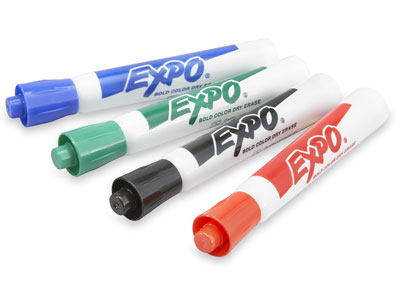
- Dry Erase Markers (We use Expo Dry Erase Markers and they work great). Get Your Expo Dry Erase Markers Here.
WHERE TO BUY
- Amazon
- Idea Paint
MANUFACTURER
Idea Paint
Not only did the wall work as good as a dry erase board but we felt it erased better. Idea paint
does not just lend itself to walls, you can let your imagination run wild and paint furniture, objects, or even your ceilings although we think it would be a little hard to use up there. Say goodbye to that plain old dry erase board!We did find that there was lots of prep work to make sure your wall was perfectly smooth before applying but it was worth while. The other thing to note is that the smell of the chemicals will drive you crazy. We painted our wall over a weekend and the potent smell remained for almost 4-5 days although it did get less irritating towards the end. Once the wall was completely dry it no longer smells and makes an amazing dry erase board.
If you are doing this at home, I would probably take a week vacation to make sure you aren't breathing this stuff, or just close the air vents and open the windows in that room.
Idea paint is offered in many cool colors and we went with the plain old boring white, however the one that just recently caught our eye was the clear kit that will allow you to basically get any color you can dream up. The kit includes everything you need to get started, so what are you waiting for?
Go ahead and let your imagination run wild. This is truly an amazing product. The 50 sqft kit will run you about $225 so get ready to dig into your piggy bank! We love this product for kids rooms and we are certain they will too... Only thing is they might get crazy and paint on your not so dry erase marker walls so you will have to lay down some ground rules for the little ones.
THE IDEA PAINT VIDEO
THE IDEA PAINT INSTRUCTIONAL VIDEO
Take a look at the installation video prior to purchasing your idea paint, this will give you an idea as to how much work it will be. Really the painting is easy, its the prep work that took us longer because our wall was not smooth.
THE GOOD
- Limits are endless, make anything a dry erase board
RECOMMENDED SURFACES
- Most sealed non-porous surfaces
- Stained wood
- Painted drywall
- Plastic
- Metal
- Aluminum
- Chalkboards
- Whiteboards
THE BAD
- Strong Odor during installation
- A bit expensive
IN THE BOX
- THIS can
- THAT can
- Recommended roller
- Stir stick
- Can opener
- HELP guide
- Wet Paint sign.
WHAT'S MISSING
- A strong will to go crazy and paint all over the place
- Dry Erase Markers (We use Expo Dry Erase Markers and they work great). Get Your Expo Dry Erase Markers Here.
WHERE TO BUY
- Amazon
- Idea Paint
MANUFACTURER
Idea Paint

Posted In: Walls and Floors
AquaIllumination Vega Color LED Lights
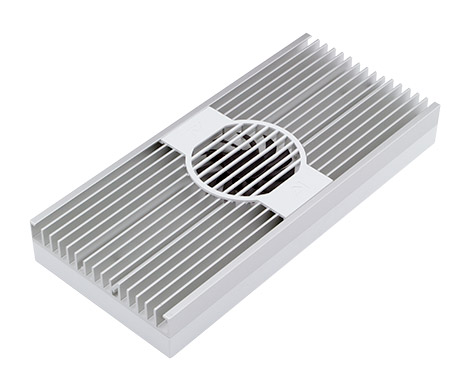
There are different types of flavors for aquarium lighting, and depending on what you have in your tank you may need some pretty intense lighting to make sure the health of your inhabitants is always at it's best. While on our search for some aquarium lighting to purchase, we came across Aquaillumination's LED lighting system. LED's are the next best thing in aquarium lighting, they offer high PAR (Photosynthetically Active Radiation which is the spectral range of solar light that is needed by corals in order to grow) at lower wattage and heat levels. LED's have been growing in the aquarium field for quite some time, and now they are just getting smarter, better and longer lasting. One of the advantages to LED lighting is that you no longer need to change those bulbs out every 6 months. LED's are said to be able to last about 10 years before having to change them out.
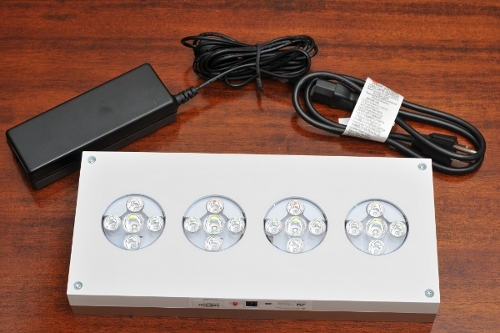
So what makes the Aquaillumination's Vega so cool? Well aside from looking like they were designed by apple computer with it's white shiny coat (also available in black), they are jam packed with features. The AI Vega LED's allow you to control each color independently. There are 4 LED pucks that carry Cree XM-L Cool White, Cree XP-E Royal Blue, Cree XP-E Blue, OSRAM OSLON Deep Blue, Cree XP-E Green, OSRAM OSLON Deep Red. This is one of the first LED systems to incorporate colors other that white and blue. We are not to sure what value that may bring to the table, but honestly the technology hasn't been out that long and these can take years to test, but we think it looks pretty cool anyways. Check out the demo video below.
Aqua Illumination Vega
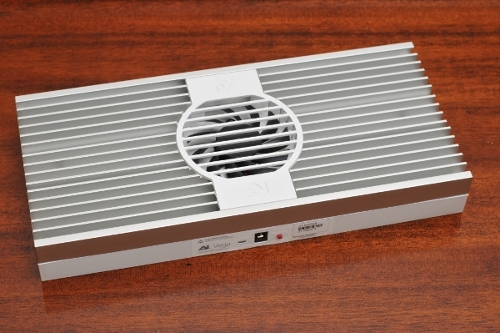
Out of the box the Aquaillumination Vega is a solid LED, the construction is impeccable and feels sturdy. The unit is heavy and feels like a quality product. The While part of the LED fixture is made of plastic while the rest is a metal heatsink to dissipate the little heat that the unit puts out. The unit also features a fan that is only enabled when the unit is hot. There are no manuals in the box except for a small insert that tells you how to turn on your LED's and also how to put them in demo mode. The Vega can be run without a controller, but we do not recommend it as it is pretty annoying to hit the button and not know what intensity the lights are on. We feel this is only to really test the unit.
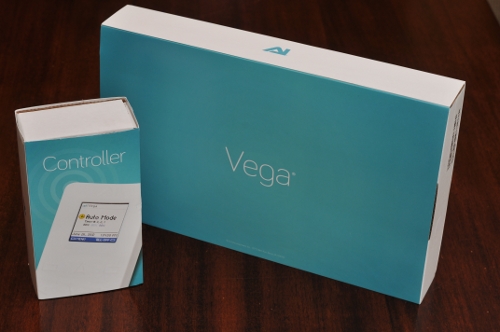
In order to test the unit we also purchased the new Aquailluminations controller. The controller allows for timer control of all the colors independently as well as allowing you to set weather controls ,and lunar cycle. We love this feature because it mimics clouds passing by at random times or even thunderstorms. honestly the thunderstorms are kinda funny looking so we turned them off pretty quickly but we did like the cloud cover options. The Lunar cycle is also pretty impressive, it will dim your lights at night to mimic the moon having a higher intensity at full moon. It did take a little while to figure out how to program the unit but once you figure it out its pretty easy. The manual did not come with the controller and had to be downloaded form the Aquallumination support website.
The controller looks decent but we feel they could have done a better job. We didn't like that you must always have the controller connected to power outlet or usb port on your computer (not so wireless after all) in order for it to send controls to the LED's. If you manage to bump the controller and disconnect it, your lights will stay at whatever intensity they were when the controller was knocked off. We feel AI could improve on this by having the controller dump the configuration on the LED's and have them run on their own. Only thing is that something like this will cost the consumer more so we can see why they probably opted out. The buttons are not very user friendly and take some getting used to, but once you play with it for a good 20 minutes you should be able to get around.
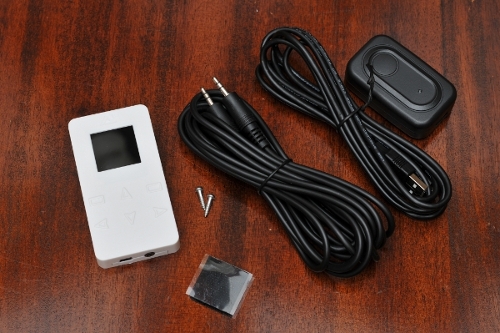
The setup between the controller and the Vega was fairly simple and straight forward, all you need to do is tell the controller that it is wireless and it goes out searching for the Vega. The default setting on the controller is for it to be wired.
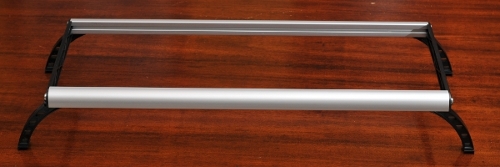
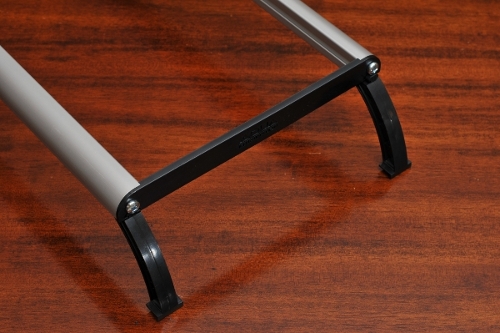
The Vega's do not come with any way to install them so you must purchase a stand from them. There are a few options, we decided to go for the older style tank mount since we were going to hang it in a tank with a hood. We opted for the 24" mount and cut it in half to create two stands. Since we weren't sure if we were going to keep to stay with this configuration we only purchased one set. but after installing the unit we are very happy with it and will be placing the order for the second set very soon.
Aqua Illumination New Controller
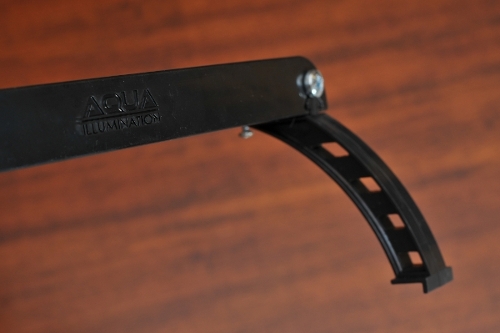
Take a look at the new mounting options. If you have existing AI Sol Blue, you can use the same mounting brackets as they are backwards compatible.
Aqua Illumination EXT Hanging Kit
Aqua Illumination EXT Rail System
All in all we are very happy with the setup and would definitely recommend it. The Vega goes for $499 and the controller will set you back another $79. You will then need to pick a mounting option which typically ranges from around $25 -$100. The savings of not having to replace the bulbs every 6 months pay off very quickly.
THE GOOD
- Good construction.
- Cheap compared to other lighting sources
THE BAD
- You have to purchase stands and controller seperatley (this could also be a good thing as it alows for flexibility)
IN THE AI VEGA BOX
- One Vega LED Light
- One Power supply
- One page manual and warranty info
IN THE AI CONTROLLER BOX
- One controller
- One Power supply
- One USB cable
- One 10' x 3.5mm cable for wired control
- One mounting kit includes Velcro and screws
WHERE TO BUY
Amazon
MANUFACTURER
Aquaillumination
So what makes the Aquaillumination's Vega so cool? Well aside from looking like they were designed by apple computer with it's white shiny coat (also available in black), they are jam packed with features. The AI Vega LED's allow you to control each color independently. There are 4 LED pucks that carry Cree XM-L Cool White, Cree XP-E Royal Blue, Cree XP-E Blue, OSRAM OSLON Deep Blue, Cree XP-E Green, OSRAM OSLON Deep Red. This is one of the first LED systems to incorporate colors other that white and blue. We are not to sure what value that may bring to the table, but honestly the technology hasn't been out that long and these can take years to test, but we think it looks pretty cool anyways. Check out the demo video below.
Aqua Illumination Vega
Out of the box the Aquaillumination Vega is a solid LED, the construction is impeccable and feels sturdy. The unit is heavy and feels like a quality product. The While part of the LED fixture is made of plastic while the rest is a metal heatsink to dissipate the little heat that the unit puts out. The unit also features a fan that is only enabled when the unit is hot. There are no manuals in the box except for a small insert that tells you how to turn on your LED's and also how to put them in demo mode. The Vega can be run without a controller, but we do not recommend it as it is pretty annoying to hit the button and not know what intensity the lights are on. We feel this is only to really test the unit.
In order to test the unit we also purchased the new Aquailluminations controller. The controller allows for timer control of all the colors independently as well as allowing you to set weather controls ,and lunar cycle. We love this feature because it mimics clouds passing by at random times or even thunderstorms. honestly the thunderstorms are kinda funny looking so we turned them off pretty quickly but we did like the cloud cover options. The Lunar cycle is also pretty impressive, it will dim your lights at night to mimic the moon having a higher intensity at full moon. It did take a little while to figure out how to program the unit but once you figure it out its pretty easy. The manual did not come with the controller and had to be downloaded form the Aquallumination support website.
The controller looks decent but we feel they could have done a better job. We didn't like that you must always have the controller connected to power outlet or usb port on your computer (not so wireless after all) in order for it to send controls to the LED's. If you manage to bump the controller and disconnect it, your lights will stay at whatever intensity they were when the controller was knocked off. We feel AI could improve on this by having the controller dump the configuration on the LED's and have them run on their own. Only thing is that something like this will cost the consumer more so we can see why they probably opted out. The buttons are not very user friendly and take some getting used to, but once you play with it for a good 20 minutes you should be able to get around.
The setup between the controller and the Vega was fairly simple and straight forward, all you need to do is tell the controller that it is wireless and it goes out searching for the Vega. The default setting on the controller is for it to be wired.
The Vega's do not come with any way to install them so you must purchase a stand from them. There are a few options, we decided to go for the older style tank mount since we were going to hang it in a tank with a hood. We opted for the 24" mount and cut it in half to create two stands. Since we weren't sure if we were going to keep to stay with this configuration we only purchased one set. but after installing the unit we are very happy with it and will be placing the order for the second set very soon.
Aqua Illumination New Controller
Take a look at the new mounting options. If you have existing AI Sol Blue, you can use the same mounting brackets as they are backwards compatible.
Aqua Illumination EXT Hanging Kit
Aqua Illumination EXT Rail System
All in all we are very happy with the setup and would definitely recommend it. The Vega goes for $499 and the controller will set you back another $79. You will then need to pick a mounting option which typically ranges from around $25 -$100. The savings of not having to replace the bulbs every 6 months pay off very quickly.
THE GOOD
- Good construction.
- Cheap compared to other lighting sources
THE BAD
- You have to purchase stands and controller seperatley (this could also be a good thing as it alows for flexibility)
IN THE AI VEGA BOX
- One Vega LED Light
- One Power supply
- One page manual and warranty info
IN THE AI CONTROLLER BOX
- One controller
- One Power supply
- One USB cable
- One 10' x 3.5mm cable for wired control
- One mounting kit includes Velcro and screws
WHERE TO BUY
Amazon
MANUFACTURER
Aquaillumination

Posted In: Technology
keep up to date:

choose a category:
- Accessories and Decor
- Art
- Books
- DIY
- Editorials
- Furniture
- Garden and Patio
- Gifts for Men
- Gifts for Women
- Go Green
- Health
- Home Automation
- Kitchen and Baths
- Lighting
- Miscellaneous
- Parenting
- Pets
- Reviews
- Site News
- Software
- Sponsor Thanks
- Technology
- Tools
- Toys and Games
- Walls and Floors
- YouTube Video Review

stuff you might have missed



friends and links